
EPOMAKER Split70 Review – A Split Keyboard Between a Traditional Layout and Ergonomic Ambitions
- Construction and Design: Two Housings, One Familiar Keyboard Concept
- Key Layout: A Familiar Arrangement with Unusual Decisions
- Mechanical Switches, Hot-Swap, and the Importance of Internal Construction
- Connectivity and Controls
- VIA and the Question of Actual Customizability
- Ergonomics Compared: Split70, Dygma Raise 2, Defy, and Sonsei
- RGB Lighting, Everyday Practicality, and Limitations
- Conclusion: A Sensible Starting Point, but Not a Complete Ergonomic Reinvention
- Transparency Statement
Split keyboards are among the most interesting developments in the field of mechanical input devices. While conventional keyboards have retained largely the same arrangement for decades, the split concept raises a fundamental question: Why do both hands actually have to work on a single, rigid surface? The answer lies less in technical necessity than in historical conventions. The arrangement of the keys dates back to a time when mechanical typewriters dictated their construction. Modern keyboards have adopted this structure, even though their electronics have long allowed for considerably more flexible designs.
With the Split70, EPOMAKER takes up this idea but follows a considerably more conservative approach than some specialist manufacturers. The keyboard consists of two separate housing halves whose key arrangement largely follows the familiar QWERTY layout. EPOMAKER avoids radical changes such as ortholinear key fields, pronounced thumb clusters, or a completely new distribution of function keys. Instead, the physical separation of the two halves is intended to provide an ergonomic advantage without simultaneously questioning every learned movement pattern.
This approach is particularly interesting because the Dygma Defy, Dygma Raise 2, and Dygma Sonsei have already undergone testing, representing several different interpretations of ergonomic keyboards. With its column-oriented key arrangement and extensive thumb clusters, the Defy follows a consistently ergonomic approach. The Raise 2, by contrast, combines a more familiar key arrangement with a modular split housing and additional thumb controls. The Sonsei takes a different route, using a unified housing with a column-oriented arrangement. All three models demonstrate that ergonomics does not arise from the shape of a keyboard alone. What matters is the interaction between hand position, key distribution, movement patterns, and individual adjustment options.
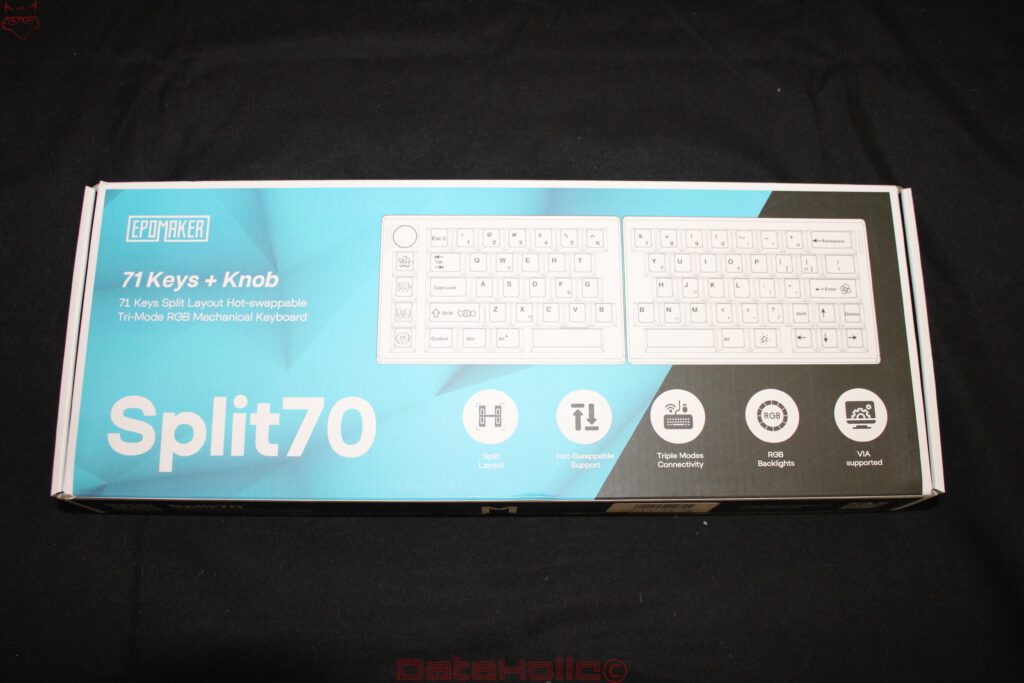
Within this spectrum, the EPOMAKER Split70 positions itself as a comparatively straightforward entry point. Two housing halves, 71 keys, a rotary knob, four additional macro keys, mechanical hot-swappable switches, RGB lighting, and three connection modes form the technical foundation. VIA support is also included, allowing the key assignments to be adapted to different workflows. On paper, this gives the Split70 several features that are otherwise frequently associated with considerably more elaborate keyboard concepts.
However, a split construction does not automatically mean that all the ergonomic problems of a conventional keyboard disappear. With a largely unchanged key layout, certain movement patterns remain. There is also the question of how sensibly the key distribution has actually been implemented. Once a keyboard consists of two independent housings, seemingly minor details suddenly become more important. The connection between the halves must function reliably, both housings must remain securely in place, and the distribution of the keys should remain practical even when the halves are positioned farther apart.
The Split70 is therefore interesting less as an exotic input device and more as an attempt to make a design previously reserved largely for specialized products more accessible. Whether this concept succeeds is determined not by the RGB lighting or the number of connection options, but by how well the mechanical construction and the layout work together.
Construction and Design: Two Housings, One Familiar Keyboard Concept
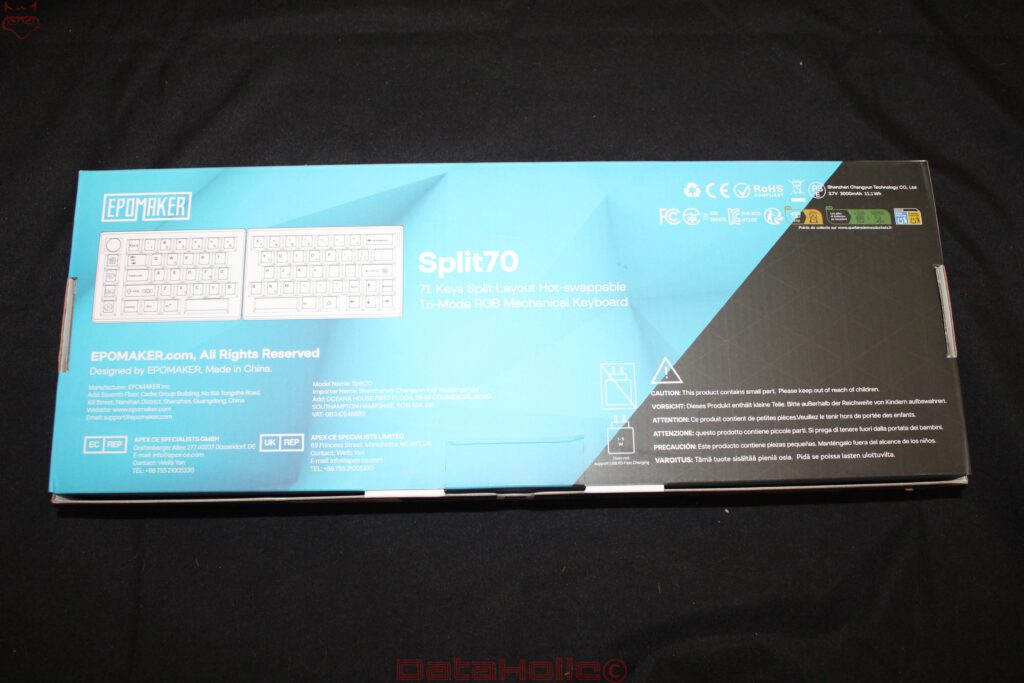
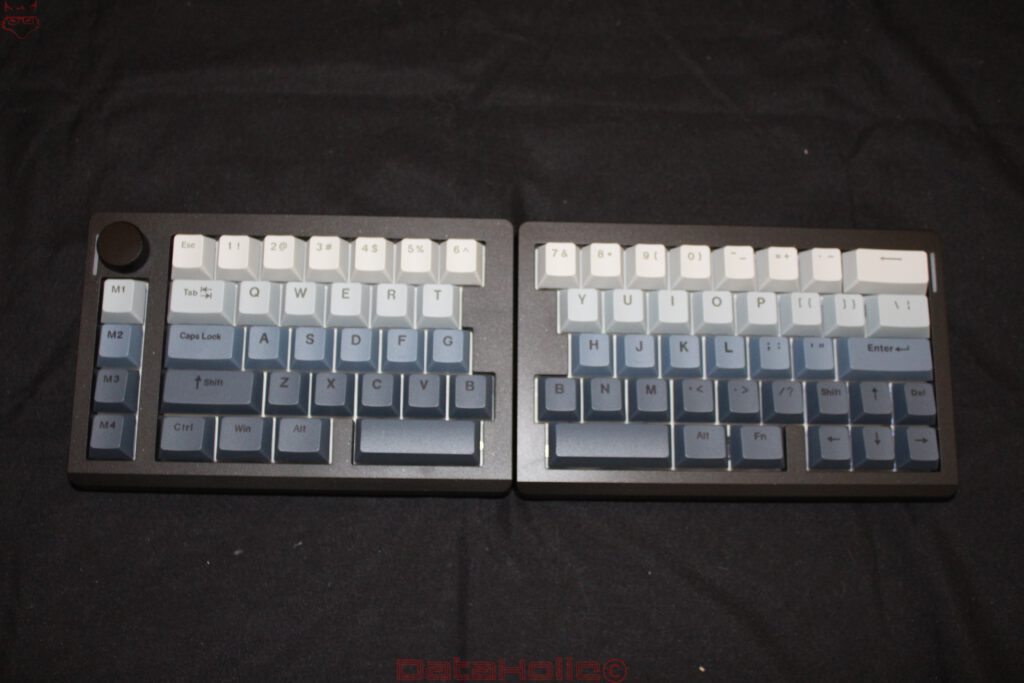
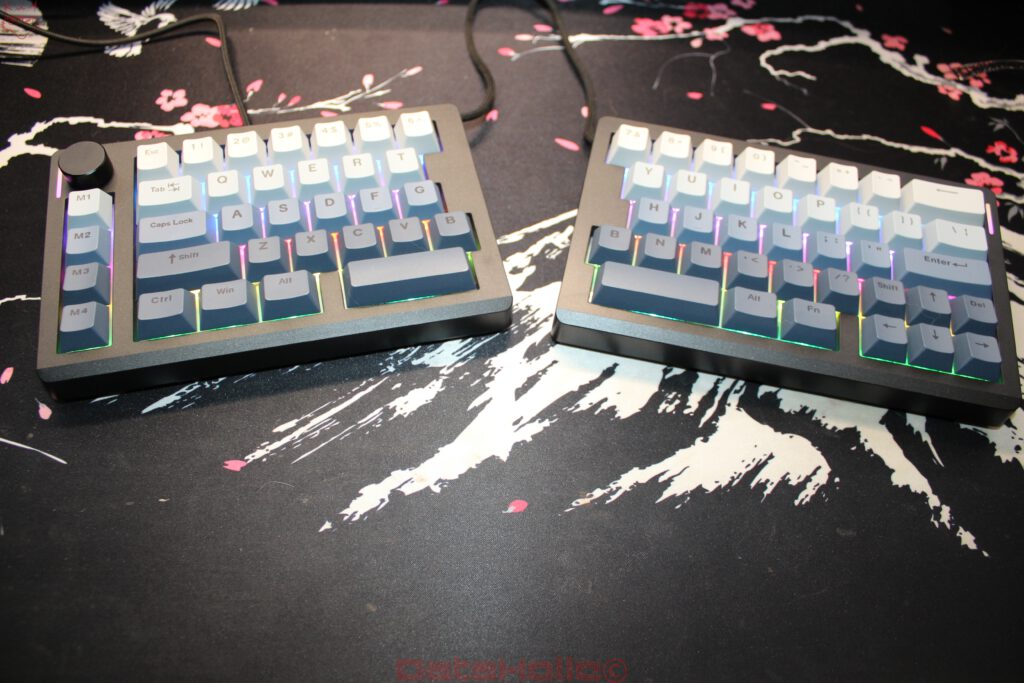
Even during unpacking, it becomes apparent that EPOMAKER has deliberately kept the Split70 visually understated. The two housings consist of dark gray, angular units with comparatively simple surfaces. Distinctive design elements are limited to the rotary knob on the left half, the four additional keys arranged beneath it, and narrow light strips. The keycaps use a graduated color scheme consisting of light gray and blue tones, visually separating the different key areas.
The housing shape is largely rectangular. A pronounced ergonomic contour, as found on more specialized split keyboards, is absent. Both halves can be positioned directly beside each other, initially creating the impression of an ordinary compact keyboard. Only when they are physically separated does it become clear what possibilities the concept offers. The two units can be moved independently and positioned at different angles.
This is precisely where the main structural difference from a conventional keyboard lies. With a rigid housing, the distance between the hands is determined by the width and arrangement of the keys. The forearms are inevitably directed toward the center of the workspace. With the Split70, each half can instead be placed closer to the natural position of the corresponding arm. This makes it possible to reduce the lateral bending of the wrists in particular.
However, the construction does not offer any recognizable integrated mechanism for deliberately raising the outer sides of the two halves. This so-called tenting feature is an important characteristic of ergonomically ambitious keyboards because it reduces the degree to which the forearms have to rotate inward. Although a flat split keyboard allows greater freedom in positioning the hands, it initially changes their rotation only to a limited extent.
The Dygma Defy and Raise 2 go further in this respect. Their ergonomic concepts consider not only the physical separation but also the inclination of the housing halves. Particularly during extended typing sessions, this difference can become relevant. The Split70, by contrast, concentrates on the simplest form of ergonomic adjustment: the distance and angle between the two halves.
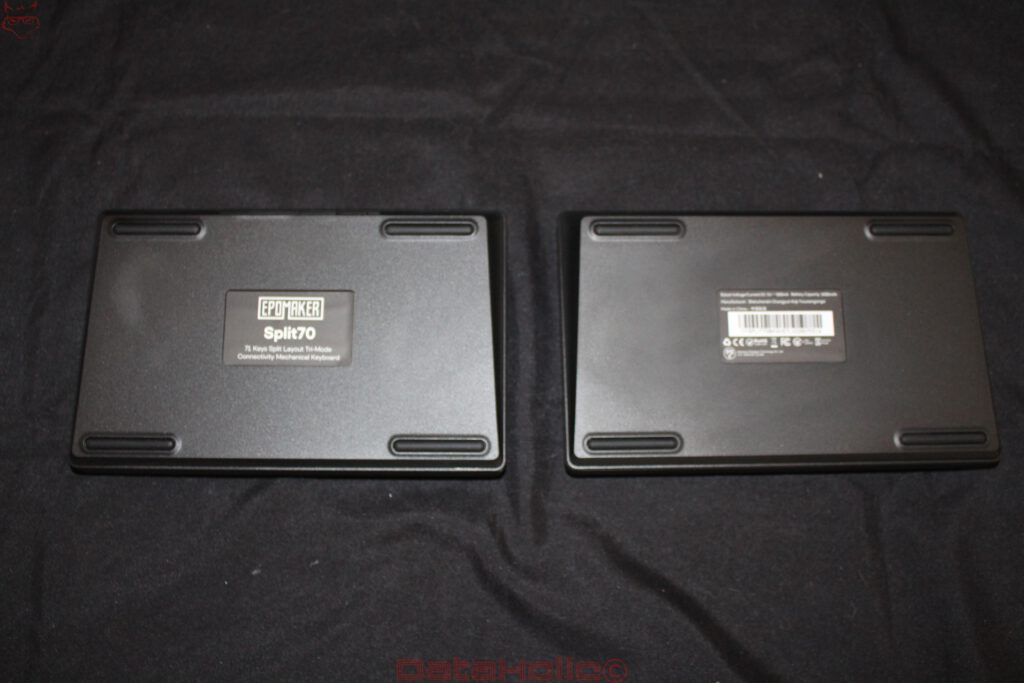
A look at the undersides reveals four elongated rubber feet on each housing. These are positioned near the corners and are intended to prevent slipping. This is more important on a split keyboard than on a unified model. Each half must remain stable on its own because the second unit provides no additional mechanical support. Particularly at greater distances or with a more pronounced outward rotation, even small movements can become disruptive.
The undersides avoid elaborate visible mechanisms. Folding feet or an integrated tenting system cannot be identified in the available photographs. Although this simplifies the construction, it also limits ergonomic flexibility. The housings therefore provide a solid foundation for horizontal positioning without claiming to offer a fully adjustable ergonomic workstation.
The overall height also deserves attention. The Split70 uses conventional mechanical switches with correspondingly tall keycaps. As a result, the fingers rest considerably above the desk surface. Without a suitable wrist rest, this can lead to greater wrist extension, particularly when the keyboard is positioned farther back on the desk. A low housing edge is therefore no substitute for a properly considered hand support.
The workmanship appears clean in the photographs. The housing edges are evenly finished, the keycaps sit properly on the switches, and no major irregularities are visible. At least visually, the matte surface avoids the impression of a heavily glossy plastic construction. However, the exact material composition of the housing cannot be conclusively determined from these observations. In any case, long-term quality depends less on the surfaces than on the rigidity of the construction, the fastening of the internal components, and the durability of the connecting elements.
Key Layout: A Familiar Arrangement with Unusual Decisions
The Split70 uses a total of 71 keys and is largely based on a compact ANSI keyboard. The letters follow the familiar QWERTY arrangement, the number row remains intact, and dedicated arrow keys are located on the right. A complete function key row, however, is absent. The corresponding functions must be accessed through additional layers or alternative assignments.
This is fundamentally nothing unusual for compact keyboards. The arrangement becomes more interesting through the separation into two housing halves. The left half accommodates most of the left-hand letter keys as well as the first six numbers. The remaining characters, navigation keys, and larger Enter key are located on the right.
One particularly striking feature is the duplicated B key. A corresponding key is present on both the left and right halves. This decision initially seems unusual but has an understandable background. On conventional keyboards, the letter B sits directly in the transition area between the hands. Depending on individual typing technique, it is pressed with either the left or right index finger. A fixed assignment would therefore force some users to change their habits.
By providing the key twice, this decision remains open. At the same time, it demonstrates that EPOMAKER does not regard the Split70 as a complete reinvention of typing. The existing layout is intended to remain as familiar as possible, even if an additional key is required to achieve this.
With the Dygma Defy, this question arises in a different form. Its column-oriented arrangement allows finger movements to follow their natural direction more closely. The Split70, by contrast, retains the staggered key rows of a conventional keyboard. This staggered arrangement has historical roots and is not necessarily optimal from an ergonomic perspective. The left hand in particular must continue to perform lateral movements resulting from the diagonal key structure.
This creates a fundamental distinction between a split keyboard and a keyboard whose layout has actually been reorganized. The Split70 changes the position of the two hands relative to each other, but not the basic distribution of letters within each half. Anyone already comfortable typing on a conventional keyboard benefits from the limited adjustment required. At the same time, some of the movement patterns that more radical ergonomic concepts deliberately change remain in place.
The two spacebars are also noteworthy. Each half has its own comparatively wide thumb key. This opens up interesting possibilities for individual assignments. One of the two keys could, for example, continue to function as a spacebar, while the other takes on an additional function. Backspace, Enter, a modifier key, or temporary access to another layer would all be conceivable.
This possibility is one of the most important ergonomic advantages of programmable split keyboards. The thumb is strong and capable of taking on several functions, while on conventional keyboards both thumbs are frequently used almost exclusively for the spacebar. However, the Split70 remains conservative here as well. Instead of several differently positioned thumb keys, it offers only the two large keys.
The Dygma Defy uses this area much more extensively. Its thumb clusters allow several frequently required functions to be distributed across keys that can be reached without substantial hand movement. This can reduce the workload on the little fingers in particular, which perform a comparatively large number of tasks on traditional keyboards. The Split70 at least enables a first step in this direction, but it does not achieve the same functional depth.
Another difference concerns the right-hand side. Dedicated arrow keys are located there and remain accessible without an additional function layer. This is a practical advantage for text editing, spreadsheet work, and general navigation. Many particularly compact keyboards move the arrow keys to a secondary layer, requiring an additional key to be held down first. EPOMAKER has opted for direct accessibility.
However, the navigation keys are positioned relatively far to the outside. Consequently, the right hand still has to leave its home position for frequent arrow-key movements. An alternative assignment within the letter area could shorten these movements. This is precisely where VIA support becomes significant.
The decision to use an ANSI layout should also not be underestimated. The keyboard shown has neither a German ISO Enter key nor appropriately labeled umlaut keys. For German-language text, this means an additional adjustment. Although a German character layout can generally be used through software, the physical key arrangement remains unchanged. In particular, the different Enter key shape and the missing additional ISO key alter familiar movement patterns.
For users who already work with ANSI, this presents no problem. When switching from a German standard keyboard, however, the unfamiliar split introduces another change. This somewhat reduces the otherwise limited learning effort associated with the Split70, at least for part of the German market.
Mechanical Switches, Hot-Swap, and the Importance of Internal Construction
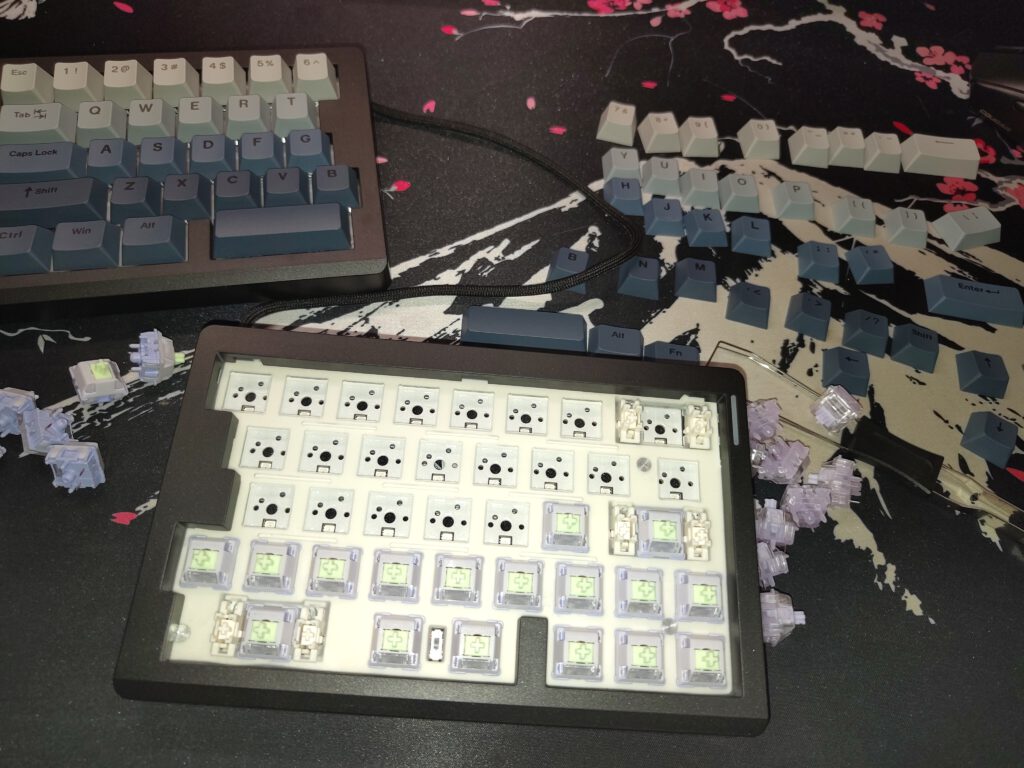
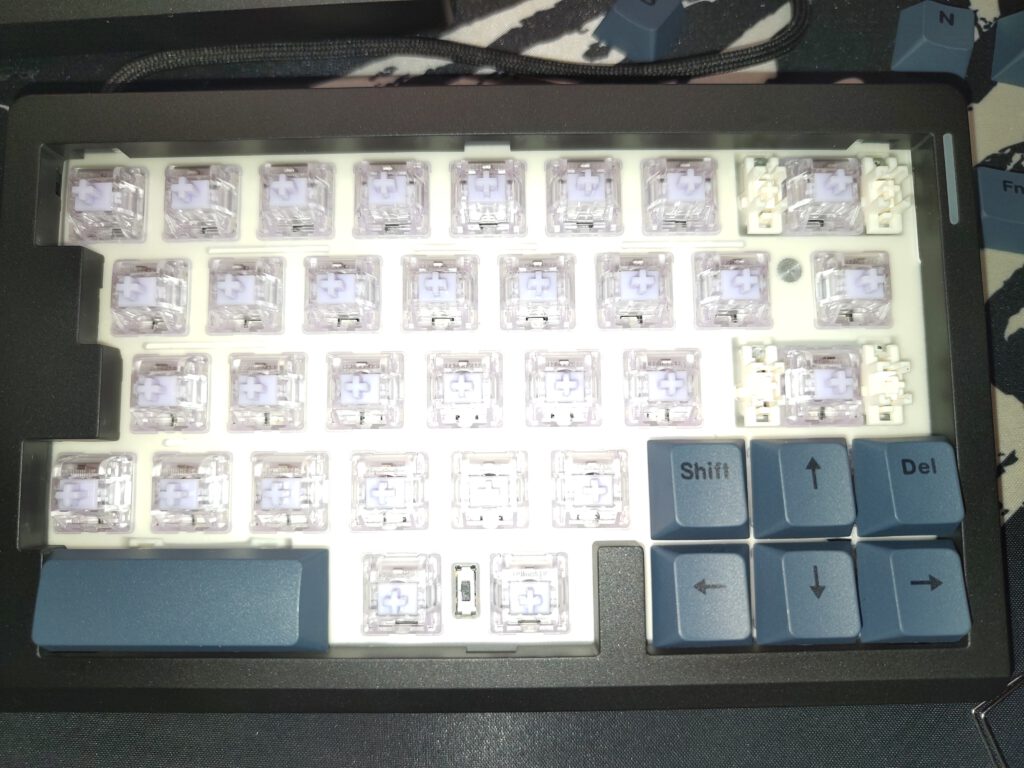
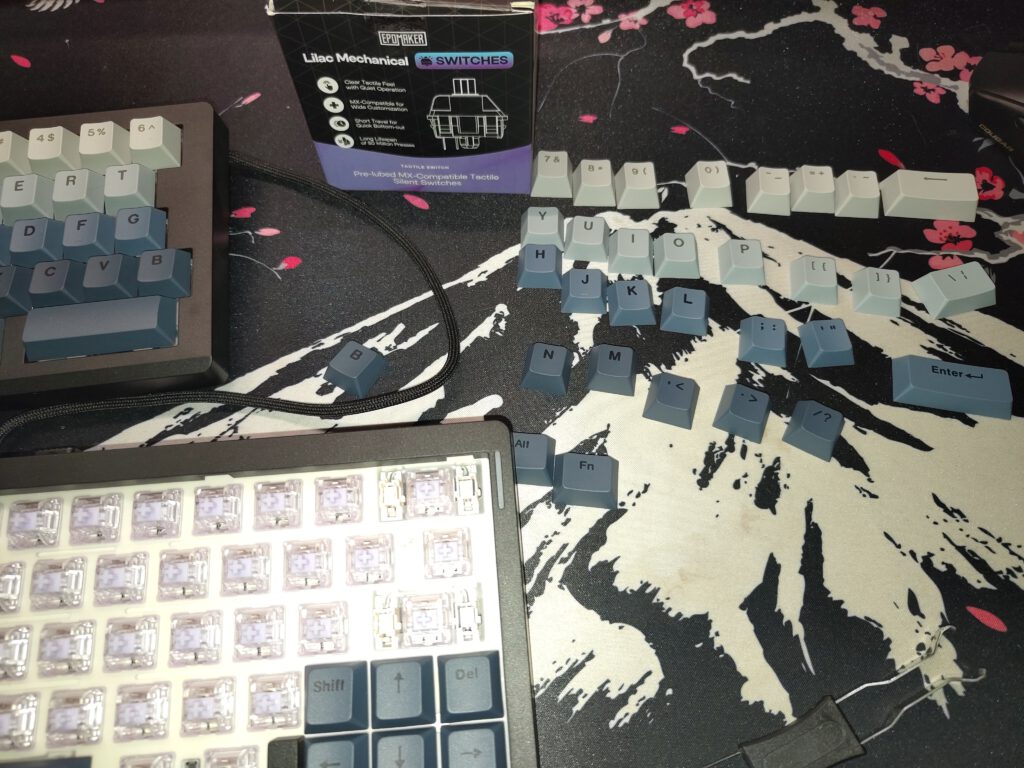
The Split70 uses mechanical switches and supports their replacement without soldering. The photographs of the partially disassembled keyboard show the corresponding hot-swap sockets and a light-colored plate beneath the keycaps. The images indicate that EPOMAKER uses a conventional mechanical construction rather than magnetic Hall-effect switches.
Hot-swap functionality has become standard equipment on many mechanical keyboards. Nevertheless, its practical value is frequently underestimated. Switches differ not only in their actuation force but also in their movement characteristics, return force, acoustic behavior, and damping at the end of the keypress. A keyboard can therefore be adapted to different requirements with comparatively little effort.
With the Split70, this possibility is particularly interesting because ergonomic keyboards are often used for extended typing sessions. In these situations, the theoretically shortest actuation time matters less than a typing experience that is as consistent and fatigue-free as possible. Smooth linear switches can feel comfortable, while tactile models provide more noticeable feedback. Dampened silent switches additionally reduce noise levels.
The documented disassembly shows that the keycaps and switches can indeed be removed. Once the switches are taken out, their corresponding sockets become visible. Larger keys use additional stabilizers designed to prevent the keycap from tilting excessively when pressed away from its center.
Such stabilizers are structurally more demanding than ordinary single keys. Particularly with long spacebars and the Enter key, insufficiently tuned components can produce secondary noises. The familiar rattling frequently results from play between the wire, plastic housing, and moving components. Proper lubrication and precise manufacturing can reduce these noises.
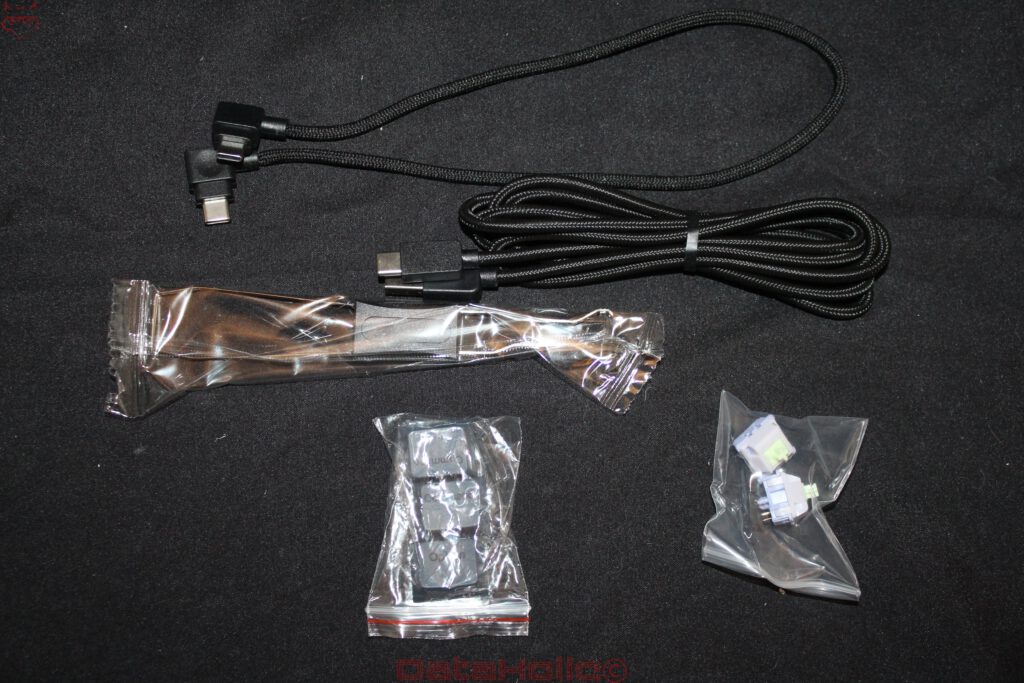
The photographs also show two different switch designs. While switches with greenish cross-shaped stems can be seen on one half, the other half features switches with light violet cross-shaped stems. Packaging for the EPOMAKER Lilac Mechanical Switches is also documented. These are described as tactile, pre-lubricated, MX-compatible switches with dampened characteristics.
This makes it clear that the Split70 does not have to remain limited to its factory-installed switches. This is particularly advantageous for an individually configured work keyboard. The ability to install different switches even makes it possible to fine-tune individual key areas. Frequently used letters could, for example, be equipped with particularly light switches, while function keys receive more pronounced tactile feedback.
Such a mixed configuration is technically possible, but it should not automatically be equated with improved ergonomics. Different actuation forces can change typing behavior and require some adjustment. The decisive factor is consistent key behavior that suits individual habits.
The construction beneath the switches is also relevant to the typing experience. The circuit board, mounting plate, housing, and any damping elements form a complete mechanical system. Each keystroke generates vibrations that propagate through these components. A rigid mounting plate produces a different sensation from a flexible construction. At the same time, the housing influences which frequencies are amplified or dampened.
The photographs do not allow the complete internal layering to be determined reliably. The visible light-colored plate alone does not provide a definitive indication of its material or the damping elements used. Likewise, it is not possible to conclusively determine whether EPOMAKER uses a particularly flexible mounting system or rigid fastening without completely disassembling the keyboard.
This is precisely why differentiation is important: Hot-swap functionality improves serviceability and customization, but it does not guarantee a particular acoustic quality. A keyboard can be equipped with high-quality switches and still produce distracting resonances. Conversely, a simpler construction can deliver a pleasant typing experience through a favorable combination of switches, keycaps, and housing.
In any case, the Split70 provides an important foundation for long-term adjustments. Worn or defective switches can be replaced individually without having to replace the entire keyboard. For an input device intended to remain in use for several years, this is a reasonable structural advantage.
Connectivity and Controls
EPOMAKER advertises three connection modes on the packaging. According to the manufacturer, the Split70 supports wired operation via USB, a wireless 2.4 GHz connection, and Bluetooth. This combination is widespread among modern mechanical keyboards, but it is technically somewhat more demanding in split models.
An ordinary keyboard has central electronics that process the signals from all keys. In a split model, by contrast, the inputs from two physically separate units must be combined. This requires an additional connection between the halves.
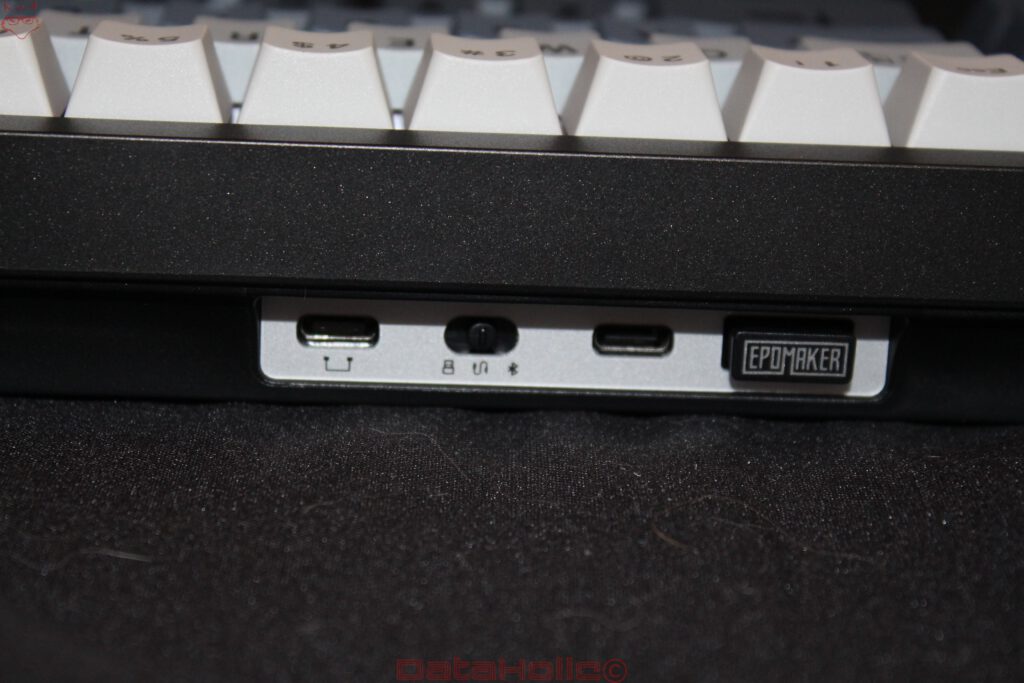
The photographs show two USB-C ports on one side of the housing, a sliding switch with connection symbols, and a stored wireless receiver. A connecting cable is also included. The Split70 therefore has a recognizable technical distinction between communication between the two halves and the connection to the computer.
This architecture differs from keyboards whose halves communicate completely independently via wireless technology. A cable between the two units restricts maximum freedom of movement somewhat, but at the same time avoids the need for an additional wireless connection between the keyboard halves.
The exact internal signal processing cannot be determined from the external construction. In particular, the question of which electronics combine the inputs and how power is distributed between the two halves remains unanswered without technical documentation. However, the visible connections show that EPOMAKER has not implemented the modular design exclusively on a mechanical level.
Compared with the Dygma Raise 2, it becomes clear that such details can have a considerable impact on everyday use. On the Raise 2, the component known as the Neuron performs central tasks within the system. As a result, the keyboard relies more heavily on its own architecture with specific components. Externally, the Split70 follows what appears to be a less complex approach, with conventional USB connections and an integrated wireless receiver taking center stage.
Support for multiple connection modes is particularly useful at workstations with different devices. A desktop computer can, for example, be connected through the 2.4 GHz receiver, while Bluetooth is available for a notebook or tablet. A wired connection remains a sensible alternative regardless, especially when the batteries need charging or wireless connections are undesirable.
However, the three operating modes should not automatically be regarded as technically equivalent. Bluetooth has different characteristics in terms of power management, connection establishment, and input latency compared with a proprietary 2.4 GHz connection. USB, in turn, avoids the typical uncertainties of wireless transmission. Without corresponding measurements, however, it would not be reasonable to claim specific latency figures or a particular polling rate for the Split70.
The rotary knob on the left housing half is another interesting detail. Such controls are frequently used for volume adjustment, but with appropriate configuration they can also perform other tasks. Its position at the upper left makes it easy to reach without displacing the actual letter keys.
Beneath it are four additional keys labeled M1 through M4. These expand the available input options and are generally suitable for macros or frequently needed functions. Their vertical arrangement along the left edge of the housing is not ideal for every application, however. In a normal typing position, they are outside the immediate finger area and require a deliberate movement of the left hand.
For occasionally used functions, this is unproblematic. For particularly frequently required commands, however, a position closer to the thumbs or within the home position would be ergonomically preferable.
Nevertheless, the combination of rotary knob and macro keys demonstrates that EPOMAKER does not see the Split70 exclusively as a typing device. It is also intended to cover general desktop tasks, multimedia control, and individually customized workflows. Particularly in combination with VIA, this creates a certain degree of functional flexibility.
VIA and the Question of Actual Customizability
A programmable keyboard is only as flexible as the software used to configure its functions. EPOMAKER explicitly advertises the Split70 with VIA support. This is initially positive because VIA does not rely exclusively on a manufacturer-specific configuration interface and allows extensive customization of key assignments on compatible keyboards.
The principle is to assign different functions to the physically available keys. In addition to ordinary letters and special characters, these can include modifier keys, media functions, and additional layers. This capability is particularly important for compact keyboards without a complete function key row.
The Split70 offers interesting possibilities in this regard. The two spacebars do not necessarily have to perform the same function. One half could, for example, retain an ordinary spacebar, while the other activates an additional layer when held down. This would make it possible to access arrow keys, navigation functions, or special characters directly within the letter area.
The four macro keys can also be used to control specific workflows. Keyboard shortcuts for text editors, image editing applications, or development environments are conceivable. However, a distinction must be made between simple key assignments and more complex macro functions. The exact capabilities available depend on the implemented firmware and its VIA support.
Dygma keyboards follow a different approach here. Bazecor provides a dedicated configuration application offering extensive possibilities for layers, so-called Superkeys, and additional functions. Particularly interesting is the connection between the physical keyboard and its configured layers. Features such as Layer Lens are intended to make navigation within more complex assignments easier.
VIA, by contrast, follows a more standardized approach. This can offer advantages in terms of independence from a single manufacturer’s interface, but it does not automatically provide the same range of functions. In particular, complex multi-function assignments and special behaviors must be supported by the respective firmware.
The Split70 should therefore not be equated with the extensive configuration capabilities of a Dygma Defy solely because of the VIA logo. Both systems allow key assignments to be customized, but they follow different technical and conceptual approaches.
Another consideration is long-term maintainability. With mechanical keyboards, software support can determine their useful lifespan. A keyboard that continues to function perfectly from a technical standpoint loses considerable value if its configuration is no longer reliably possible after an operating system change or the discontinuation of an application.
The use of a widely supported configuration solution is therefore sensible in principle. However, it does not replace the manufacturer’s responsibility to provide suitable firmware files, device descriptions, and understandable instructions. Whether the Split70 benefits from an open and maintained firmware foundation in the long term depends on the actual implementation and its continued support.
Reliable long-term configuration would be particularly important for a split keyboard. Its ergonomic benefits often increase only when the key assignments are adapted to the changed hand positions. The physical separation of the housings is merely the first step. The real strength emerges through a sensible distribution of functions.
Ergonomics Compared: Split70, Dygma Raise 2, Defy, and Sonsei
The comparison with the previously tested Dygma keyboards demonstrates particularly clearly how differently ergonomic concepts can develop. Although all four models aim to improve hand posture or finger movements, their structural approaches differ considerably. The Split70 and Raise 2 rely on a physical separation of the two keyboard halves while retaining a largely familiar key arrangement. The Defy, by contrast, combines the separation with a column-oriented layout and extensive thumb clusters. The Sonsei dispenses with physical separation but adopts the column-oriented structure and provides additional thumb keys.
The Split70 has an important advantage here: Getting started requires comparatively few changes. The letters remain in their familiar positions, the number row is preserved, and the arrow keys are directly accessible. Anyone who has already mastered touch typing therefore does not need to relearn every movement pattern. Only the separation between the hands changes the spatial orientation.
However, this advantage also has a downside. Due to their staggered key rows, conventional keyboards force the fingers to perform certain lateral movements. The Split70 retains this arrangement almost completely. Although the wrists can be aligned more naturally, the fingers continue to move along the familiar diagonal structure. The ergonomic benefit is therefore concentrated primarily on the positioning of the arms and wrists.
The Dygma Defy intervenes much more extensively in movement patterns. Its column-oriented arrangement follows the natural directions of finger movement more closely. At the same time, the thumbs take over several functions that are frequently performed by the little fingers on conventional keyboards. In the long term, this can lead to a different distribution of physical strain. However, the adjustment process is correspondingly more demanding. The first few days with such a keyboard can involve typing errors, unfamiliar movements, and a considerable loss of typing speed.
The Split70 avoids much of this initial difficulty. It therefore offers a reasonable compromise between a conventional keyboard and a consistently ergonomic input device. This compromise is neither fundamentally better nor worse. What matters is which complaints, requirements, or habits motivate the switch in the first place.
Anyone primarily seeking to reduce the lateral bending of their wrists already receives an important adjustment option through the separate housings. Those looking to reduce strain on individual fingers, transfer frequently used functions to the thumbs, or alter forearm rotation will, however, reach the Split70’s structural limits more quickly.
The Raise 2 also offers more possibilities for changing the spatial orientation of the keyboard through its additional ergonomic equipment. This applies particularly to the inclination of the housing halves. The Split70 remains more straightforward in this respect. Although external accessories could enable additional positions, they are not part of its recognizable integrated concept.
Another interesting question concerns mouse positioning. When the two keyboard halves are moved farther apart, additional space is created between them. A trackball or another input device could be positioned there, for example. Alternatively, the mouse can be placed closer to the right keyboard half, provided its position is chosen accordingly.
However, the Split70 does not automatically require less desk space simply because of its separate housings. If both halves are positioned farther apart, the overall width occupied increases. The connecting cable and the necessary freedom of movement must also be considered. An ergonomically sensible workstation therefore does not result solely from purchasing a split keyboard, but from integrating it into the entire working environment.
The Sonsei, in turn, demonstrates that an ergonomic key arrangement does not necessarily require two separate housings. Its approach focuses more strongly on finger movements and the position of additional thumb keys. In a sense, it represents the opposite approach to the Split70: While EPOMAKER retains the familiar key arrangement and separates the housings, the Sonsei changes the key structure within a unified housing.
An important conclusion emerges from this comparison. Ergonomics is not a single product characteristic, but the result of several structural decisions. A split keyboard can improve posture without optimizing every movement pattern. A column-oriented keyboard can change finger movements without offering the same degree of freedom in arm positioning. Within this spectrum, the Split70 covers a clearly defined area.
RGB Lighting, Everyday Practicality, and Limitations
RGB lighting is part of the Split70’s visible equipment. The photographs show multicolored illumination emerging between the keycaps and visually connecting the two housing halves. Particularly in darker surroundings, this creates a clearly recognizable lighting effect.
Technically, a distinction must be made between illumination around the switches and the actual backlighting of the legends. The keycaps shown do not have obviously translucent characters. Accordingly, the focus is less on illuminating individual legends and more on the overall background effect.
This makes a difference in practical work. An illuminated keyboard only makes orientation substantially easier if the relevant characters actually become more visible. Colored lighting between the keys may look appealing, but it does not replace clearly legible legends.
Power consumption is another factor. On wireless keyboards, RGB lighting is among the components that can affect battery life. The extent of this influence on the Split70 depends on brightness, selected effects, and actual power management. Reliable battery life figures cannot be provided without documented measurements.
For extended typing sessions, the lighting is secondary anyway. More important are reliable input, understandable key assignments, and consistent mechanical behavior. The Split70 fundamentally provides the appropriate prerequisites for this, particularly through its replaceable switches and programmable key assignments.
One practical criticism remains the ANSI layout. Particularly for a keyboard whose unusual construction already distinguishes it from ordinary input devices, an ISO-DE version would make sense for the German market. This concerns not only the legends on the keycaps but also the physical arrangement of individual keys.
The ability to activate a German software layout does not completely eliminate this difference. Some characters are located in different positions, while the additional key of the ISO layout is physically absent. For developers who frequently use English-language special characters, ANSI can certainly offer advantages. For extensive German-language writing, however, the decision depends more heavily on previous typing habits.
The two large spacebars also deserve critical consideration. Although they enable an alternative distribution of functions, they do not replace dedicated thumb clusters. Particularly during longer typing sessions, an additional row of smaller thumb keys could be useful. This would make frequently needed functions accessible without moving the hands away from their home positions.
EPOMAKER deliberately avoids such complexity. This keeps the keyboard straightforward and reduces the adjustment required. At the same time, it limits the possibilities that could arise from a fundamentally rethought ergonomic key distribution.
Conclusion: A Sensible Starting Point, but Not a Complete Ergonomic Reinvention
The EPOMAKER Split70 follows a reasonable approach. Instead of completely reinventing the conventional keyboard, it divides the housing into two independently positionable units and complements the construction with modern features. Mechanical hot-swappable switches, VIA support, three connection modes, a rotary knob, and additional macro keys provide equipment that goes far beyond a simple split standard keyboard.
Its greatest strength lies in the comparatively low barrier to entry. The familiar key arrangement remains intact, while the two halves can be adjusted to individual arm positions. Particularly for users who want to work with a split keyboard for the first time, this is an important difference compared with more specialized concepts.
However, the Split70 should not be confused with a fully ergonomically optimized keyboard. The staggered key rows remain, no integrated tenting system is recognizable, and the two spacebars offer only a limited substitute for extensive thumb clusters. Consequently, the ergonomic advantage is concentrated primarily on the spatial separation of the hands.
The direct conceptual comparison with the Dygma Defy reveals just how different the requirements can be. The Defy changes movement patterns much more comprehensively, but it also demands a considerably more intensive adjustment period. The Raise 2 offers additional ergonomic adjustment options with a more familiar layout, while the Sonsei places a different emphasis on its column-oriented arrangement.
The Split70 positions itself between these concepts and an ordinary mechanical keyboard. It enables a first step toward a more individualized hand position without requiring users to abandon their familiar typing technique completely.
The mechanical customization options are particularly positive. The documented switch replacement shows that the keyboard does not have to remain limited to its original configuration. Using different switches opens up possibilities for adapting the typing experience and noise characteristics to different requirements. Together with VIA, this provides a technical foundation that also allows long-term changes to personal key assignments.
The limitations lie less in the fundamental idea than in its implementation. An additional ergonomic tilt adjustment, a larger selection of thumb keys, and an ISO-DE version would significantly expand the concept. Thoroughly documented software and firmware support is also crucial for the long-term use of a programmable split keyboard.
The EPOMAKER Split70 is therefore particularly interesting for those who want to replace a conventional mechanical keyboard with a more flexible input device without simultaneously having to learn an entirely new typing technique. It offers the freedom to position both hands more independently and combines this capability with contemporary mechanical features.
However, the comparison with the previously tested Dygma models also highlights the limitations of this approach. The Split70 is not a direct alternative to every function offered by a Defy or Raise 2. Rather, it is an independent interpretation of the split concept in which familiarity and adaptability are given greater importance than the most comprehensive possible ergonomic redesign.
That is precisely where its justification lies. Not every ergonomic improvement requires a complete departure from a familiar layout. The Split70 demonstrates that simply separating a conventional keyboard into two physical halves already creates new possibilities. How far these possibilities extend, however, depends just as much on the construction as on the individual configuration.
Transparency Statement
The EPOMAKER Split70 was provided to DataHolic by EPOMAKER for independent testing.
This review is neither sponsored nor paid advertising. EPOMAKER had no influence whatsoever on the testing process, editorial content, or final verdict.
Sincere thanks go to EPOMAKER and the entire team for their trust and continued support. Providing the review unit makes it possible to conduct an independent technical evaluation and examine different keyboard concepts while maintaining complete editorial independence.