
MSI MPG Infinite Z3 Unboxing – RTX 5080, 64 GB DDR5, and an Interior That Sparks Curiosity
- Packaging and Accessories – Functional Rather Than Excessive
- Case and Build Quality – Gaming Design with a Functional Approach
- Connectivity – Modern Interfaces and a Generous Selection of USB Ports
- Inside the System – Powerful Hardware with a Clear Layout
- Cooling – Large Radiator Area and Multiple Airflow Paths
- Assembly and Maintenance – Neat Construction, but Some Questions Remain
- Initial Assessment – Strong Specifications, but Integration Remains the Key
- Unboxing Conclusion
- Transparency Statement
A gaming PC equipped with an NVIDIA GeForce RTX 5080, 64 GB of DDR5 memory, and a 2 TB SSD undoubtedly belongs to the performance-oriented segment of modern desktop systems. However, especially with a preconfigured computer, the choice of components alone does not determine whether the overall package is convincing. Case construction, cooling, airflow, expandability, and assembly quality play equally important roles. With the MSI MPG Infinite Z3, a system has arrived that already reveals several interesting design decisions during unboxing. Before benchmarks, temperatures, and gaming performance take center stage, it is worth taking a closer look at the packaging, included accessories, connectivity, and internal construction.
Packaging and Accessories – Functional Rather Than Excessive
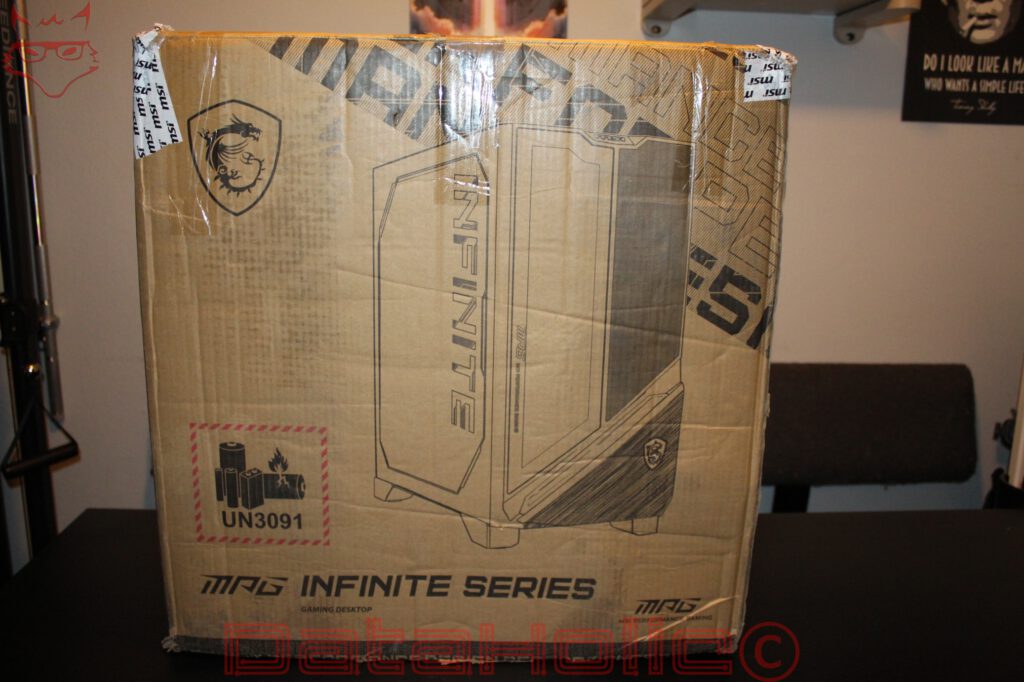
The MPG Infinite Z3 arrives in a large shipping box whose design is largely limited to functional information. Alongside MSI’s dragon logo, the packaging features a schematic illustration of the case and the MPG Infinite Series designation. The box therefore makes it immediately clear that MSI is offering a gaming-oriented desktop system rather than an ordinary office computer.
One noticeable detail is the UN3091 marking on the packaging. This indicates that lithium batteries are being transported together with equipment. In a desktop PC, this may refer, for example, to the battery responsible for maintaining the real-time clock and certain system settings. However, the marking alone does not provide any information about additional energy storage devices that might be installed.
The shipping box shows minor dents and signs of handling, particularly around the edges. Such marks are not unusual for a heavy desktop system. What ultimately matters is whether the protective packaging fulfills its purpose and the case arrives undamaged. The visible exterior surfaces of the unpacked computer show no obvious major shipping damage.
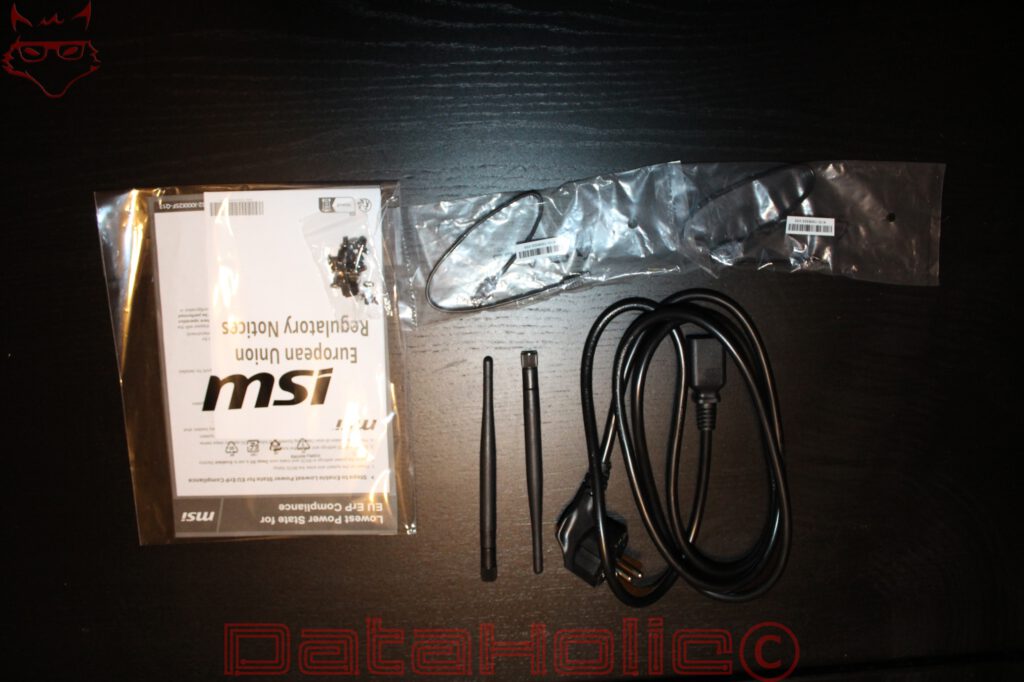
MSI takes a pleasantly restrained approach to the included accessories. Alongside the documentation, the package contains a power cable, two external Wi-Fi antennas, and additional small parts and connection accessories. The antennas are intended for wireless networking and attach to the corresponding connectors on the rear panel. The remaining accessories cannot be identified completely from the photographs.
The package therefore concentrates on the essentials required for initial setup. No additional mouse or keyboard is visible in the photographs. For a gaming PC in this performance category, that is not necessarily a disadvantage, since existing input devices are often selected according to individual preferences anyway. More important is that the necessary connections and accessories for operation are included.
Case and Build Quality – Gaming Design with a Functional Approach
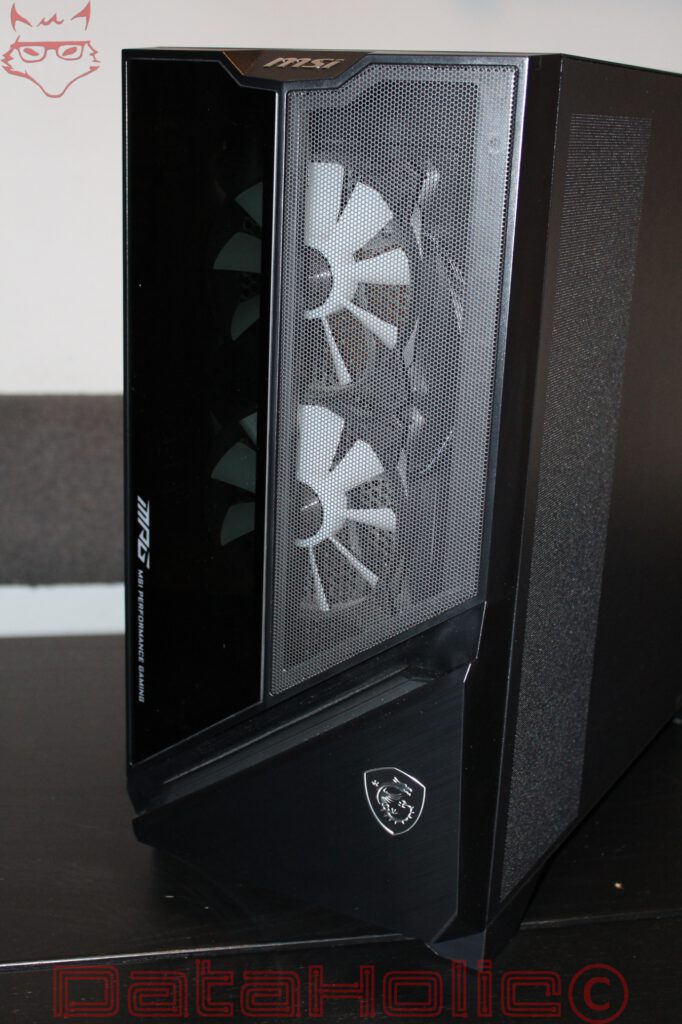
Once unpacked, the first thing that stands out is the relatively angular design of the case. MSI combines large black surfaces with an asymmetrical front panel, a side window, and clearly visible ventilation areas. The styling is unmistakably aligned with the MPG series, but it avoids the completely open glass front found on numerous other gaming cases.
The front is divided into two sections. A dark, largely closed area featuring MPG branding sits alongside a large mesh section. Behind it are two clearly visible fans with light-colored blades. The combination of enclosed design elements and an air-permeable grille is technically interesting because it immediately highlights the conflict between visual design and fresh-air intake.
A mesh grille reduces airflow resistance compared to a completely closed front panel. At the same time, actual cooling performance depends on the available open area, the fans being used, and whether additional filters restrict airflow. Fan speed control also plays a significant role. The exterior construction alone is therefore not enough to draw conclusions about actual cooling performance.
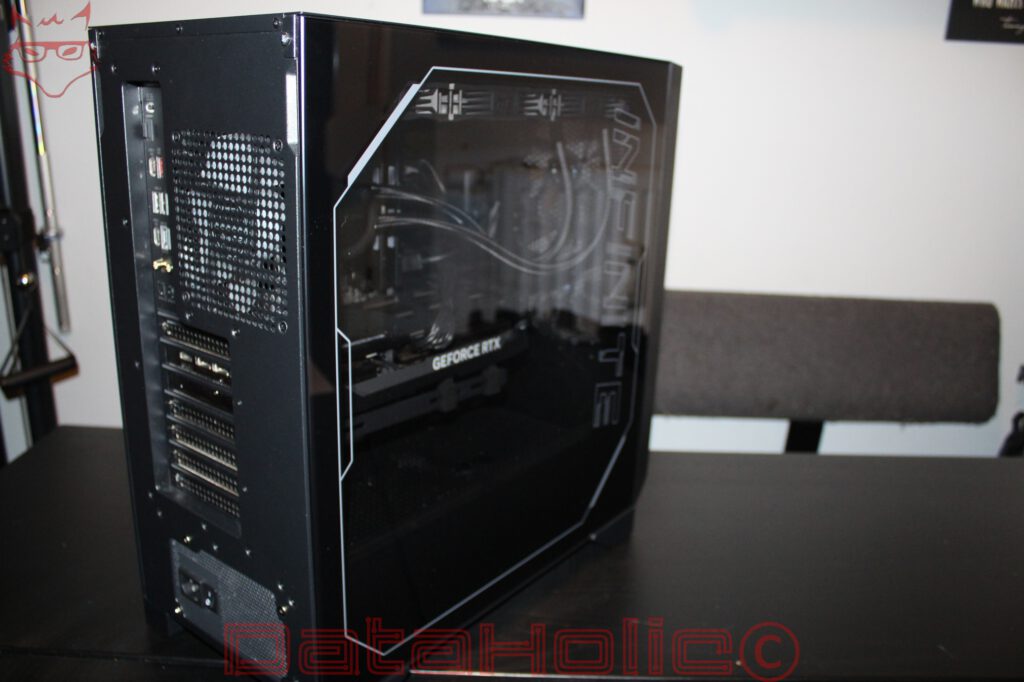
The side panel provides a view of the installed hardware through a large, geometrically framed window. Its dark tint gives the interior a relatively understated appearance when the lighting is switched off. Nevertheless, the graphics card, cooling system, and essential areas of the motherboard remain visible.
Overall, the case appears neatly assembled in the photographs. Panel gaps look largely consistent, the exterior panels appear properly fitted, and the construction provides a recognizable separation between the visible hardware compartment and the lower power supply section. However, a definitive assessment of material thickness, torsional rigidity, and long-term durability is not yet possible based on the unboxing alone.
Connectivity – Modern Interfaces and a Generous Selection of USB Ports
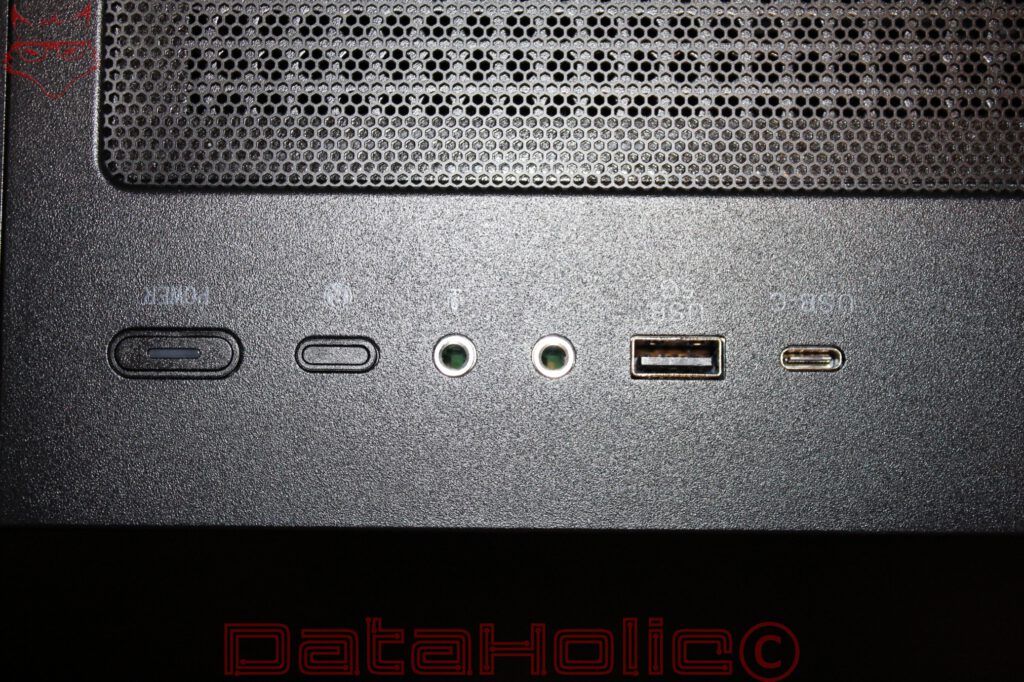
A closer look at the connectivity reveals that MSI has equipped the Infinite Z3 with a versatile selection of interfaces. The upper front panel houses the power button, an additional function button, two 3.5 mm audio connectors, and one USB-A and one USB-C port. The audio connectors allow a headset with separate headphone and microphone plugs to be connected directly.
The position of the front connectors is generally practical for a tower placed on the floor. USB flash drives, external SSDs, and headsets can be connected without turning the computer around. If the case is positioned on a desk instead, accessibility depends more heavily on its exact placement.
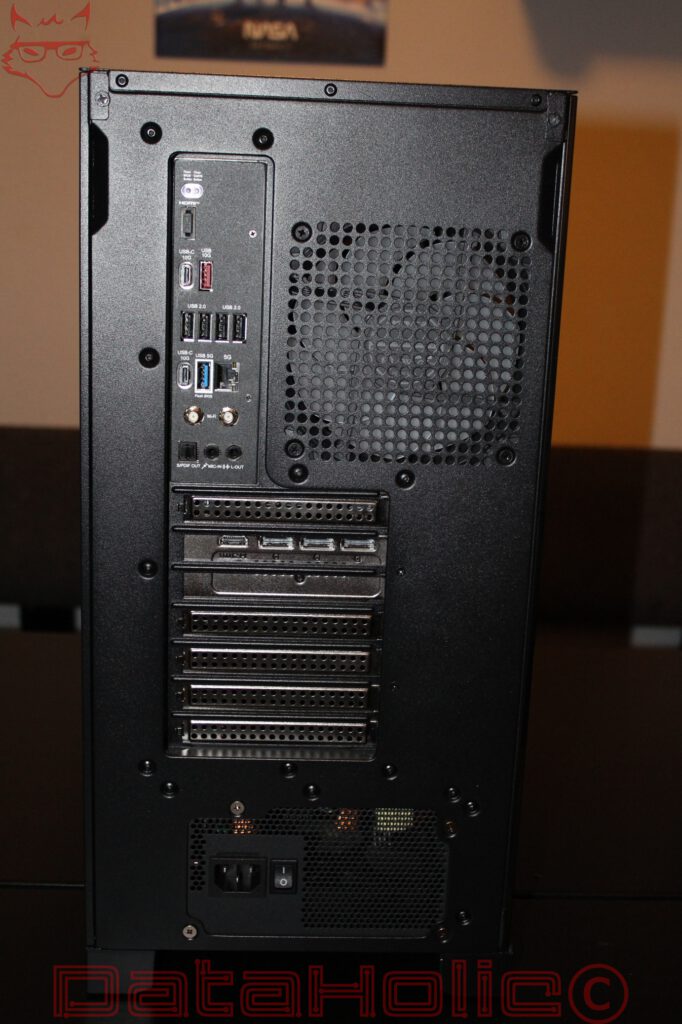
The rear panel is even more interesting. The motherboard’s I/O section features several USB-A connectors with different speed ratings, including four ports explicitly labeled USB 2.0. There are also two USB-C ports marked for 10 Gbps operation, another USB-A connector with a corresponding designation, and an additional blue USB-A port. This provides a comprehensive selection for conventional peripherals, external storage devices, and additional accessories.
Also visible is a wired network connector labeled 5G. This indicates an Ethernet port supporting speeds of up to 5 Gbps. For a modern gaming system, this is an interesting feature, although actual transfer speeds naturally depend on the connected network infrastructure. In a conventional Gigabit Ethernet network, the connection remains limited to the speed of that infrastructure.
Two connectors for the external Wi-Fi antennas are also present. The exact Wi-Fi generation and supported frequency bands cannot be reliably determined from the images.
The audio section includes analog connections and an optical S/PDIF output. In addition to conventional headsets, this provides connectivity for compatible external audio equipment.
An HDMI connector is also visible on the motherboard. For gaming with the dedicated GeForce RTX 5080, however, the graphics card’s video outputs are the relevant connections. The photographs show one HDMI output and three DisplayPort connectors on the graphics card. This combination generally enables multiple monitors to be connected, although the supported resolutions and refresh rates depend on the respective interface versions, displays, and cables.
Inside the System – Powerful Hardware with a Clear Layout
The most interesting part of this unboxing begins with a look through the side window. It becomes apparent that MSI has chosen a largely conventional tower architecture for the Infinite Z3. The motherboard is mounted vertically in the upper section of the case, the graphics card is installed horizontally in the PCIe slot, and the power supply sits in a separate lower compartment.
This arrangement has been established for years, but modern high-performance components place increasingly demanding requirements on cooling, available space, and mechanical stability.
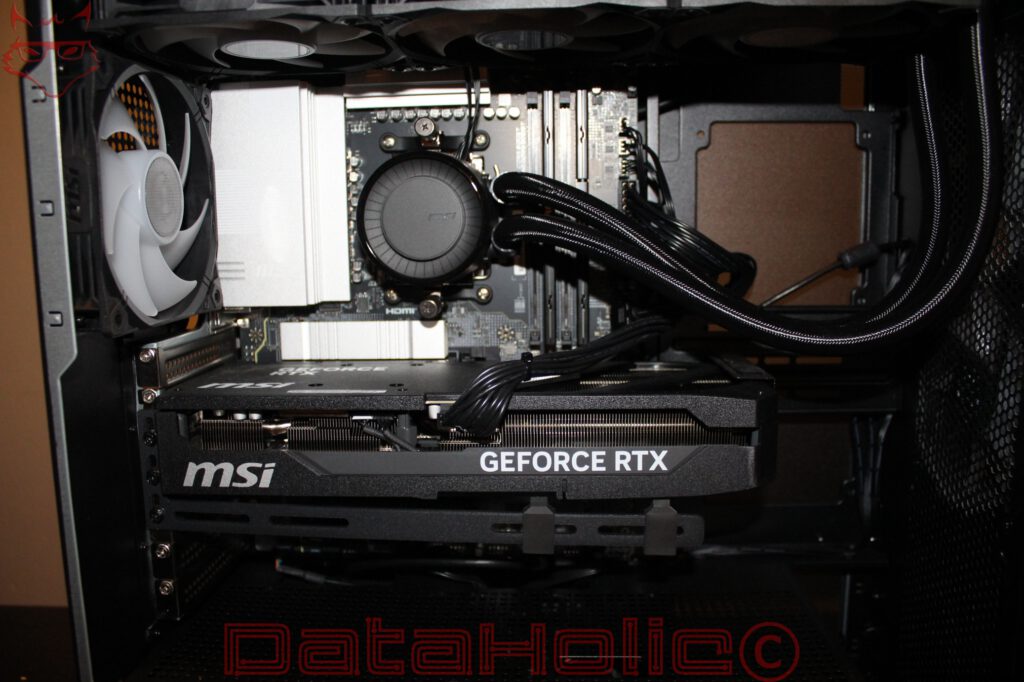
At the center of the system is the MSI GeForce RTX 5080. The graphics card occupies a considerable portion of the visible interior and features a substantial heatsink. Its relatively massive construction is already apparent in the photographs. A cooling solution of this size is hardly surprising for a graphics card in this performance category, since the generated heat must be distributed as evenly as possible across the heatsink before being transferred to the surrounding case air.
The additional mechanical support is particularly welcome. A horizontal bracket positioned beneath the graphics card supports its weight and is intended to reduce mechanical stress on the PCIe slot. With long and heavy graphics cards, such support is sensible. Without additional stabilization, the weight can eventually cause the outer end of the card to sag visibly.
The graphics card’s power connection is also visible in the photographs. The cables approach the card from above. For the long-term operational reliability of high-performance graphics cards, it is particularly important that the power connector is fully seated and that the cables are not excessively bent immediately next to the connector. Whether all necessary clearances and connection requirements are satisfied cannot be conclusively assessed from the available viewing angle.
The installed system memory amounts to 64 GB of DDR5 RAM. This makes the computer interesting not only for gaming but also for memory-intensive applications. Extensive image editing, larger development environments, virtual machines, and multiple applications running simultaneously can all benefit from this capacity.
For gaming alone, 64 GB is currently more than necessary in many situations. However, the additional capacity can become useful when streaming software, browsers, communication applications, or productivity tools remain open alongside a game. Apart from capacity, memory frequency, timings, and the exact module configuration are crucial to actual memory performance. These details cannot yet be verified from the photographs.
Storage is provided by a 2 TB SSD. Considering the size of modern games, this is a practical capacity. Large game installations can now occupy well over 100 GB each, meaning a 1 TB drive can quickly become restrictive when maintaining a larger game library.
Whether the installed SSD uses PCIe 4.0 or PCIe 5.0, which memory chips it employs, and how it performs under sustained write workloads remain questions for the technical examination. Particularly with prebuilt systems, identifying the exact SSD model is worthwhile, since identical capacity figures do not guarantee identical performance.
Cooling – Large Radiator Area and Multiple Airflow Paths
One particularly interesting aspect is the CPU cooling system. Inside the case is an all-in-one liquid cooler featuring a circular MSI pump block mounted on the processor. Two sleeved tubes extend from the block toward the front of the case, where the radiator is installed.
The tubing appears neatly routed in the photographs. No obvious excessive mechanical tension or pronounced kinks are visible. At the same time, sufficient space remains around the CPU socket and neighboring components.
Three fans are installed along the upper edge of the case. There is also a rear fan with light-colored blades. Together with the two front fans, this creates an extensive active ventilation arrangement, although its actual effectiveness can only be assessed through temperature and noise measurements.
The combination of a powerful graphics card and liquid cooling requires carefully coordinated airflow. While the CPU transfers its heat through the radiator, the graphics card initially releases a substantial portion of its waste heat into the interior of the case. This warm air must then be removed reliably.
Positioning the radiator toward the front can offer both advantages and disadvantages. If cool outside air passes through the radiator, the CPU benefits from relatively low intake temperatures. At the same time, the air entering the interior has already been warmed, potentially affecting graphics card temperatures. The extent of this effect depends on power consumption, fan speeds, and the overall airflow pattern.
The three upper fans generally provide the possibility of exhausting warm air from the case. However, their actual airflow direction cannot be determined with sufficient certainty from the photographs.
For the subsequent practical review, maximum cooling performance will therefore not be the only important factor. Idle noise levels, behavior during short load spikes, fan control, and temperature development under sustained simultaneous CPU and GPU workloads will be equally relevant.
Assembly and Maintenance – Neat Construction, but Some Questions Remain
The interior leaves a largely tidy impression in the photographs. The graphics card’s power cables are bundled together, the liquid cooling tubes run without noticeable interference, and there are no major accumulations of cables in the visible compartment.
The additional graphics card bracket is more than a cosmetic detail. It demonstrates that MSI has taken the weight of modern high-end graphics cards into account during construction. At the same time, such a bracket should not make future removal unnecessarily complicated. How easily the RTX 5080 can be removed will only become clear after a closer examination of the mounting arrangement.
The same applies to cooling maintenance. Mesh surfaces are beneficial for airflow but can also accumulate dust. The decisive factor is therefore whether the corresponding filters and covers can be accessed without significant effort. Particularly with a prebuilt computer intended for several years of use, straightforward cleaning is more important than elaborate lighting controls.
The recognizable use of a conventional case architecture with accessible expansion slots is encouraging. However, this does not establish whether MSI relies entirely on standardized components for the motherboard, power supply, and internal connections. That would be an important consideration for future upgrades, since the long-term usability of a prebuilt system also depends on whether defective or outdated components can be replaced without difficulty.
Initial Assessment – Strong Specifications, but Integration Remains the Key
With its GeForce RTX 5080, 64 GB of DDR5 RAM, and 2 TB SSD, the MSI MPG Infinite Z3 offers specifications that go far beyond the requirements of ordinary desktop applications. Its focus is clearly on demanding gaming and performance-intensive workloads.
The RTX 5080 provides a powerful foundation for high resolutions, demanding graphical settings, and modern rendering technologies. Whether the Infinite Z3 can fully exploit these capabilities, however, does not depend on the graphics card alone. The installed processor, memory configuration, power limits, and particularly the thermal conditions all influence the final result.
Noise levels also deserve attention. Six visible case fans and a liquid cooling system do not necessarily result in a noisy computer. With properly coordinated fan control, a larger overall fan area can even help move the required volume of air at lower rotational speeds. Conversely, poorly configured fan curves, pump noise, or vibrations can significantly affect acoustic performance.
The initial look at the Infinite Z3 certainly reveals a system in which MSI has not focused exclusively on eye-catching exterior surfaces. The large ventilation openings, additional graphics card support, comprehensive connectivity, and clearly separated hardware compartments suggest a construction approach that considers the requirements of powerful components.
Whether this also results in a convincing gaming PC will have to be determined through measurements. The actual gaming performance of the RTX 5080, temperatures under sustained load, power consumption, and acoustic behavior will be particularly interesting. It also remains to be seen how MSI has coordinated the available cooling components and what possibilities exist for future expansion.
Unboxing Conclusion
The MSI MPG Infinite Z3 leaves a promising first impression after unpacking. The case combines a distinctive appearance with visible measures for ventilation, the graphics card receives mechanical support, and the interior appears neatly assembled. Connectivity is versatile, particularly thanks to the numerous USB interfaces and the 5 Gbps Ethernet port.
The combination of an RTX 5080, 64 GB of DDR5 memory, and a 2 TB SSD provides a powerful starting point, but its actual quality will only become apparent during operation. A tidy interior and large fans alone guarantee neither low temperatures nor quiet operation.
That is precisely why the Infinite Z3 is an interesting candidate for a detailed technical examination. The unboxing reveals the foundations of its construction. The full review will determine how successfully MSI has integrated this hardware into a balanced system under real-world conditions.
Transparency Statement
The MSI MPG Infinite Z3 was provided to DataHolic by MSI for independent testing. The exact duration of the loan has not yet been finalized at the time of this unboxing.
This article is neither sponsored nor paid advertising. MSI had no influence on the editorial content or the initial assessment.
Our sincere thanks go to MSI and the entire team for providing the review system and for their continued support of independent hardware testing.