
Dygma Sonsei Review Conclusion: The Keyboard That First Throws Everything Off and Then Gets Surprisingly Much Right
- First Contact: Why Have the Fingers Suddenly Stopped Working?
- A Split Keyboard That Is Not Actually Split
- The Empty Space in the Middle Is Not Forgotten Real Estate
- Eight Thumb Keys: Finally, the Strongest Finger Gets a Proper Job
- 56 Keys, Yet Surprisingly Little Is Missing
- Bazecor: Where the Sonsei Becomes Either a Tool or a Puzzle
- Low Profile Fits the Concept Better Than a Heavy MX Build
- Hot-Swap Is About More Than Keyboard Enthusiasts
- 393 Grams Feel Almost Suspiciously Light
- RGB Is, for Once, More Than a Small Fairground
- The Battery Makes It Very Clear How Expensive Light Can Be
- Bluetooth for Five Devices Is More Useful in Everyday Life Than Any Gaming Superlative
- Gaming Works, but Muscle Memory Wants to Argue First
- Palm Rest and Tenting: Pleasantly Flat, but Not Maximally Flexible
- On a Notebook It Looks Wrong at First, Then Suddenly Makes Sense
- The Sonsei Is Ergonomic, but It Is Not a Medical Solution
- The Price Is the Most Uncomfortable Topic
- What Really Sticks After a Few Days
- What the Sonsei Cannot Do
- What It Does Exceptionally Well
- Conclusion: First the Fingers Get Offended, Then Going Back Becomes Difficult
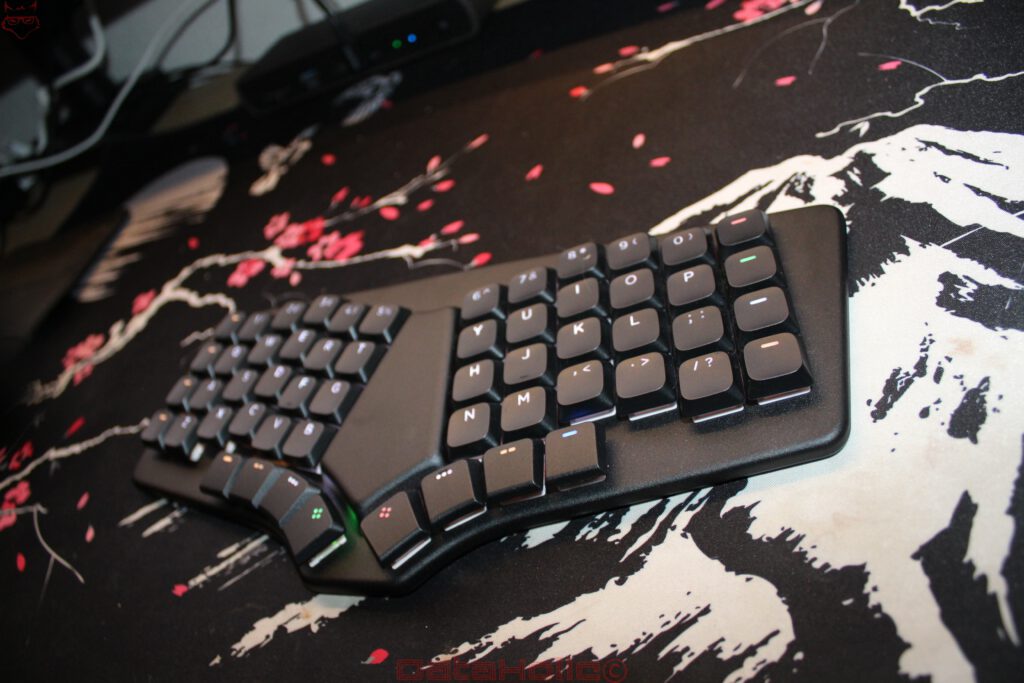
Some keyboards leave no questions unanswered after five minutes. Plug them in, type a few sentences, maybe adjust the lighting, and that is it. The Dygma Sonsei definitely does not belong in that category. It sits on the desk looking almost harmless at first, yet within seconds it starts disrupting movement patterns that have been ingrained for decades. Two angled key fields, strictly arranged columns, eight thumb keys, and significantly fewer keys than a full-size PC keyboard would normally offer. Add to that a large empty area in the middle that almost provocatively looks as though someone forgot to install a few more switches during development. After the first few lines, looking down at the keyboard becomes almost inevitable. Where was that key again? Why does the finger keep landing one position off? And where the hell are the arrow keys? That moment describes the Dygma Sonsei better than any product description. It does not try to make a conventional keyboard a little prettier, flatter, or more modern. It questions the layout itself. That is uncomfortable at first, sometimes very uncomfortable. At the same time, this is exactly where its appeal begins. Many input devices promise ergonomics through a slightly curved case, a palm rest, or a few millimeters less height. The Sonsei goes deeper. It changes the paths the fingers travel, finally gives the thumbs some real work to do, and moves functions onto layers so the hands need to leave their home position as rarely as possible while typing. Unlike Dygma’s Defy, the Sonsei does not consist of two completely separate keyboard halves. Both sides sit inside a single, flat chassis. At first, that sounds like a limitation, but it is actually the reason the Sonsei becomes so interesting in everyday use. Dygma is not trying to build the most uncompromising ergonomic keyboard on the market here. The Sonsei is supposed to make ergonomics portable. The result is a keyboard that, once the learning phase is over, feels less like a stripped-down Defy and more like an independent alternative to the conventional laptop and desktop keyboard. Pasted markdown
First Contact: Why Have the Fingers Suddenly Stopped Working?
The Sonsei has one characteristic that will never appear on a specification sheet: it can challenge confidence in typing skills with remarkable efficiency. Anyone who has spent years or decades typing quickly on conventional keyboards no longer expects a learning curve. Typing happens automatically. Words appear while the mind is already working on the next sentence. Looking down at individual letters is unnecessary. Muscle memory knows the route. On the Sonsei, that exact muscle memory initially trips over its own feet.
The letters have not been completely rearranged. QWERTY or QWERTZ remains fundamentally recognizable. The relationship between the keys, however, has changed. Dygma uses a columnar layout. The keys are arranged more directly above and below one another instead of being offset sideways from row to row as on a traditional keyboard. Anatomically, that makes a fair amount of sense. Fingers naturally move primarily forward and backward when stretching and flexing. The historically inherited diagonal stagger of conventional keyboards repeatedly requires small lateral movements instead.
The catch is simple: anatomical logic does not automatically defeat decades of training on day one.
Suddenly, a finger lands exactly where the brain expects a letter to be, except that the letter itself sits slightly farther to the left or right. Things become particularly entertaining when personal typing habits developed over many years enter the equation. Some letters are regularly hit with the “wrong” finger on a standard keyboard without it ever becoming noticeable. The B key is a familiar example. Depending on typing style, either the left or right hand may take responsibility for it on a conventional keyboard. The Sonsei defines these zones much more clearly. A small shortcut in the movement pattern that has survived for years suddenly becomes obvious.
During the first few hours, this can feel almost absurd. A password normally entered blind in a fraction of a second suddenly becomes an exercise in concentration. A sentence filled with special characters feels like a practical exam. And when a familiar shortcut is attempted at speed for the first time, there is sometimes a brief moment when the fingers clearly have a different idea about what should happen next than the brain does.
The old phrase “old habits die hard” fits unusually well here. Old habits really do die hard. The Sonsei does not try to eliminate them brutally, though. After a few days, the new grid slowly begins to make sense. A little later, the number of mistyped keys drops significantly. Eventually, the eyes stop wandering down toward the keyboard. That is the point at which the Sonsei begins to reveal why Dygma demands this adjustment in the first place.
A Split Keyboard That Is Not Actually Split
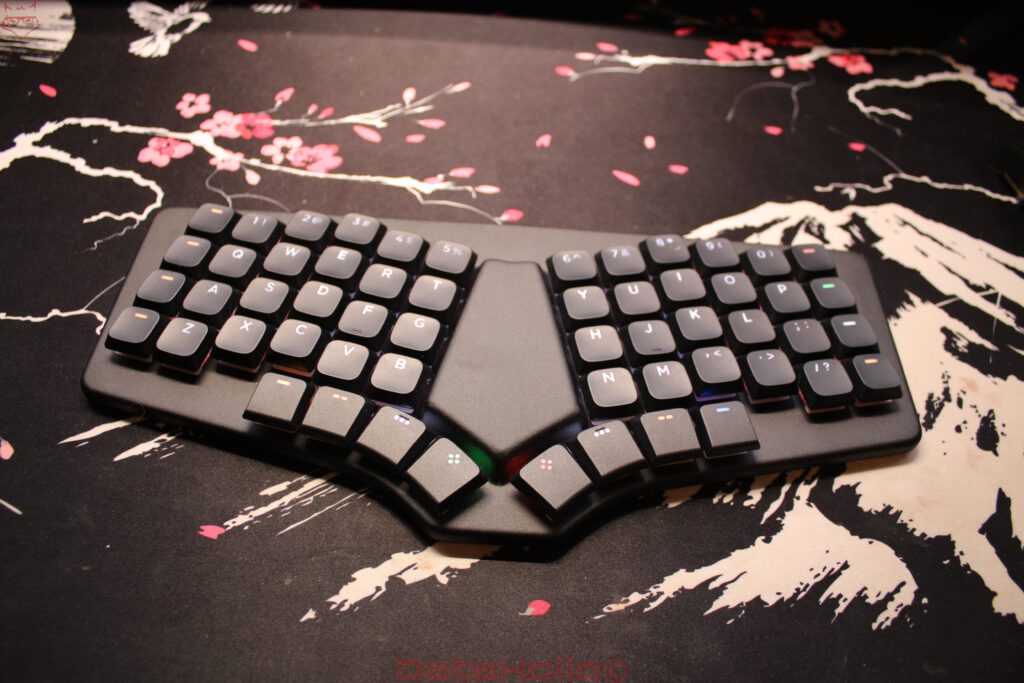
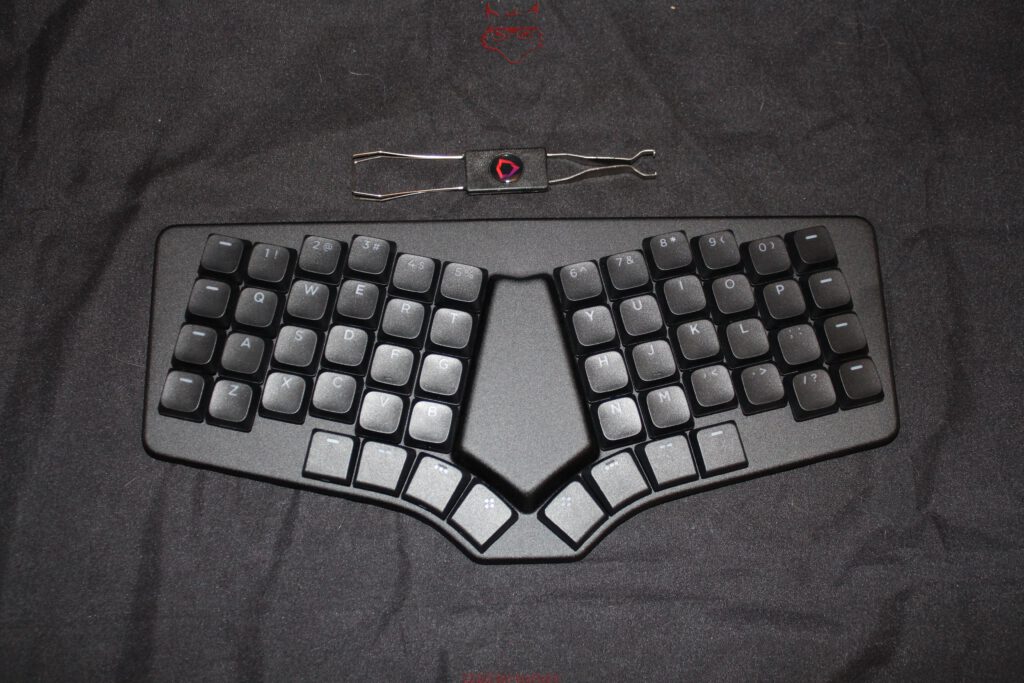
Visually, the Sonsei immediately resembles a split keyboard. The two letter sections are clearly separated and angled slightly away from one another. The chassis itself, however, remains a single solid unit. There is no separate left and right half that can be repositioned independently on the desk.
For experienced split-keyboard users, that initially sounds like a step backward. A fully separated keyboard offers one major advantage: the distance between the hands can be adjusted precisely to body size, shoulder width, and sitting position. Each side can also be rotated independently and, depending on the design, tilted upward. The Defy takes this principle much further.
The Sonsei deliberately gives that up.
The reason becomes obvious as soon as the keyboard is used anywhere other than a perfectly arranged desk. A traditional split keyboard needs space. Two halves have to be unpacked, positioned, and, depending on the model, connected. At a permanent workstation, that is no issue at all. On a small table, in a meeting room, or while travelling, the situation looks rather different.
The Sonsei simply lands on the surface and is ready.
At roughly 299 × 140 millimeters, the chassis remains compact. Including switches and keycaps, the keyboard stands just over 18 millimeters tall and weighs just under 400 grams. That makes it genuinely practical to carry alongside a notebook without turning the bag into moving luggage. Dygma even includes a dedicated carrying case. This combination in particular shows why the single-piece chassis is not a cost-cutting compromise but a deliberate part of the concept.
The ergonomic effect remains. The hands do not sit as close together as they would on a typical 60- or 75-percent keyboard. The two key fields angle slightly away from one another, reducing how far the wrists have to rotate inward. The forearms can follow a more relaxed line, at least within the limits of the fixed angle.
That is also where the limitation lies. The Sonsei cannot replace an individually adjustable split position. Shoulder width, sitting posture, and arm position vary from person to person, while the geometry of the Sonsei always remains the same. Adjustable tenting is missing as well. Anyone already using a heavily tented Defy and deliberately rotating the palms away from a completely flat position will miss that degree of freedom.
In return, another problem disappears: the keyboard does not need to be set up from scratch every time.
That may sound unspectacular, but in everyday use it matters. Good ergonomics are of limited value when the hardware that provides them stays at home because it is too bulky or inconvenient to carry.
The Empty Space in the Middle Is Not Forgotten Real Estate
The wide area between the two key fields immediately stands out. From a purely geometric perspective, Dygma could have filled it with additional controls. A few macro keys perhaps, maybe a small numpad, perhaps even a rotary dial. The space almost begs to be used.
Dygma left it empty anyway.
This is one of those decisions that only begins to make sense after closer inspection. Additional keys on the inner side would need to be reached by the thumbs. The farther a thumb has to travel toward the center, the more the entire hand position begins to change. At some point, a short finger movement turns into a full movement from the wrist.
According to Dygma, additional inner key positions were deliberately rejected during development even though the physical space existed. Ergonomic considerations were one reason, while the battery inside the chassis was another. More switches would have required relocating the battery, increasing the height, or enlarging the housing.
That decision fits the Sonsei extremely well. It is not designed to look impressively packed with hardware. It is meant to remain compact and place frequently used inputs where they can actually be reached comfortably.
Dieter Rams is often credited with the phrase, “Good design is as little design as possible.” The idea fits the Sonsei remarkably well. The empty section shows that a key that was never installed can be just as deliberate a design choice as one that was.
Eight Thumb Keys: Finally, the Strongest Finger Gets a Proper Job
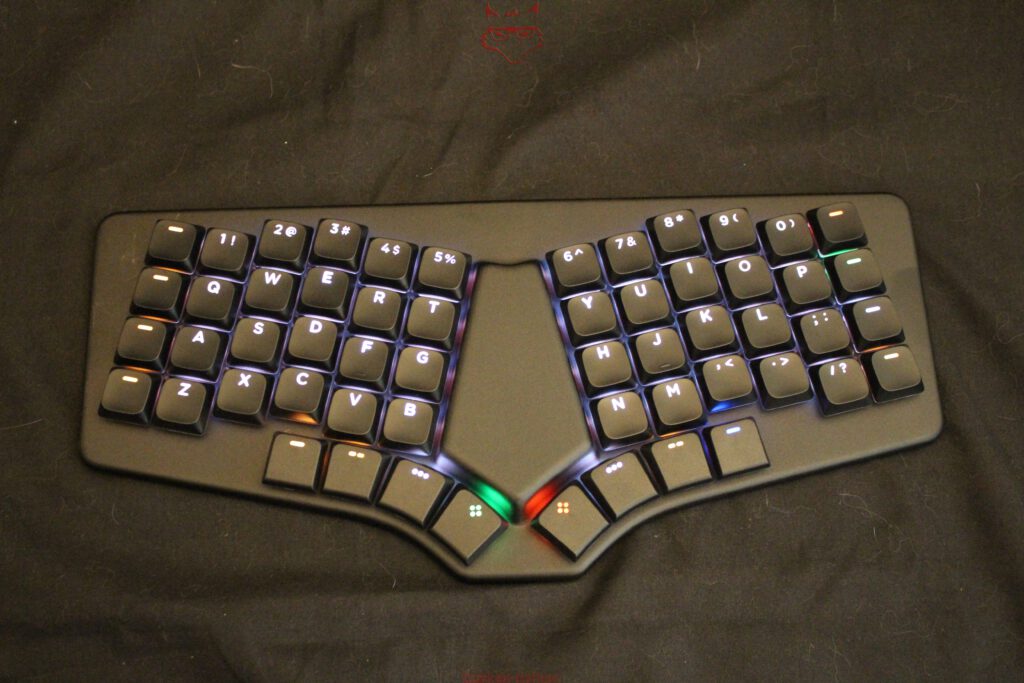
The most important area of the Sonsei is arguably located below the letter keys. Eight thumb keys sit there, four on each side. They are not an additional macro strip bolted onto the design afterwards; they form a central part of the operating concept.
Traditional keyboards have maintained a rather strange division of labor for decades. The little finger handles Shift, Ctrl, Tab, Caps Lock, and several other edge keys. The thumb, meanwhile, gets a space bar so wide that a breakfast plate could almost fit on top of it.
Dygma redistributes the workload.
Space can still sit under one thumb on the Sonsei, but the rest of the cluster can do far more. Enter, Backspace, Shift, layer switching, and other frequently used functions can all be moved there. Which combination works best depends heavily on individual habits, which is exactly why a rigid universal layout would be counterproductive.
Backspace quickly shows why the concept works. On a conventional keyboard, the right hand regularly leaves its home position and moves toward the upper-right corner. With a corresponding Sonsei configuration, the thumb performs the same action with a short movement.
That sounds minor.
After several thousand keystrokes per day, small details stop being small.
The thumb keys become even more important when changing layers. One key can be held while the remaining fingers operate a second layout containing arrow keys, function keys, a virtual numpad, or media controls. Release the thumb and the keyboard immediately returns to the normal typing layer.
The interesting effect appears after a few days. At first, there is conscious thought about which thumb key performs which task. Later, layer switching simply happens. At that point, the true strength of the system no longer lies in the visible hardware but in the newly learned movement pattern.
Even more interesting is switching back to a conventional keyboard. Suddenly, the thumb searches for Backspace and finds nothing but space bar. There are few better signs that a new input logic has successfully become part of muscle memory.
56 Keys, Yet Surprisingly Little Is Missing
The Sonsei has 56 physical keys. A traditional full-size keyboard has more than 100. Even compact keyboards can look generously equipped beside it.
The obvious question is therefore: where did the rest go?
The short answer: onto other layers.
Dygma ships the Sonsei with preconfigured layers. Arrow keys, F-keys, the numpad, and media controls have not disappeared; they simply no longer require their own dedicated switches. By default, additional layers are activated through the thumb keys. Up to ten layers can be configured in total.
Anyone familiar with the Fn key on a notebook already understands the basic principle. The Sonsei simply takes it much further.
One layer can, for example, turn H, J, K, and L into a navigation cluster. Another can transform part of the right-hand side into a numpad. F1 through F12 can sit on the number row. Media controls do not need their own dedicated symbols on additional keys.
The important part is not the raw number of possible functions. Ten layers filled with dozens of secondary assignments may sound impressive, but they can just as easily turn everyday use into a digital maze.
A good configuration is one that can eventually be forgotten.
Arrow keys should sit where they feel intuitive. A numpad should follow a logical arrangement. Frequently used functions belong close to the home position. Rare specialist commands can sit farther away.
The Sonsei rewards restraint.
A keyboard with ten completely overloaded layers is not automatically more productive than one with three carefully designed ones.
Bazecor: Where the Sonsei Becomes Either a Tool or a Puzzle
Bazecor is not the sort of software that gets opened once to disable RGB and then spends the rest of the keyboard’s life forgotten somewhere on the SSD. It is a fundamental part of the Sonsei concept because it defines how the relatively small number of physical keys actually behave in everyday use.
Every key can be remapped, existing layers can be modified or rebuilt from scratch, macros and shortcuts can be stored, and mouse functions can be assigned directly to the keyboard. Then there are so-called Superkeys, which allow a single physical key to perform several different tasks. The real strength is not the sheer number of functions available, but the freedom to adapt the Sonsei to an individual workflow.
At the beginning, the temptation to rebuild everything immediately is considerable. That, however, can quickly create a layout that looks technically impressive and is practically unusable. Anyone who moves Backspace, Enter, Shift, navigation, the numpad, and several layers during the first hour will probably spend more time searching for functions afterwards than searching for keys on a normal keyboard.
A gradual approach works much better. The basic layout can remain largely untouched at first. Changes only become worthwhile when daily use reveals that a function consistently gets in the way or requires unnecessary movement. Backspace is a good example. If it feels too far away, it can move onto a thumb key. The same applies to Enter or layer switching. The arrow keys do not need to remain where Dygma placed them by default either. What matters is not whether a layout looks theoretically elegant, but whether it still works without conscious thought several days later.
That is exactly what separates the Sonsei from many conventional keyboards. On an ordinary model, customization often ends after swapping two keys and perhaps assigning one macro to a regularly used application. On the Sonsei, configuration can genuinely change the entire movement pattern. Functions move closer to the home position, the hands travel across the keyboard less often, and certain actions can be assigned to fingers that do very little work on traditional layouts.
Superkeys become particularly interesting here. A single key can trigger different actions depending on how it is pressed. A short tap can do something different from a longer hold or another defined input pattern. This significantly expands what can be done with 56 physical keys, but it also introduces Bazecor’s greatest danger.
Too many multi-function assignments can quickly turn a flexible keyboard into a memory test. If every second key requires a moment of thought about whether a tap, hold, or combination is the correct input, the whole advantage disappears. A good configuration eventually stops being noticeable altogether. Functions sit where they are expected, fingers find them automatically, and Bazecor fades into the background.
That is when the concept works best: not when as many functions as possible have been configured, but when the keyboard responds so naturally that the configuration itself no longer requires any thought.
Low Profile Fits the Concept Better Than a Heavy MX Build
The low height of the Sonsei is not simply part of the “looks modern” category. It is a key element of both the ergonomic and mobile concept. Dygma uses 56 Gateron KS-33 2.0 low-profile switches installed in hot-swap sockets, topped by low-profile double-shot PBT keycaps. The result is a keyboard that remains pleasantly low and does not require a thick wrist rest simply to bring the hands up to keycap height.
That matters more on a mobile keyboard than it might initially seem. A conventional mechanical keyboard with tall MX switches can feel excellent, but it also sits considerably higher. A separate palm rest is often added, which means more space and more weight. For a keyboard that is supposed to disappear into a bag on a regular basis, that would hardly make sense. The Sonsei remains low enough to be used comfortably without an additional rest.
Despite the low construction, it does not feel like a notebook keyboard. The Gateron switches provide a clearly defined travel and noticeably more mechanical feedback than the very short scissor mechanisms used in many laptops. Different switch characteristics are available, including linear, tactile, clicky, and especially quiet options. The Silent Red version, for example, operates with roughly 45 gf actuation force, a 1.7-millimeter actuation point, and three millimeters of total travel.
The quieter switches suit the Sonsei particularly well. A keyboard explicitly intended for mobile or flexible workplaces will inevitably end up in environments where not everyone appreciates a loud clicky switch. On a train, in an office, or during a meeting, an especially noisy keyboard can develop roughly the same charm as someone clicking a ballpoint pen continuously for an hour.
Dygma has therefore addressed not only the switches but also the chassis itself. Several sound-absorbing layers are intended to reduce resonance and vibration. That makes sense in a flat design with an aluminum top plate, because thin housings can easily sound hard, hollow, or slightly rattly if the internal components are not properly damped.
The Sonsei sounds much more controlled. The damping obviously does not change the fundamental character of the selected switch: a clicky switch remains audible, while a silent version remains far more restrained. It does, however, prevent the chassis itself from unnecessarily joining the performance.
This combination fits the wider concept extremely well. The Sonsei is supposed to remain light, flat, and portable without feeling like a thin laptop keyboard. It succeeds surprisingly well. The low-profile construction does not feel like a fashion choice but like a technical consequence of the goal: building an ergonomic mechanical keyboard that can realistically be carried around every day.
Hot-Swap Is About More Than Keyboard Enthusiasts
Hot-swap is often treated as a playground for mechanical-keyboard enthusiasts. Linear today, tactile tomorrow, and the day after that some newly released switch with a name that sounds more like a cocktail than an input device. That is certainly part of the appeal, but with the Sonsei it is only half the story. The more practical advantage is repairability.
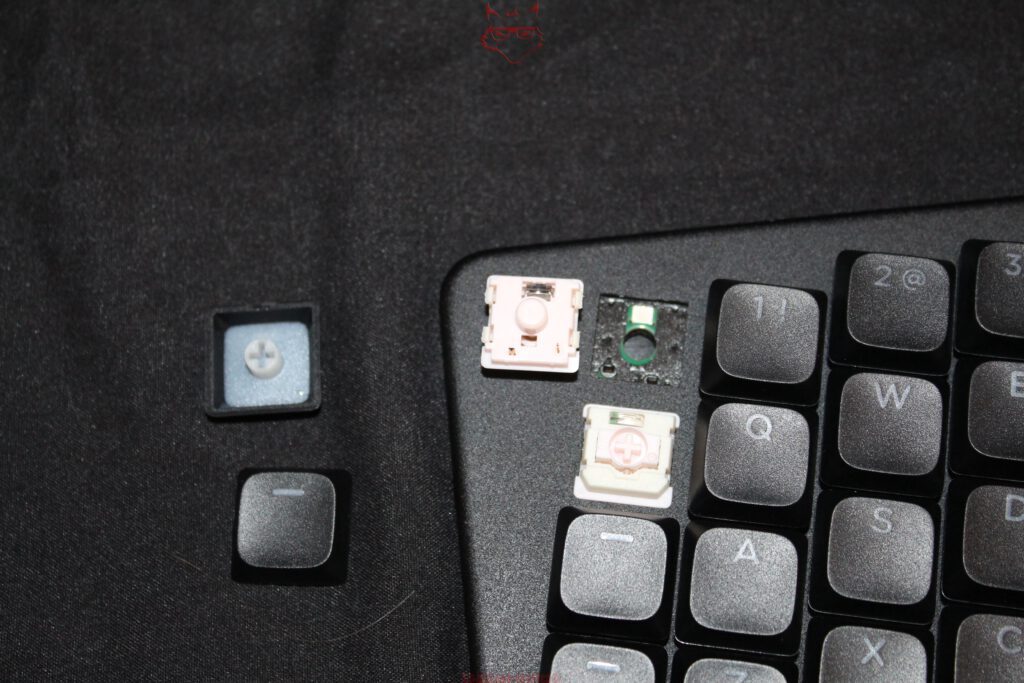
A mechanical switch is a wear component. Even though good switches are rated for millions of actuations, an individual switch can eventually fail, start chattering, or simply stop responding reliably. On a soldered keyboard, that can quickly mean searching for a soldering iron, suitable tools, or a repair service. On the Sonsei, the process is much simpler: pull off the keycap, remove the switch with the supplied tool, insert a replacement, and continue typing.
Dygma even includes two spare switches together with the appropriate keycap and switch removal tool. On a keyboard in this price category, that is not a spectacular bonus but simply a sensible decision. A failed switch should not require replacing an otherwise fully functional keyboard.
The system is not without restrictions, however. The Sonsei uses Gateron KS-33 2.0 low-profile switches. That means it does not benefit from the enormous choice available in the conventional MX ecosystem. Anyone with a drawer full of MX switches at home cannot simply reuse them. Within the compatible low-profile family, however, swapping remains straightforward and allows both repairs and changes to typing feel.
The same applies to the keycaps. They are not permanently tied to the original set either. Compatible low-profile keycaps with the appropriate MX-style stem can be used, and even the specially shaped thumb keys can be replaced with conventional 1u caps if required. Despite its unusual layout, the Sonsei therefore remains surprisingly open to future changes.
That is a welcome approach for a product designed for long-term use. A switch can fail, a keycap may eventually need replacement, and personal preferences can change without sending the entire keyboard to the sidelines. Hot-swap is therefore less an invitation to constantly experiment and more a sensible insurance policy against minor defects and future changes in taste.
393 Grams Feel Almost Suspiciously Light
The Sonsei is slightly surprising the first time it is picked up. Visually, it looks more substantial than it actually is. Dygma specifies a weight of 393 grams, and even together with the carrying case the entire package remains below half a kilogram. For a mechanical keyboard with an aluminum top plate, that is remarkably light.
On a purely stationary model, low weight would not automatically be an advantage. A heavy aluminum block can sit confidently on a desk and react to every attempt to move it with complete indifference. On the Sonsei, that behavior would miss the point entirely. This keyboard is not supposed to live permanently in one place; it is meant to disappear into a backpack regularly.
A two-kilogram keyboard would make little sense there. Notebook, charger, cables, mouse, and other accessories already have a habit of turning an apparently light work bag into a small relocation project. The Sonsei therefore saves weight where it matters without feeling like a thin plastic shell.
The anodized aluminum top plate is largely responsible for that. It gives the chassis the necessary rigidity and prevents the keyboard from feeling fragile while typing. At the same time, large rubber surfaces on the underside do a surprisingly good job of keeping the low weight under control. The Sonsei remains stable on the desk even though it feels much lighter when lifted than its appearance suggests.
That balance suits the wider concept perfectly. The Sonsei does not try to simulate quality through mass. It is supposed to remain portable without feeling cheap, and it succeeds. The chassis feels solid, the keyboard stays sufficiently planted on the desk, and in a backpack its weight is barely noticeable. For a mobile keyboard, that is far more useful than a massive metal block that looks impressive but starts being noticed by the shoulder after the second day away from the desk.
RGB Is, for Once, More Than a Small Fairground
Each of the Sonsei’s 56 keys can be illuminated individually. On paper, that initially sounds like the usual RGB requirement attached to modern mechanical keyboards. A few colors, a few effects, job done. On the Sonsei, however, lighting serves a much more useful purpose.
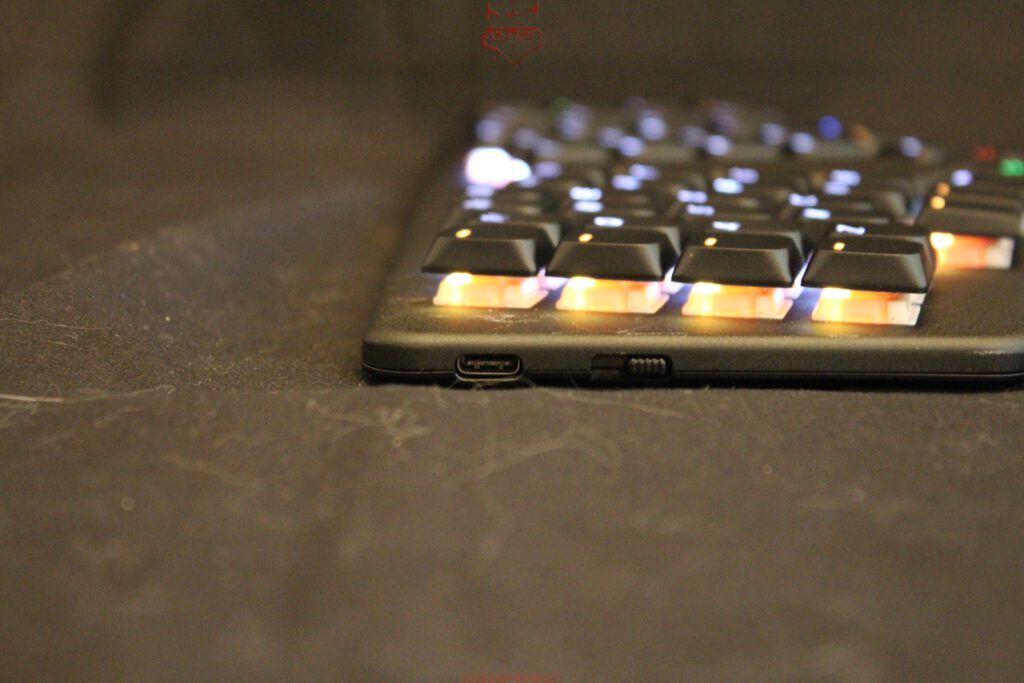
Because so many functions are organized across different layers, color can be used for orientation. The normal typing layer can remain subtle, while navigation uses another color. A virtual numpad can be highlighted separately, as can media functions or dedicated work profiles. The active layer therefore becomes visible immediately rather than only being noticeable through changed key behavior.
That is surprisingly useful during the learning phase. Anyone who has not yet memorized every layer can see at a glance which mode the keyboard is currently using. It prevents some of those moments when a letter is pressed and the cursor suddenly starts wandering across the text instead.
The lighting is therefore more than decoration. It directly supports the Sonsei’s operating concept and makes more complex layer structures easier to understand. RGB still consumes additional power, of course, and in this case the effect is far from insignificant. Keeping the lighting permanently bright reduces battery life dramatically.
Overall, however, this is one of the rare cases in which RGB provides a genuine functional benefit. The colors do not merely look attractive; they help make an otherwise invisible layer system much easier to understand.
The Battery Makes It Very Clear How Expensive Light Can Be
Inside the Sonsei sits a 2,000 mAh battery. On paper, that figure looks neither especially large nor especially small. Battery life becomes much more interesting because it depends heavily on how aggressively the RGB lighting is used.
With the lighting disabled, Dygma quotes more than 40 days of runtime. At full brightness, that figure drops to just over eight hours. At 50 percent brightness, around 16 hours are possible, while 30 percent brightness extends the figure to roughly 24 hours. The difference could hardly be clearer.
It quickly becomes obvious where the biggest power draw comes from. The keyboard electronics themselves are not the main problem; the LEDs are. In practical use, it therefore makes sense to run RGB only as bright as necessary. If color is used primarily to identify individual layers, a much lower brightness setting is usually perfectly sufficient.
That suits the character of the Sonsei anyway. It does not feel like a keyboard trying to justify its existence through the most spectacular lighting effects possible. The illumination serves a functional purpose and does not need to run at full power all the time.
With RGB disabled, the battery becomes a genuine advantage. More than 40 days without a charging cable fits extremely well with a keyboard designed for regular travel. A mobile input device quickly loses its appeal if it starts hunting for a wall socket after a single day of work.
Another particularly positive detail is that the battery is not designed as a permanently sealed disposable component. Dygma provides for replacement. On a product in this price category, that matters because a worn battery after several years should not automatically mean the end of the entire keyboard.
The Sonsei therefore demonstrates very clearly how strongly features and battery life can influence one another. With RGB at full brightness, there is enough power for a long working day. Without lighting, the same keyboard can theoretically last for weeks. For mobile use, the second scenario is considerably more convincing.
Bluetooth for Five Devices Is More Useful in Everyday Life Than Any Gaming Superlative
The Sonsei can be used either through a conventional USB connection or wirelessly over Bluetooth. Up to five Bluetooth devices can be paired, with support for Windows, macOS, Linux, iOS, and Android. That makes the keyboard well suited to a modern work environment that no longer revolves around one single computer.
Notebook, desktop, tablet, and smartphone can all be configured once and then switched between without going through the pairing process again. At changing workplaces, that is significantly more practical than constantly reconnecting cables or rebuilding wireless connections. The Sonsei therefore behaves more like a permanent input device for several systems than a keyboard tied to one specific machine.
At the same time, what is missing is equally noticeable: there is no proprietary 2.4 GHz wireless connection optimized for minimum latency. That is not an accidentally forgotten feature; it fits the Sonsei’s positioning rather well. The keyboard is primarily aimed at productive work, mobile typing, and more ergonomic input. Gaming works too, but it is not the central focus.
NKRO is present, so several keys pressed at the same time are registered reliably. Typical gaming features such as 8,000 Hz polling, Rapid Trigger, or individually adjustable magnetic actuation points are completely absent.
That does not have to be a disadvantage. Quite the opposite: the Sonsei does not try to be an ergonomic travel keyboard, an office tool, and an uncompromising esports keyboard all at once. For the lowest possible latency, USB remains the obvious connection anyway. In everyday work, Bluetooth offers exactly the flexibility that belongs on a mobile keyboard.
Gaming Works, but Muscle Memory Wants to Argue First
The Sonsei can of course be used for gaming as well. The thumb keys in particular turn out to be more useful than expected. Functions such as jumping, reloading, Push-to-Talk, or frequently used abilities can be positioned in ways that allow the main fingers to remain on the movement keys. What saves movement while typing also works surprisingly well in games.
The first gaming session can still be slightly chaotic. WASD is fundamentally where it is expected to be, but the columnar layout changes the familiar spacing compared with a conventional keyboard. Movements that have happened entirely automatically for years suddenly require conscious attention again.
That can create some genuinely funny situations at first. The character moves left instead of right, an ability is triggered too early, or a finger simply lands on the neighboring key. At that moment, the Sonsei is not really the problem; muscle memory is still working from the old map.
After some adjustment, this largely disappears. The thumb cluster then becomes interesting for gaming as well, because additional actions can be reached without moving the hand away from its normal position. Games with many frequently used commands can benefit in particular.
The Sonsei should still not be confused with a current esports keyboard. Magnetic switches, Rapid Trigger, adjustable actuation points, and extremely high polling rates are not part of the concept. The priorities clearly lie in ergonomics, mobility, and productive work.
That is ultimately refreshingly consistent. Dygma does not attempt to tick every current gaming buzzword. The Sonsei can handle gaming and does a respectable job after the learning phase, but it does not pretend that the next esports title is the reason it exists.
Palm Rest and Tenting: Pleasantly Flat, but Not Maximally Flexible
Dygma offers optional Palm Pads for the Sonsei. Because the keyboard is already so low, however, they are far less essential than on traditional mechanical keyboards with tall switches and thicker housings. The Sonsei sits comparatively flat on the desk, so the hands do not first have to climb over a pronounced front edge. Depending on typing posture, that can feel more comfortable and reduce additional wrist extension.
Those who still prefer a soft support can use Dygma’s matching solution made from silicone with a vegan-leather covering. During longer typing sessions, this can add comfort without making the keyboard dependent on the accessory.
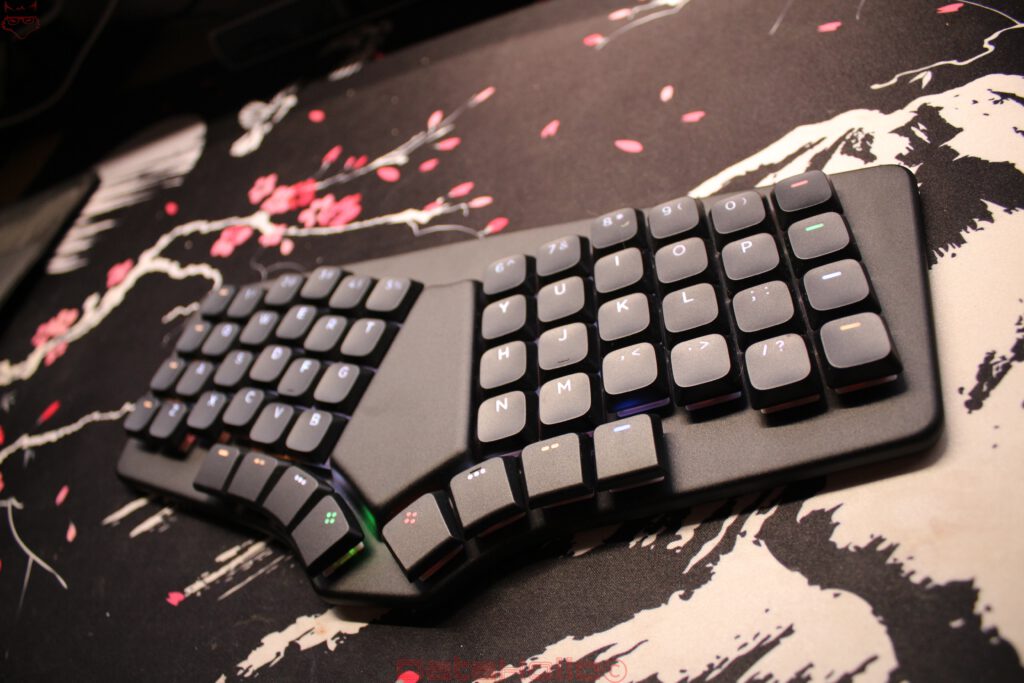
The more significant limitation lies elsewhere: there is no tenting system at all. Many ergonomic split keyboards allow the inner edges to be raised so the hands do not remain completely flat on the desk. This allows the forearms and wrists to sit in a more natural relationship to one another.
The Sonsei offers no such adjustment. Both key fields remain fixed in a flat position. From an ergonomic perspective, that makes it less flexible than a Defy or other fully split keyboards with adjustable angles.
The omission is consistent with the concept, though. An integrated tenting mechanism would have made the design thicker, heavier, and mechanically more complicated. That would directly conflict with the Sonsei’s mobile focus. Dygma therefore sacrifices part of the maximum adjustability in order to keep the keyboard flat, light, and easy to carry.
The Sonsei is not an uncompromising ergonomic tool. It is a deliberately mobile middle ground, and that distinction matters when evaluating it.
On a Notebook It Looks Wrong at First, Then Suddenly Makes Sense
One of the Sonsei’s more unusual ideas is using it directly on top of a notebook. According to Dygma, the keyboard has been tested on devices of different sizes. On 13- and 14-inch laptops, depending on the chassis design, the Sonsei can rest on the side or upper areas of the notebook without pressing the keyboard underneath. On larger models, it can sometimes sit directly above the built-in keyboard.
Visually, the arrangement initially looks a little as if one keyboard has decided to run over another.
In practical terms, however, there is a clear idea behind it. Anyone who uses an ergonomically optimized layout at home and then returns to a flat notebook keyboard while travelling immediately loses all the learned habits built around thumb keys, layers, and the columnar arrangement.
The Sonsei can close that gap. Instead of switching completely back to a conventional notebook layout on the road, the fundamental input logic remains intact. This is particularly interesting when the Sonsei is not used as the only keyboard but as a mobile companion to a Dygma Defy.
Dygma even allows a Defy backup to be transferred to the Sonsei through Bazecor. The physical layouts are not identical, but many layers, functions, and familiar assignments can still be carried over. That means there is no need to start from scratch when working away from the main desk.
This is probably one of the most sensible connections between the two products. The Defy stays at the permanent workstation, where it offers maximum freedom over distance, angle, and positioning. The Sonsei carries much of the same operating logic outside without requiring two separate keyboard halves, additional stands, or a larger setup.
It sounds less spectacular than many of the Sonsei’s other features, but in everyday use it may be one of the stronger arguments. An ergonomic input concept is particularly useful when it does not stop at the office door.
The Sonsei Is Ergonomic, but It Is Not a Medical Solution
With ergonomic products, it is important to distinguish clearly between sensible engineering and medical promises.
The Sonsei can shorten movement paths, change hand position, and move frequently used functions onto the thumbs. This can reduce lateral finger movement and keep many inputs closer to the home position.
That can make everyday work more comfortable. It does not mean that an ergonomic keyboard automatically eliminates physical complaints.
A desk that is too high remains too high. A poor sitting position does not become good simply because 56 carefully arranged keys are sitting in front of the monitor. Working for hours without breaks does not suddenly become healthy because aluminum, low-profile switches, and thumb clusters are involved.
The Sonsei is therefore best understood as a tool. It can help make movement patterns more ergonomic and reduce unnecessary travel. How significant the effect becomes still depends on the complete workstation, sitting position, and personal habits.
Within those limits, it works convincingly: not as a medical solution, but as a technically well-considered input device that deliberately addresses several long-standing weaknesses of conventional keyboards.
The Price Is the Most Uncomfortable Topic
With a starting price of 279 US dollars, the Sonsei sits firmly in a category where a keyboard has to explain more than its switches and a piece of aluminum. At first glance, the price can seem especially high because several things are visibly missing: no dedicated arrow keys, no F-row, no numpad, no rotary dial, and no display.
That is exactly why judging the price purely by the number of visible keys misses the point. The Sonsei is not selling the maximum number of switches per dollar. The money goes toward the unusual layout, flat aluminum construction, hot-swap sockets, double-shot PBT keycaps, Bluetooth, battery, freely programmable layers, thumb cluster, and especially Bazecor as the central control system behind the whole concept.
Even so, 279 US dollars is a serious amount of money.
For occasional office work or a few emails in the evening, that price would be difficult to justify. Far cheaper keyboards perform those tasks perfectly well. The equation changes when the keyboard is used for many hours every day and genuinely functions as a work tool. Then the discussion is no longer limited to materials and features, but also includes comfort, adaptability, and the thousands of keystrokes passing through it every single day.
That does not suddenly make the Sonsei inexpensive. It simply changes the perspective. An input device used every working day for years can justify a higher price than an accessory pulled from a drawer twice a week.
Whether the premium makes sense therefore depends less on how many keys are physically visible and more on whether the Sonsei’s specific concept will actually be used. Anyone with no interest in thumb clusters, layers, or a columnar layout is simply paying too much. Anyone specifically looking for those characteristics and using the keyboard every day receives considerably more than an expensive 56-key board.
What Really Sticks After a Few Days
The biggest surprise of the Sonsei is not the aluminum chassis, Bluetooth, or battery life. Even the unusual columnar layout gradually fades into the background. What really stays with the keyboard are the thumb keys and the layer system.
Once the movement patterns have settled, moving the entire right hand away from its position just to reach the arrow keys suddenly feels surprisingly inefficient. A conventional space bar can seem equally strange afterwards, occupying a huge portion of the bottom row despite performing essentially one single task.
This is where the Sonsei shows how much traditional keyboard layouts rely on habit. The conventional approach works extremely well, is universally understood, and requires almost no learning phase. Decades of familiarity mean that hardly any thought is given to why specific functions sit where they do.
The Sonsei turns that logic around. Instead of reserving one physical key for every function, regularly used commands are moved closer to the fingers. The thumbs receive much more work, while layers take over jobs that would otherwise require additional key blocks.
After the adjustment period, this can feel surprisingly efficient. At the same time, that is also the Sonsei’s greatest hurdle. It demands time, a willingness to learn, and the readiness to reorganize familiar routines.
Its strength is therefore not greater universality than a conventional keyboard. Quite the opposite. The Sonsei trades universality for adaptability. Anyone willing to make that trade receives a highly personal input device. Anyone who simply wants to start typing without changing habits will be happier with a conventional layout.
What the Sonsei Cannot Do
The Sonsei is not a fully split keyboard and does not attempt to replace one completely. Anyone looking for maximum ergonomic freedom will therefore encounter deliberate limitations. The distance and angle between the two key fields are fixed, and there is no tenting system. A true split keyboard can adapt these factors much more precisely to sitting position, shoulder width, and personal preference.
The Sonsei is also somewhat more restricted in terms of hot-swap than many conventional mechanical keyboards. The Gateron low-profile switches offer less choice than the enormous MX ecosystem. Anyone who regularly experiments with different switches therefore has less room to play.
The same applies to the missing dedicated arrow and function keys. All of those functions are available through layers, but they are not physically visible. After the learning phase, that works very well, but it requires a different kind of muscle memory. Anyone frequently switching between several keyboards will need to readjust each time.
Another weakness emerges directly from one of Bazecor’s greatest strengths. Because almost every key and every layer can be freely configured, the Sonsei can also be configured into something worse than the factory layout. An overloaded setup with too many special functions, multi-purpose keys, and illogical layers can quickly become more cumbersome than the default configuration.
The freedom is enormous, but it requires a little discipline. The best Sonsei configuration is not the most spectacular one. It is the one that eventually just works and disappears into the background of everyday use.
What It Does Exceptionally Well
The Sonsei brings part of the ergonomic thinking behind fully split keyboards into a format that can genuinely be carried around without difficulty. That is probably its greatest strength.
An ideally arranged workstation only helps where it actually exists. As soon as the working day moves into a meeting room, a hotel, a train, or a different desk, much of that familiar ergonomic setup usually disappears. The built-in notebook keyboard takes over again, bringing its conventional layout, narrow hand position, and familiar long reaches to navigation and secondary keys.
The Sonsei creates a remarkably successful middle ground. It is flat enough for a backpack, light enough for everyday transport, and still a fully mechanical keyboard. Add eight thumb keys, freely programmable layers, and the ability to adapt the complete layout through Bazecor.
Most importantly, it does not feel like a stripped-down emergency solution. The Sonsei does not come across as an ergonomic keyboard that simply had part of its functionality removed to make it portable. The concept feels designed around mobility from the start.
The compromise remains visible, of course. Hand spacing is fixed, tenting is absent, and it cannot match the freedom of a fully split keyboard. In return, another problem disappears completely: the Sonsei does not need to be assembled, aligned, and packed as several separate pieces every time.
That is precisely why it works so well in everyday life. It carries a large part of the Dygma philosophy without turning every mobile workspace into a small setup project. For a keyboard intended to provide more ergonomic input while still regularly living in a backpack, that may be its strongest argument of all.
Conclusion: First the Fingers Get Offended, Then Going Back Becomes Difficult
The Dygma Sonsei is one of those keyboards that cannot really be judged fairly after two days. On the first day, habit wins. On the second, habit usually wins again. Maybe even on the third. Fingers search, typos become annoying, and at some point the question inevitably appears: why replace a keyboard layout that has worked perfectly well for years?
Then the perception slowly begins to shift.
The columns start to make sense. The thumb keys become natural. Backspace suddenly sits in a position that, in hindsight, almost feels more obvious than the upper-right corner. Arrow keys appear beneath the fingers through a layer without the entire right hand having to leave its working area. The virtual numpad exists when it is needed and disappears again afterwards. What initially felt foreign gradually turns into a tool.
That is exactly where the appeal of the Sonsei lies.
It does not try to be a smaller Defy. Some of the Defy’s most important freedoms are missing by design. The two halves cannot be positioned independently, the distance remains fixed, and there is no tenting system. Anyone specifically looking for maximum adjustability will simply find more options in the Defy.
The Sonsei solves a different problem.
A Defy wants a workstation. The Sonsei can become part of the luggage.
At just under 400 grams, with a flat construction, Bluetooth for up to five devices, and very good battery life with the lighting disabled, the concept genuinely works outside a permanent desk. That is also where the fixed frame begins to make sense. The keyboard lands on the table, powers on, and is ready to go. There are no two halves to align and no additional setup is required.
Enough of Dygma’s core philosophy remains for the Sonsei to avoid becoming just another flat Bluetooth keyboard. The columnar layout reduces unnecessary lateral finger movement, the separated key fields open the hand position slightly, and the eight thumb keys distribute work much more sensibly than a traditional oversized space bar. Bazecor expands the 56 physical switches through layers and freely configurable functions far beyond what their visible number suggests. Hot-swap and a replaceable battery also provide a sensible foundation for keeping the keyboard in use for more than a few years.
The price remains difficult, of course.
279 US dollars is not an amount that simply disappears into a keyboard purchase. The Sonsei needs to be used regularly for that investment to make sense. It needs to become part of the daily workflow, its layers need to be used, and the thumb keys cannot remain decorative extras beneath the main key field.
That is exactly when it works best.
Perhaps the most telling anecdote does not happen while using the Sonsei at all, but afterwards. After spending a long time with it, a completely ordinary keyboard sits in front of the hands again. The first sentence works without issue. So does the second. Then a word needs to be deleted. The thumb moves automatically to the position where Backspace sits on the Sonsei and hits a gigantic space bar instead.
For a brief moment, the Dygma Sonsei is no longer the keyboard that feels unusual.
The keyboard that has been considered completely normal for decades does.
That is the effect that remains after the test. The Sonsei is not perfect, not universal, and with its fixed construction certainly not the most flexible ergonomic keyboard on the market. What it does achieve is a convincing combination of ergonomics, mobility, repairability, and an unusually thoughtful control concept that genuinely works in everyday use.
For this technical consistency, the successful execution of its mobile ergonomic concept, and its high degree of configurability, the Dygma Sonsei receives the DataHolic Technology Award.

Notice in accordance with EU transparency requirements:
The Dygma Sonsei featured in this review was provided to us by Dygma as a non-binding loan sample for testing purposes. This is not paid advertising.
Dygma had no influence on the content, evaluation, or editorial independence of this article. All opinions expressed are based exclusively on our own hands-on experience.
We would like to thank Dygma for providing the Dygma Sonsei and for the trust placed in dataholic.de.