
Dygma Sonsei in a Technical Unboxing: Ergonomics Suddenly Becomes Travel-Friendly
- Even the Packaging Reveals Its Intended Purpose
- The Included Accessories Are Surprisingly Comprehensive
- One Chassis Instead of Two Halves
- Aluminium Where Structural Rigidity Matters
- 56 Keys and a Completely Different Idea of Space
- Eight Thumb Keys Instead of One Enormous Space Bar
- Low Profile All the Way Down to the Switch
- PBT Instead of Thin Notebook Plastic
- RGB with 56 Individually Addressable LEDs
- Two Nordic Controllers Beneath the Surface
- Three States on One Small Switch
- 2,000 mAh Inside the Flat Chassis
- The Underside Tells a Different Story from the Top
- No Integrated Palm Rest
- The Sonsei Is Small, but Technically It Has Not Been Stripped Down
- Transparency Notice in Accordance with EU Requirements:
Ergonomic keyboards have a fundamental problem that, surprisingly, has very little to do with ergonomics: they tend to become rather large. Split housings, palm rests, elaborate angle mechanisms and additional thumb keys all require space. A Dygma Defy can therefore work brilliantly on a permanent desk, but it is not necessarily something that casually slips into a bag alongside a notebook, power adapter and headphones. This is exactly where the Dygma Sonsei comes in. Instead of building two completely separate keyboard halves, Dygma places its ortholinear, or more precisely columnar, layout inside a single, flat chassis. At first glance, the result almost looks like an ergonomic keyboard that has been caught by a shrink ray. A footprint of 299 x 140 millimetres, a height of just 18.4 millimetres and a weight of around 393 grams are unusually compact for this class of device. Yet inside are 56 mechanical low-profile switches, eight thumb keys, Bluetooth, USB, a 2,000 mAh battery, individually addressable RGB lighting and hot-swap sockets.
During the unboxing, it is therefore less a single technical feature that stands out than the consistency with which Dygma has attempted to translate its existing concept of an ergonomic keyboard into a genuinely portable format. The Sonsei is neither a two-piece Defy nor simply a flatter Raise 2. Its construction, key geometry and electronics have been built around a different usage scenario: the keyboard is intended to move between workplaces together with a notebook without abandoning its fundamental ergonomic principles.
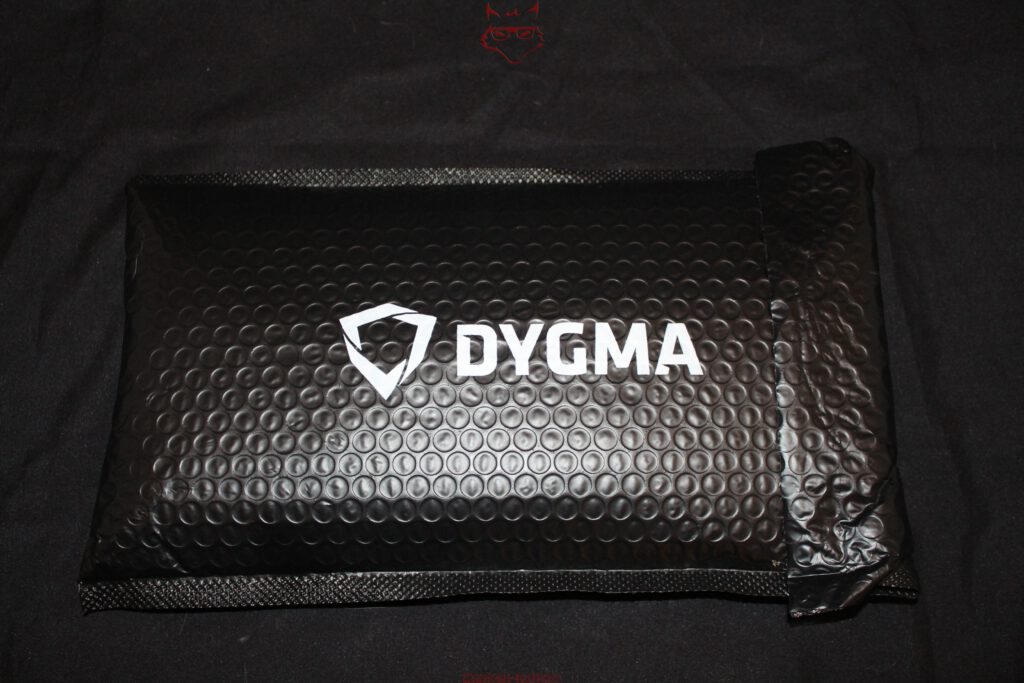
Even the Packaging Reveals Its Intended Purpose
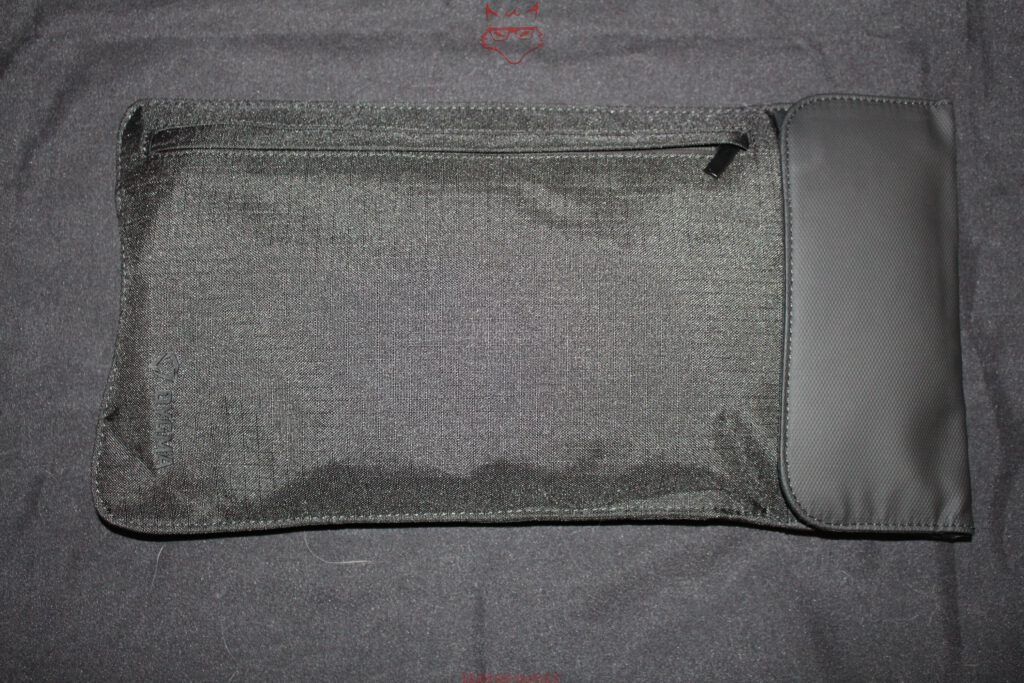
The actual product box almost becomes a secondary concern during the unboxing. The Sonsei initially arrives at the desk inside a black padded sleeve bearing a large Dygma logo. Underneath is not simply another layer of packaging material, but already part of the included equipment: a travel sleeve. It is a small detail with quite a lot to say. A keyboard whose carrying case does not have to be purchased separately was clearly not designed exclusively for a life between a monitor and a mouse pad.
The sleeve is made from a relatively lightweight textile fabric and is considerably less substantial than a conventional hard case. That suits the Sonsei perfectly. A transport case weighing several hundred grams would partially negate the keyboard’s weight advantage when travelling. The sleeve therefore primarily protects against scratches, dirt and the usual contact with notebook power supplies, cables and other luggage. This construction is less suited to the mechanical stresses of an overpacked suitcase.
The internal arrangement is interesting. In addition to the main compartment for the keyboard, there is a separate zippered compartment for accessories. This prevents cables, adapters and tools from resting directly against the keycaps. It is a small design decision that proves more useful in everyday life than a particularly spectacular product box. Portable hardware ultimately depends less on how impressive it looks the first time it is opened and more on how uncomplicated it remains the fiftieth time it is packed away.
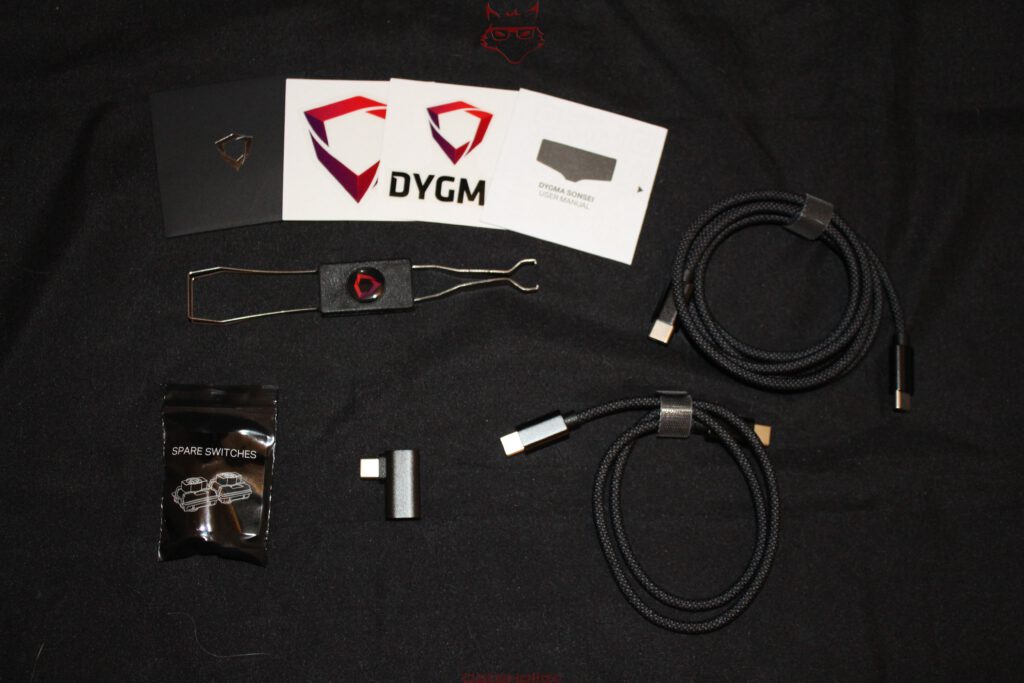
The Included Accessories Are Surprisingly Comprehensive
Once everything has been unpacked, quite a collection of smaller components spreads across the desk. Alongside the Sonsei itself and the travel sleeve are two fabric-braided USB-C cables, an angled USB-C adapter, two spare switches, a combined keycap and switch puller, and the documentation. The almost obligatory Dygma stickers are included as well.
The two USB-C cables of different lengths genuinely make sense for a mobile keyboard. The shorter cable is suitable for use directly beside a notebook, while the longer cable provides greater freedom of movement at a stationary workstation. Dygma currently specifies 50 centimetres for the shorter cable and 120 centimetres for the longer one. Interestingly, an earlier official description also mentioned a length of 150 centimetres for the longer cable. For this unboxing, the important point is therefore that two cables intended for clearly different workstation scenarios are included.
Even more interesting is the small 90-degree USB-C adapter. The Sonsei’s USB-C port is positioned on the side of the left section of the chassis. A cable plugged directly into it therefore initially runs horizontally away from the keyboard. The angled adapter allows the cable to be routed immediately towards the rear or in another more suitable direction. It sounds like an accessory from the “nice, but hardly essential” category until a compact workstation is set up on a small table and a stubborn USB-C cable ends up exactly where a mouse or coffee cup is supposed to sit.
The inclusion of two spare switches and the appropriate tool also fits the hot-swap construction. This is not a feature that appears on the product page only to require the purchase of additional tools before it can actually be used.
One Chassis Instead of Two Halves
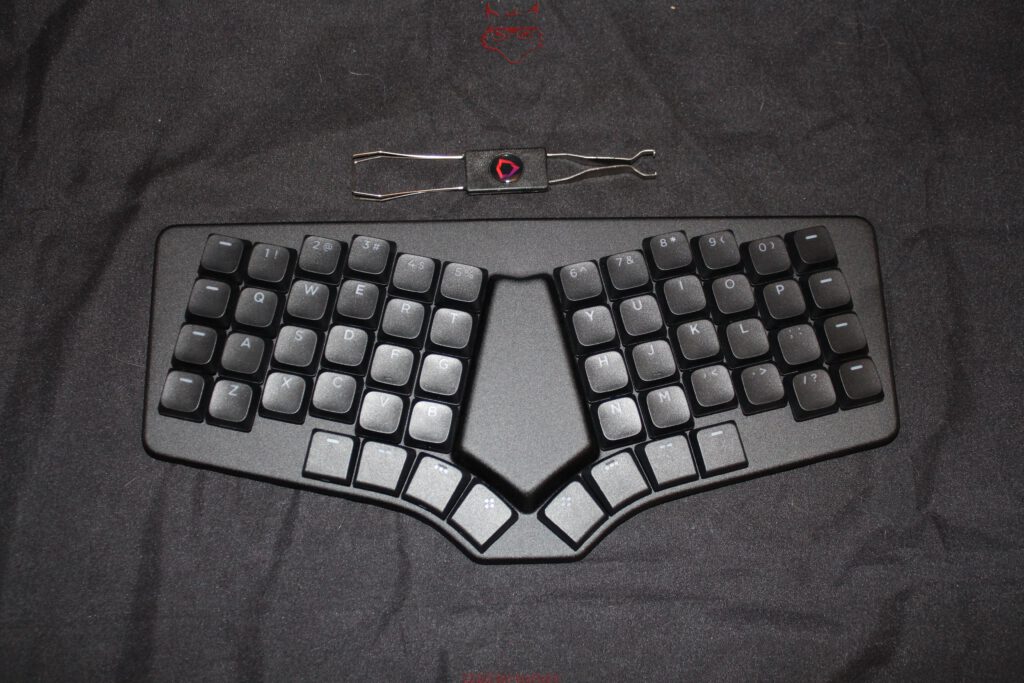
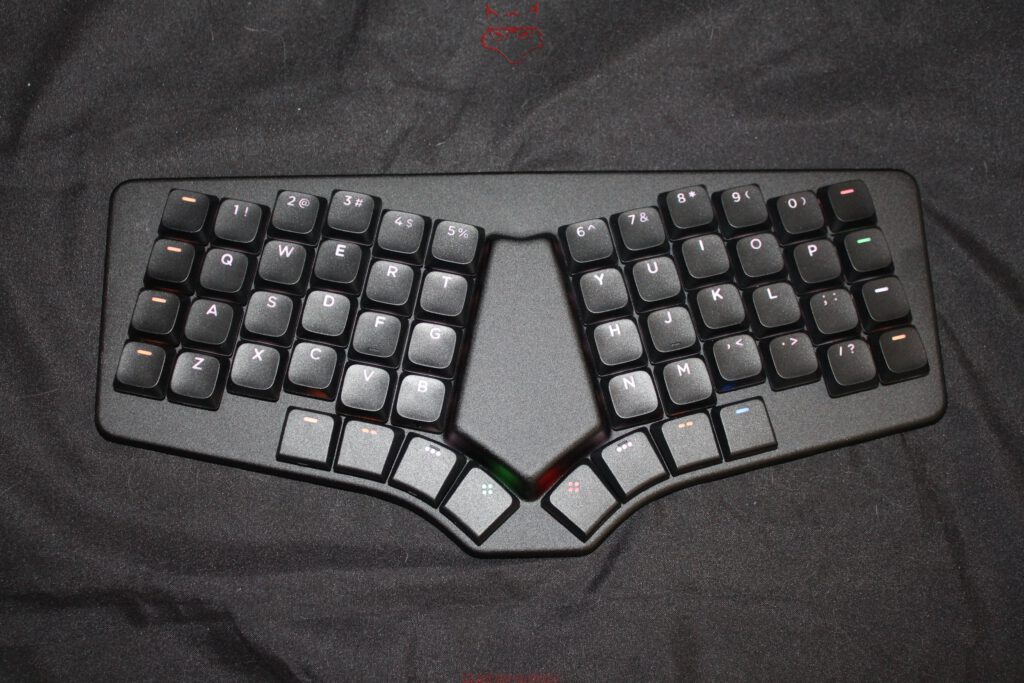
Once removed from the sleeve, the decisive difference compared with many ergonomic keyboards becomes immediately apparent. Although the Sonsei is visually divided into two clearly distinct typing areas, physically it remains a single device. Both key fields are angled relative to one another and open towards the centre. Between them is a large unused area, while the lower edge curves significantly inwards.
It looks unusual at first, but follows a comprehensible geometric concept. On a conventional keyboard, the letter rows run largely horizontally. This forces both hands to rotate further inward. On the Sonsei, by contrast, the two key fields point more closely towards the respective forearms. The hand position is therefore not created by two freely movable housing halves, but is already defined by the fixed geometry of the chassis.
Dygma consciously accepts a compromise here. A fully split keyboard allows the distance and angle between both halves to be adjusted individually. The Sonsei cannot do that due to its construction. In return, precisely the characteristic that can make split keyboards cumbersome on the road disappears: two housings, two positions and, with some designs, additional connecting cables or separate wireless electronics.
The unibody concept therefore feels less like a stripped-down split keyboard and more like an attempt to freeze the most important geometric properties of such a design into a fixed form. The angle cannot be freely adjusted, but the keyboard is immediately in its intended position as soon as it is taken out of the sleeve.
Aluminium Where Structural Rigidity Matters
The top consists of an anodised aluminium plate. With a width of just under 30 centimetres and a weight below 400 grams, this is not merely an aesthetic decision. A flat keyboard with a large opening or unused area between its two key fields requires sufficient structural rigidity to prevent the chassis from flexing unnecessarily under load.
The top view in particular shows just how much space between the two letter blocks is not occupied by keys at all. The aluminium construction forms a continuous frame here, connecting both sides. During initial handling, this creates a noticeably more solid impression than the low weight might initially suggest.
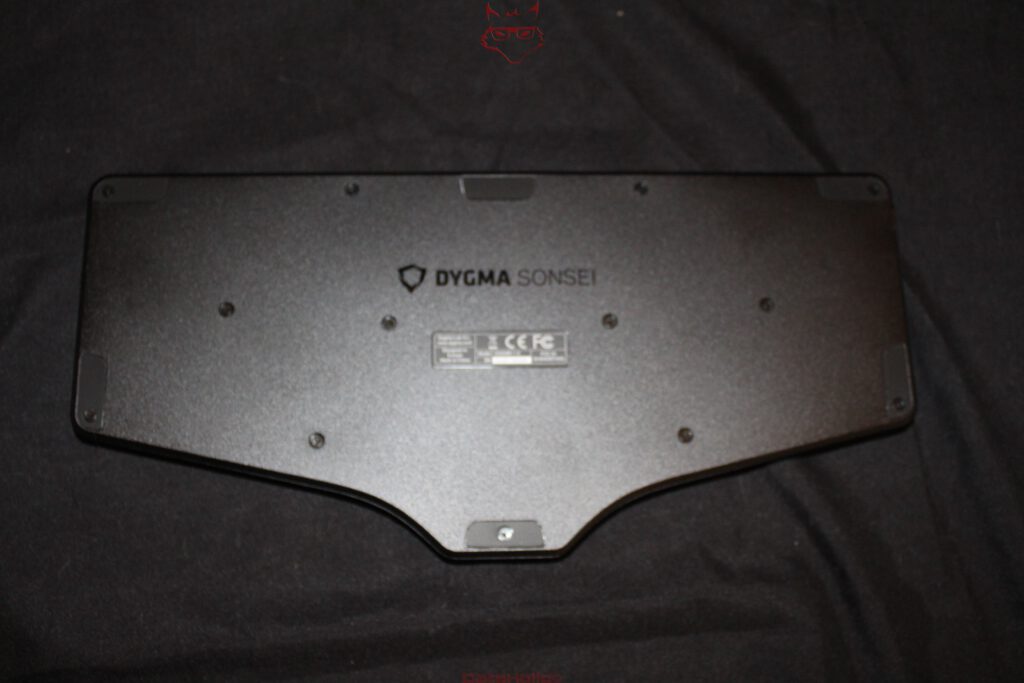
The underside is correspondingly functional. Several screws make it clear that the housing was not designed as a completely bonded unit. Recessed or flush-mounted rubber elements keep the distance from the desk surface to a minimum. The largely flat underside is also striking. There are no fold-out feet, complicated tenting mechanisms or bulky structural additions.
This is precisely what keeps the Sonsei so flat. Its 18.4-millimetre height already includes the switches and keycaps. That is remarkably little for a mechanical keyboard and also explains why Dygma does not use conventional MX switches.
56 Keys and a Completely Different Idea of Space
The Sonsei has a total of 56 keys. Anyone coming from a conventional 104-key layout might briefly check whether roughly half the keyboard went missing during transport. In reality, that reduction is a central part of the concept.
There are no separate function keys, dedicated number pad, conventional navigation cluster or expansive groups of modifier keys. Instead, the Sonsei works with layers and fully programmable keys. The physical number of keys therefore represents only part of the functionality available.
The arrangement of the letter keys is particularly striking. The rows are not staggered against each other as they are on a traditional typewriter-style keyboard, but instead follow the fingers in columns. This columnar layout reduces lateral movement within the individual finger zones. The two blocks are also angled relative to each other.
Even without typing a single sentence, the top view makes it very clear that this is not an attempt to make a standard layout merely look more ergonomic. The geometry itself has genuinely been changed.
That does, however, have an immediate consequence: habits developed on conventional keyboards cannot be transferred completely unchanged. The lower rows and modifiers in particular sit where muscle memory initially expects other keys. The Sonsei is therefore not a keyboard on which typing automatically continues at exactly the same speed immediately after unboxing. That, however, belongs to the later practical test. At this stage, the unboxing simply reveals how consistently the physical layout departs from the conventional desktop keyboard.
Eight Thumb Keys Instead of One Enormous Space Bar
The most interesting area is found along the lower inner edge. A total of eight keys are distributed across two thumb clusters, each containing four positions. This is where one of the fundamental differences compared with conventional keyboards becomes particularly obvious.
A normal keyboard reserves several centimetres of width for the space bar, even though both thumbs are anatomically capable of doing considerably more. Dygma instead distributes important functions across several keys. The commands assigned to them can ultimately be configured through the software. Functions such as Space, Backspace, Enter, Shift or layer switching can therefore be moved into the thumb area.
The keycaps in these clusters have a specially adapted shape and follow the curve along the lower edge of the chassis. At the same time, Dygma has designed the construction so that conventional 1u low-profile keycaps can be used as an alternative. This is technically relevant because proprietary thumb-key shapes can quickly become a problem when a custom keycap set is to be installed.
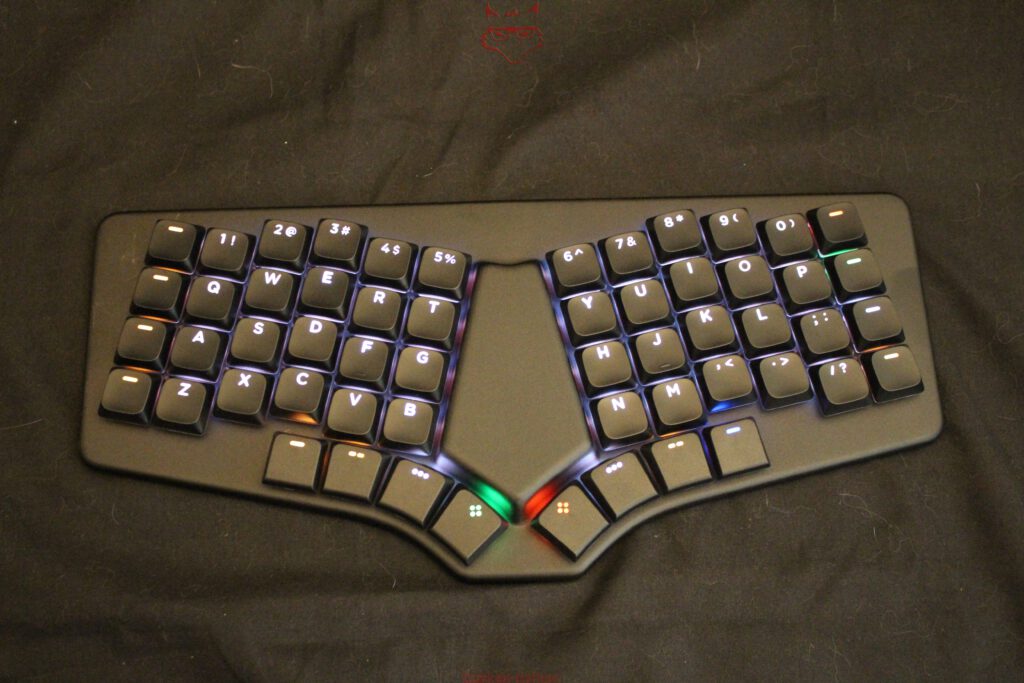
The coloured symbols on some of these keys are also associated with layer and control functions. Even with the keyboard simply switched on, it becomes apparent that the RGB lighting is not intended to be purely decorative. Different colours can visually distinguish functions or layers from one another.
Low Profile All the Way Down to the Switch
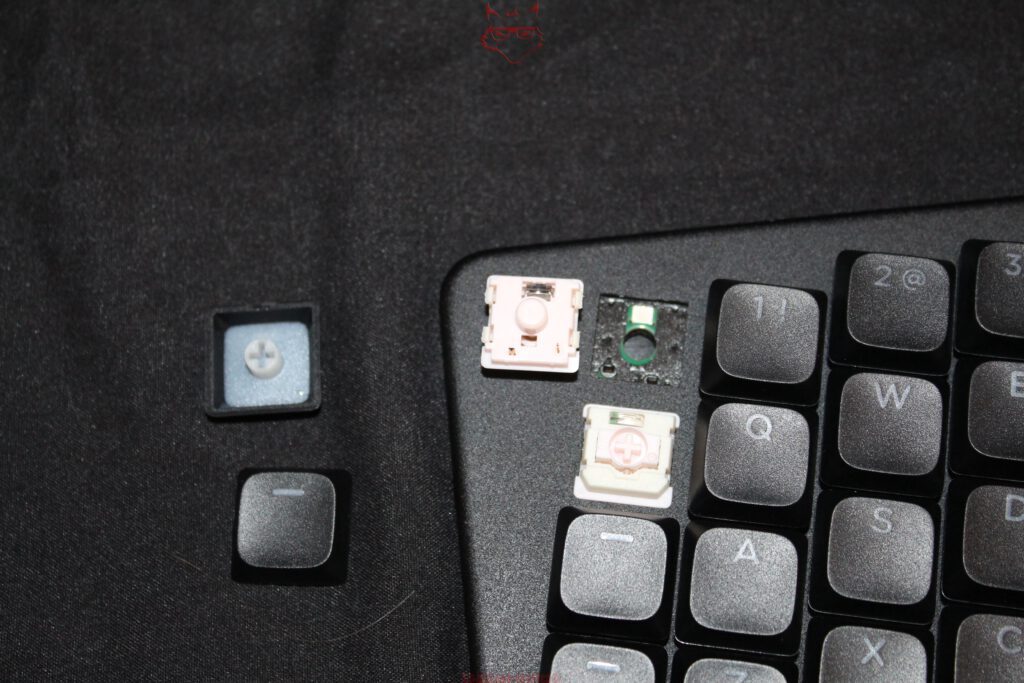
Beneath the keycaps sit Gateron KS-33 2.0 low-profile switches. There are 56 hot-swap sockets in total, allowing every switch to be replaced without soldering. The unit shown here demonstrates particularly well just how compact the entire mechanism remains as a result.
Removing a keycap reveals the cross-shaped MX-compatible stem. Beneath it sits a substantially flatter switch housing than on a conventional MX switch. The difference is not cosmetic. A standard MX switch would alter the entire concept of the Sonsei through its height alone.
Dygma offers different KS-33 2.0 variants for the Sonsei. Depending on the configuration, linear, tactile and clicky options are available. According to Dygma, the currently offered switches feature a 1.7-millimetre actuation point and a total travel distance of 3.0 millimetres. The required actuation force varies depending on the switch variant.
Hot swapping on low-profile keyboards is somewhat more complicated than in the conventional MX ecosystem, however. “Low profile” does not describe a universal electrical or mechanical standard. Different manufacturers and switch families use different pin arrangements and housing geometries. The Sonsei is therefore designed for Gateron KS-33 2.0 switches. An arbitrary low-profile switch will not automatically fit.
The included combined puller takes this construction into account. One side grips the keycaps, while the other is used for the switches. When removing a low-profile switch, Dygma recommends a slight side-to-side movement rather than brutally pulling it straight upwards. With such small contact pins, a little patience certainly pays off.
PBT Instead of Thin Notebook Plastic
Double-shot PBT keycaps sit on top of the switches. That is worth mentioning on a flat mobile keyboard because particularly compact designs frequently rely on thin ABS caps.
With the double-shot manufacturing process, the legends and the actual keycap are formed from separate sections of plastic. The lettering is therefore not simply printed onto the surface. As a result, it cannot wear away in the same manner as an applied coating.
PBT also offers comparatively strong resistance to the characteristic shine that can develop on frequently used ABS keycaps over time. For a device explicitly intended to travel between different workplaces, the material choice therefore fits well with the rest of the construction.
The surface of the black keycaps on this unit is finely textured and appears noticeably grainier under direct flash than under normal room lighting. The legends remain translucent, allowing the RGB LEDs underneath to illuminate the characters.
RGB with 56 Individually Addressable LEDs
Each key has its own RGB LED underneath. That provides a total of 56 individually addressable light sources. The illumination shines both through the legends and laterally between the switch and keycap.
The photographs show particularly well how strongly the transparent or translucent sections of the switch housings distribute the light. With the keycaps removed, it becomes apparent that the LED sits directly around the hot-swap socket or switch mounting area.
On a programmable layered keyboard, this lighting has a more practical purpose than on a conventional 104-key board. If a key suddenly becomes an arrow key, media command or shortcut on a second or third layer, suitable colour coding can help with orientation. RGB therefore evolves, at least partially, from desktop fireworks into an interface.
The actual configuration, however, belongs to the software and therefore goes beyond the scope of a pure unboxing.
Two Nordic Controllers Beneath the Surface
Underneath the aluminium is electronics that are comparatively interesting for a keyboard. Dygma uses a Nordic nRF52840 as the main controller and an nRF52833 for key scanning. Both chips belong to a family strongly focused on low-power wireless applications.
That fits the Sonsei’s wireless design. In addition to USB, it supports Bluetooth and can store up to five devices. Switching between these connections is handled through appropriately assigned keys or Bluetooth channels.
NKRO is supported as well. This is intended to allow the keyboard to register all simultaneous key presses instead of running into matrix limitations with certain combinations. For a keyboard that appears primarily productivity-focused, that might initially sound like technical excess, but it prevents unwanted input restrictions particularly when complex layer, modifier and shortcut combinations are used.
The Sonsei is compatible with Windows, macOS and Linux as well as mobile platforms including iOS and Android. Once again, this fits its portable character: a keyboard that can easily connect to a notebook, tablet and smartphone does not necessarily require a permanently assigned computer at the centre of the setup.
Three States on One Small Switch
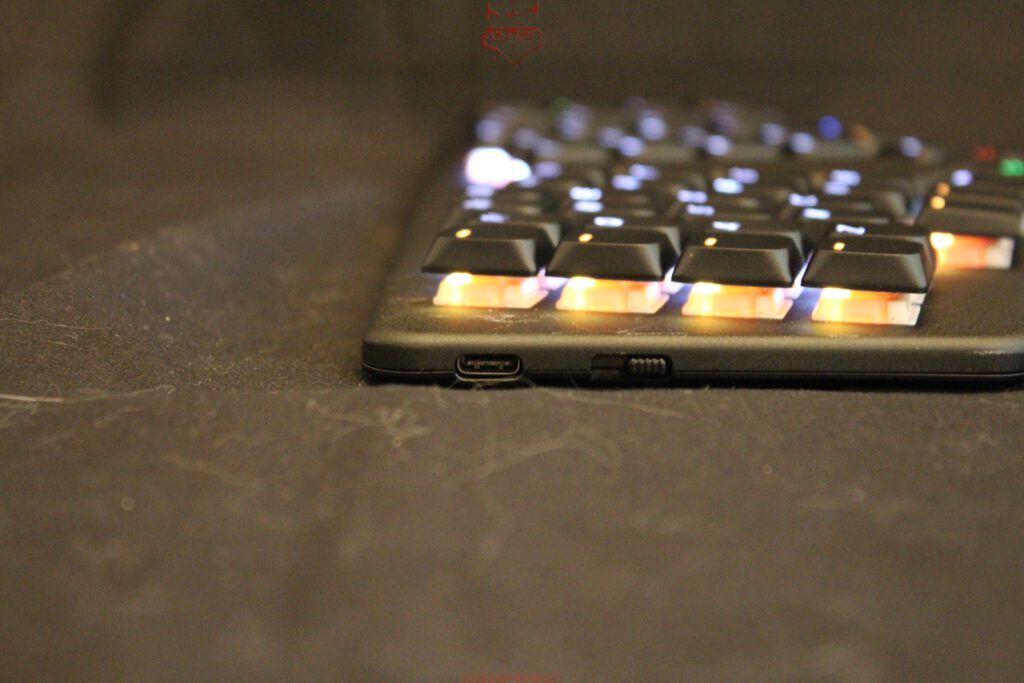
A small mechanical slider sits beside the USB-C port. It selects between Bluetooth, the powered-off state and wired USB operation.
It is a pleasantly unambiguous solution. Multifunction keys on wireless keyboards can quickly make it difficult to determine whether a device has actually been switched off or merely moved into another wireless mode. Here, the physical position of the switch provides immediate feedback.
In USB mode, the Sonsei operates as a wired keyboard. In Bluetooth mode, the wireless connection takes over. The centre position switches the keyboard off. According to Dygma, the battery can be charged via USB-C regardless of the selected operating mode.
The port itself sits deeply enough within the edge of the housing without protruding unnecessarily. Combined with the included angled adapter, this creates unusually flexible cable management for a device of this size.
2,000 mAh Inside the Flat Chassis
Inside is a battery with a capacity of 2,000 mAh. Dygma specifies a runtime of more than 40 days with the lighting disabled. With the RGB lighting permanently operating at 100 percent brightness, more than eight hours of continuous use are said to be possible.
This enormous difference illustrates rather neatly which component accounts for a significant part of the energy budget in a modern wireless keyboard. Fifty-six permanently illuminated RGB LEDs require considerably more power than the controllers and Bluetooth connection during normal typing.
It is also interesting that Dygma describes the battery as replaceable. For a mobile device, this is far more relevant in the long term than a particularly spectacular lighting animation. Lithium batteries are consumable components. If a keyboard is structurally designed for years of use, an ageing battery should not automatically mean the end of the entire electronic device.
The Underside Tells a Different Story from the Top
Turn the Sonsei over and almost everything playful disappears. There are no RGB strips, no large decorative elements and no externally mounted mechanisms. Instead, a dark metal surface dominates, carrying the Dygma Sonsei branding, regulatory markings and several visible screws.
The contour of the chassis is particularly striking from this perspective. The keyboard is not simply a rectangle containing diagonally arranged keys. Its outer shape genuinely follows the position of the hands. Along the lower edge, this creates a broad concave line that extends forwards in the centre. The chassis therefore becomes part of the ergonomics rather than merely serving as a carrier for an unusual key matrix.
Several rubber pads are distributed across the underside and prevent direct contact between the aluminium or housing and the desk. Their low-profile integration adds almost nothing to the overall height.
The absence of conventional fold-out feet also fits the overall concept. On standard keyboards, such feet generally raise the rear edge and create a stronger positive typing angle. On an already ergonomically designed low-profile construction, that would not necessarily be beneficial. Dygma instead keeps the Sonsei as close to the desk surface as possible.
No Integrated Palm Rest
What is not included is equally noticeable: palm pads. Dygma offers matching palm rests separately. The chassis already provides the corresponding area in front of the actual key fields, but it remains uncovered in the base package.
From a mobility perspective, that is understandable. A permanently integrated padded palm rest would increase weight, thickness and transport volume. At the same time, hand position is one of the central characteristics of an ergonomic keyboard. How comfortable the Sonsei remains over several hours without additional pads can therefore only be established during the actual practical test.
During the unboxing, the comparatively low front edge initially stands out positively. Thanks to the low-profile switches and flat chassis, this is not a tall mechanical keyboard that requires the hands to be raised several centimetres before typing can even begin.
The Sonsei Is Small, but Technically It Has Not Been Stripped Down
Once everything has been completely unpacked, an unusually dense package sits on the desk: the 393-gram keyboard, travel sleeve, two USB-C cables, 90-degree adapter, combined switch and keycap puller, two spare switches and the documentation. Very little of it feels like incidental bundled equipment. Almost every component can be directly explained by the mobile concept.
The keyboard itself is even more interesting. Fifty-six hot-swap sockets, 56 Gateron KS-33 2.0 switches, 56 individually addressable RGB LEDs, double-shot PBT keycaps, eight thumb keys, two Nordic microcontrollers, Bluetooth for up to five devices, USB, NKRO and a 2,000 mAh battery all fit inside a chassis measuring 299 x 140 x 18.4 millimetres, barely larger than some compact notebook keyboards.
Even after the unboxing alone, the technical experiment behind the Sonsei is therefore clear. Dygma is not attempting to squeeze as many keys as possible into the smallest possible rectangle. Instead, the traditional keyboard matrix is pulled apart, angled and then brought back together inside a single mobile chassis. Functions for which there is no longer physical space move onto layers and into the thumb clusters. Overall height is reduced through low-profile switches, cable clutter is avoided through Bluetooth, and the transport question is addressed with a travel sleeve included as standard.
Whether this approach ultimately works for writing, programming and extended working sessions cannot be determined simply by opening the packaging. From a construction perspective, however, the Dygma Sonsei already makes one thing quite clear on the desk: “mobile” does not simply mean making a conventional mechanical keyboard smaller. The entire system has been organised around that requirement.
Transparency Notice in Accordance with EU Requirements:
The Dygma Sonsei featured in this review was provided by Dygma as a non-binding permanent loan unit for testing purposes. This does not constitute paid advertising. Dygma had no influence over the content, assessment or editorial independence of this article. All opinions expressed are based solely on editorial hands-on experience. Our thanks go to Dygma for providing the keyboard and for the trust placed in dataholic.de.