
EPOMAKER NEX Pro Review Conclusion: 8,000 Hz, PAW3950 and a Charging Dock That Actually Makes Sense
- From keyboards to mice: EPOMAKER expands across the desk
- 65 grams without turning the shell into Swiss cheese
- PAW3950: The sensor is no longer the weak link
- 8,000 Hz: Eight times more is not eight times better
- Wireless performance: the invisible half of a wireless mouse
- The charging dock: two small contacts against the USB-C ritual
- 500 mAh: 8K sends the battery to the gym
- Buttons and scroll wheel: the art of the uneventful click
- Skates and lift-off distance: small details with a large effect
- Browser-based configuration: no software empire required for changing DPI
- 42,000 DPI, 8K and 50 G: numbers need context
- Everyday use instead of benchmark obsession: the NEX Pro has two personalities
- Not everything is perfect: ergonomics remain personal and 8K remains a luxury
- The real highlight sits underneath the mouse
- Conclusion: The EPOMAKER NEX Pro succeeds through balance, not 42,000 DPI
- Transparency notice in accordance with EU requirements:
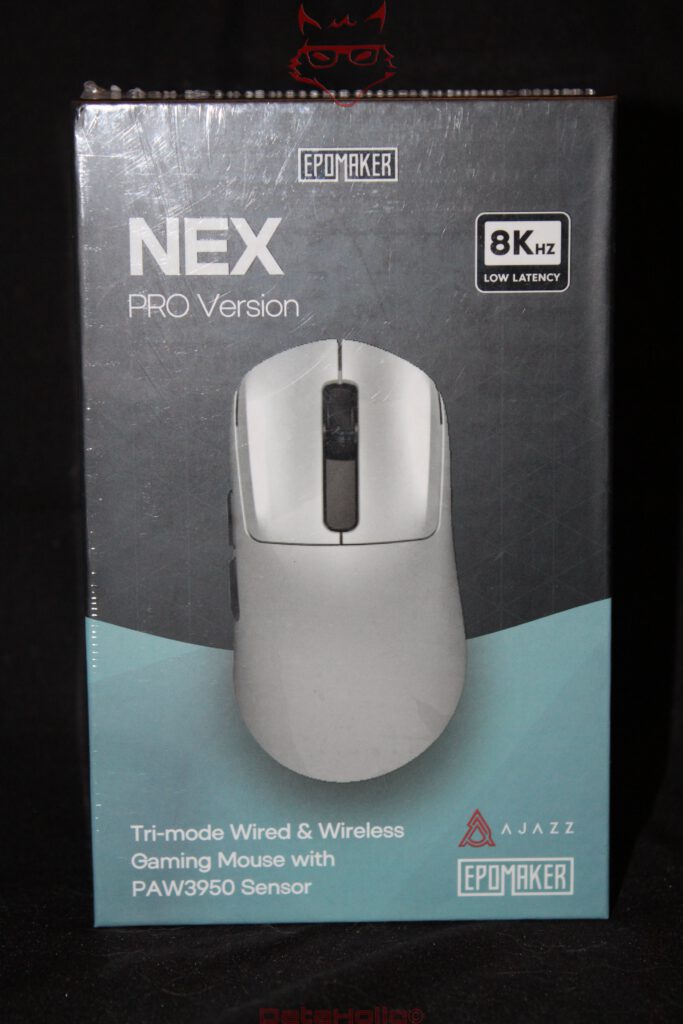
Gaming mice have taken a slightly peculiar path over the past few years. Weight is discussed down to individual grams, polling rates are rising faster than the refresh rates of many monitors, and DPI figures have reached regions where a few millimeters of physical movement could theoretically send the pointer on a small trip around the world. The packaging of the EPOMAKER NEX Pro makes no attempt to hide this development. “8K Hz Low Latency” is printed prominently on the front, accompanied by a reference to the PAW3950 sensor. At first glance, this looks very much like another gaming mouse designed to sell itself through numbers.
After spending time with it on the desk, however, that impression changes considerably. The most interesting characteristic of the NEX Pro is not actually found in its specification sheet. It is the way EPOMAKER combines a powerful sensor, a pleasantly conventional shell, a weight of around 65 grams, three connection methods and a genuinely useful charging dock into a surprisingly coherent system.
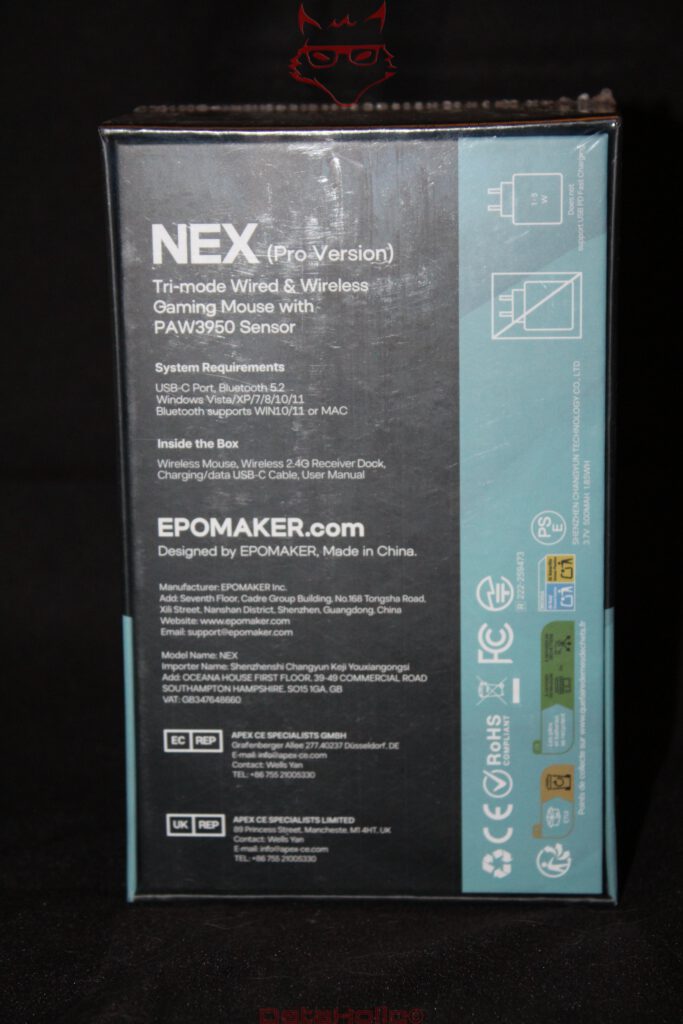
The NEX Pro measures approximately 12.2 × 6.5 × 4.2 centimeters, uses an ABS shell and is clearly designed for right-handed use. Underneath sits PixArt’s PAW3950 sensor, accompanied by sensitivity settings reaching 42,000 DPI, polling rates of up to 8,000 Hz over USB and 2.4 GHz wireless, a 500 mAh battery and Bluetooth as the third connection option. Without the dock, the mouse weighs around 65 grams.
Those specifications already reveal something important. The NEX Pro is not trying to break every possible record. Sixty-five grams is light, but no longer absurdly light. The closed shell avoids holes, carbon-fiber skeletons and other weight-saving measures that occasionally leave gaming mice looking as though a particularly hungry hamster spent the night chewing through the casing. Instead, the NEX Pro remains a conventional, solid mouse with thoroughly modern electronics underneath.
That combination turns out to be considerably more interesting in daily use than the large 8K logo printed on the box.
From keyboards to mice: EPOMAKER expands across the desk
EPOMAKER is primarily associated with mechanical keyboards, switches and keycaps, although its product portfolio has expanded considerably. Mice and headsets have joined the keyboards, and the NEX Pro represents a performance-oriented interpretation of what a modern wireless gaming mouse should look like.
This also places the product in an interesting market segment. A mouse in this category is far enough removed from an ordinary office peripheral to create serious expectations, yet still competes in a market where established gaming brands increasingly charge considerably more for their flagship models.
That means the NEX Pro cannot rely on the PAW3950 logo alone. Sensor, wireless implementation, shell construction, switches, software and power management all have to work as a complete package.
That is precisely where the mouse begins to surprise.
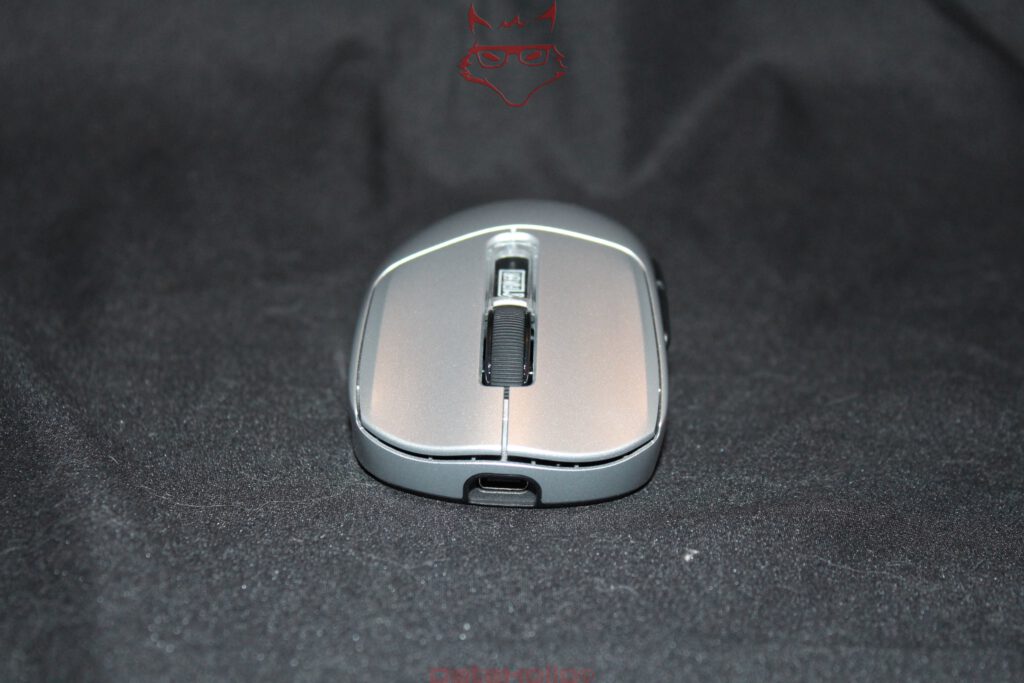
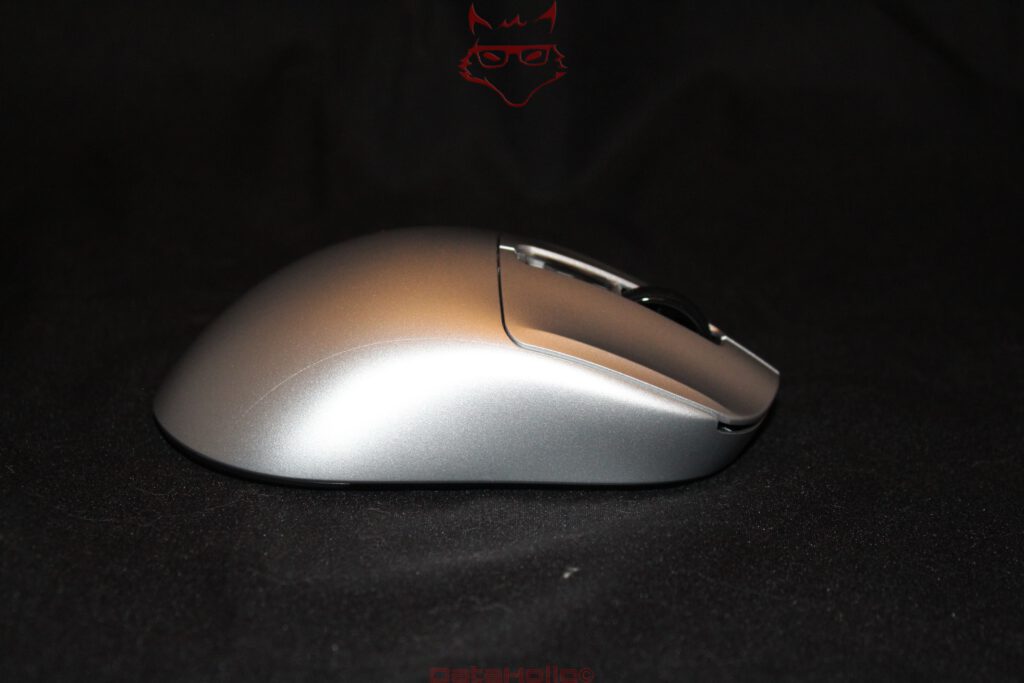
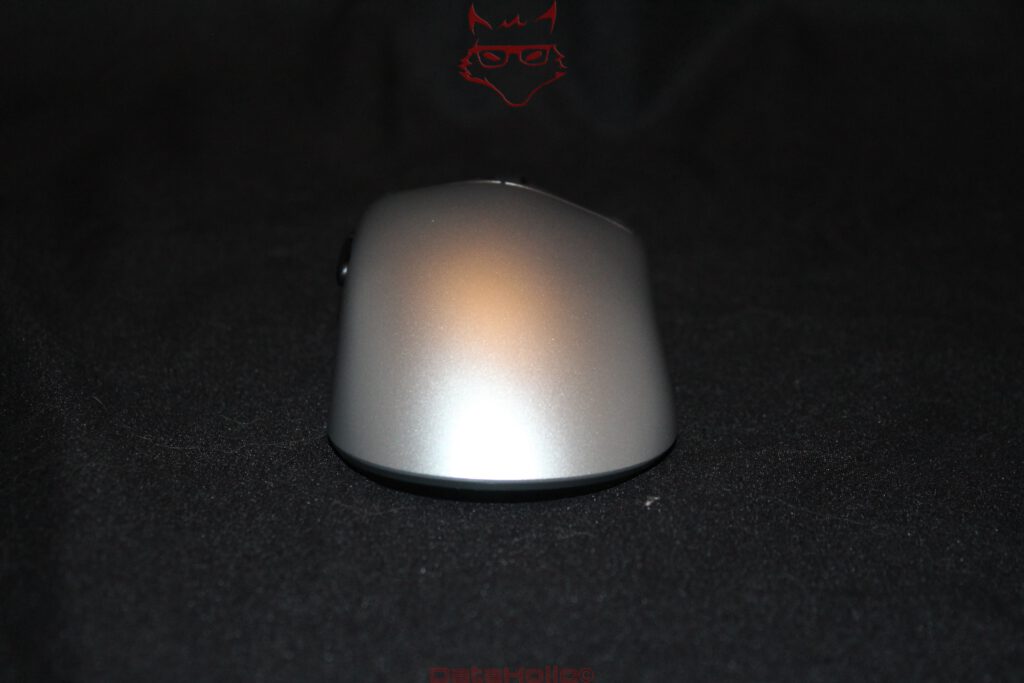
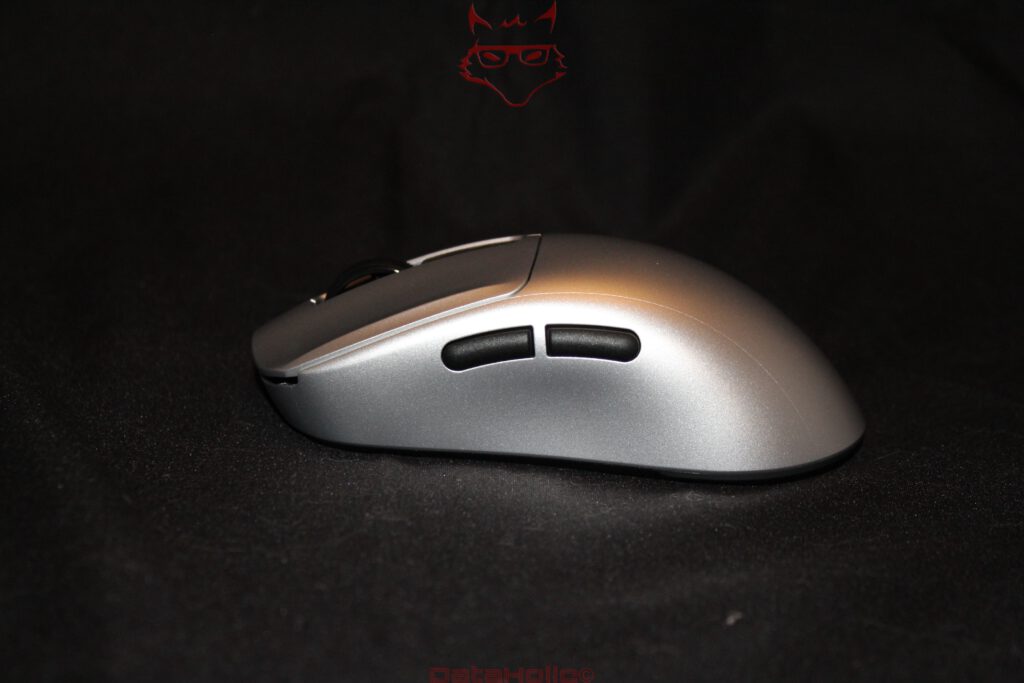
At first glance, there is very little visual drama. The silver shell is paired with black controls, two side buttons, a conventional scroll wheel and large primary buttons. There is no aggressive RGB spectacle built into the mouse itself, no skeletal structure and no design language suggesting that the device escaped from the bridge of a science-fiction spacecraft.
The charging dock provides a little more visual character, but the mouse itself remains remarkably restrained. There is something almost ironic about a device capable of 42,000 DPI and 8,000 Hz looking perfectly comfortable next to a notebook, coffee cup and a pile of office paperwork.
A quotation commonly attributed to Oscar Wilde reads: “Everything in moderation, including moderation.”
Applied to gaming hardware, the idea fits surprisingly well. The NEX Pro carries plenty of technical excess underneath its shell. It simply does not wear that excess like a neon sign.
65 grams without turning the shell into Swiss cheese
The housing is one of the more convincing aspects of the NEX Pro. EPOMAKER uses ABS and an ergonomic right-handed shape. At 12.2 centimeters long and 6.5 centimeters wide, the mouse has enough physical volume for medium-sized and larger hands without feeling like a heavy ergonomic office mouse. A maximum height of around 4.2 centimeters creates a pronounced rear section that provides useful support for the hand.
The term “ergonomic” still deserves some caution when discussing mice. Hands vary enormously, as do grip styles. Palm, claw and fingertip grips place very different demands on length, width, hump position and weight distribution. A shape that works beautifully for one hand can become uncomfortable for another.
The asymmetrical construction of the NEX Pro clearly commits to right-handed use. That makes it less universal than a symmetrical design, but also gives the shell greater freedom to support the hand naturally.
More importantly, EPOMAKER reaches approximately 65 grams without perforating the exterior.
Closed shells offer several practical advantages. Dust, skin particles and crumbs have a harder time reaching the interior, while the surface itself feels consistent across the entire mouse. There is also a less technical but still relevant benefit: a closed mouse simply feels complete.
Low weight immediately changes how the NEX Pro behaves. A heavier mouse needs to be accelerated and subsequently stopped again. At 65 grams, considerably less force is required, especially during broad movements at low sensitivity. The mouse feels immediate without becoming so feather-light that every tiny unintended movement becomes visible on screen.
This illustrates an important distinction between specifications and actual usability. A 50-gram mouse is not automatically better than a 65-gram mouse. Weight distribution, shell shape, skates and center of gravity all contribute to the result.
The NEX Pro finds a convincing middle ground between low mass and enough physical presence to remain controlled.
PAW3950: The sensor is no longer the weak link
At the heart of the mouse sits PixArt’s PAW3950. It belongs to the current high-performance sensor class and supports up to 42,000 DPI in the NEX Pro, alongside tracking speeds of up to 750 IPS and acceleration of up to 50 G. Lift-off distance can also be adjusted to 0.7, 1 or 2 millimeters.
Those figures need some translation.
DPI, or more accurately CPI in this context, essentially describes how strongly physical mouse movement is translated into pointer movement. A higher value therefore does not automatically mean greater precision.
Forty-two thousand DPI is spectacularly high for normal use. At that setting, a tiny movement is enough to send the pointer racing across multiple displays. It is less an everyday setting than a demonstration of the sensor’s available operating range.
The important point lies elsewhere.
A modern sensor such as the PAW3950 has enormous technical reserves. High movement speeds and aggressive acceleration should not result in lost tracking or incorrectly interpreted motion. Fast direction changes in competitive games benefit far more from reliable tracking than from an absurdly high maximum sensitivity setting.
Reasonable DPI settings are therefore considerably more important in practice. The NEX Pro provides useful stages including 400, 800, 1,600, 3,200, 8,000 and the headline-grabbing 42,000 DPI, with 1,600 DPI serving as a sensible default.
For most desktop and gaming scenarios, somewhere around 800 to 1,600 DPI already covers a large portion of practical use cases.
Forty-two thousand DPI is therefore better understood as an indication of the sensor’s capabilities rather than an invitation to actually use the mouse that way. A speedometer ending at 300 km/h does not require a trip to the bakery at 287 km/h either.
What matters is how the sensor behaves at normal settings.
Here the NEX Pro feels immediate and controlled. Fast movements remain predictable, while small corrections do not feel vague or detached. On a good mousepad, the sensor effectively disappears between hand movement and the resulting action on screen.
That is perhaps the greatest compliment a mouse sensor can receive.
8,000 Hz: Eight times more is not eight times better
The most prominent figure on the packaging is the 8,000 Hz polling rate.
A conventional gaming mouse operating at 1,000 Hz reports its position theoretically once every millisecond. At 8,000 Hz, the interval drops to 0.125 milliseconds. The NEX Pro supports multiple polling rates over USB and 2.4 GHz, ranging from 125 Hz all the way to 8,000 Hz. Bluetooth operates at a much lower polling rate and is clearly intended for convenience rather than maximum gaming performance.
Mathematically, the difference sounds dramatic.
In practice, the situation is considerably more complicated.
Between a physical mouse movement and the corresponding visible reaction sits an entire processing chain. Sensor, microcontroller, wireless or USB transmission, operating system, game engine, CPU, GPU and finally the monitor all contribute to overall latency.
Increasing the polling rate improves only one part of that chain.
A 60 Hz monitor refreshes approximately every 16.7 milliseconds. At 144 Hz, that interval falls to around 6.94 milliseconds. A 240 Hz display reaches roughly 4.17 milliseconds, while 360 Hz corresponds to about 2.78 milliseconds.
Against those figures, reducing the mouse reporting interval from 1 millisecond at 1,000 Hz to 0.125 milliseconds at 8,000 Hz suddenly looks somewhat less revolutionary.
That does not make 8K pointless.
On very fast displays, with high frame rates and rapid mouse movements, higher polling rates can increase the temporal resolution of input. The system receives more current position information, potentially producing smoother and more immediate movement. Competitive gaming setups with 240, 360 or even 500 Hz displays provide much better conditions for exploiting this advantage.
For ordinary desktop work, however, 8,000 Hz is roughly as essential as a Formula One pit stop during a shopping-cart wheel replacement.
Higher polling rates also carry a cost. More reports mean more USB events and more frequent CPU involvement. Modern systems generally handle this well, but 8K is not computationally free. Battery consumption rises as well.
This makes the adjustable polling rate considerably more important than the maximum figure itself.
For many systems, 1,000 or 2,000 Hz already represents an excellent compromise between responsiveness, efficiency and battery life. Four and eight kilohertz remain available for situations where the rest of the hardware is fast enough to benefit from them.
Wireless performance: the invisible half of a wireless mouse
A good sensor alone does not create a good wireless gaming mouse.
Between the PAW3950 and the computer sits the electronics responsible for processing and transmitting its data. The NEX Pro supports three fundamentally different operating modes: 2.4 GHz wireless, Bluetooth and wired USB-C.
Each serves a different purpose.
The 2.4 GHz connection is the actual gaming mode. This is where high polling rates and low latency matter. USB-C provides a direct wired connection while simultaneously charging the battery. Bluetooth is the convenience option for notebooks, tablets and other devices where maximum polling performance is unnecessary.
This three-way arrangement becomes more useful in daily operation than the specification sheet initially suggests.
A dedicated gaming mouse does not necessarily need Bluetooth. A mouse expected to live on a modern multi-device desk benefits greatly from it. A desktop gaming PC can use the high-performance 2.4 GHz link, while a notebook can be connected through Bluetooth. USB-C remains available as the universal fallback.
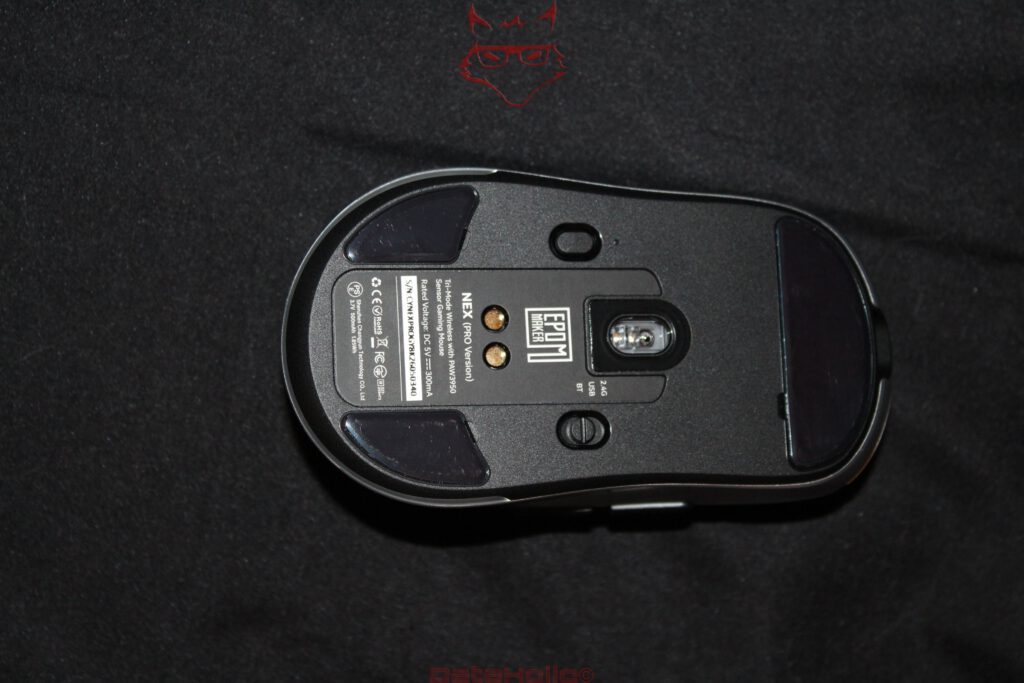
The underside contains the corresponding mode controls alongside the PAW3950 sensor, charging contacts and large glide surfaces. The layout is clean and functional. There is little visual experimentation because none is required.
Sometimes the best engineering decision is simply putting the necessary components where they belong.
The charging dock: two small contacts against the USB-C ritual
Perhaps the biggest surprise of the NEX Pro is its charging dock.
Mouse charging stations are hardly a new invention. Nevertheless, they disappeared from many products over the years or became expensive optional accessories. That is unfortunate because a dock solves a very real problem with wireless peripherals: forgetting to charge them.
USB-C is technically excellent. It is universal, reversible and reliable.
It still requires the cable to be connected.
In practice, this usually happens approximately five minutes after the first battery warning has been ignored, followed by several additional warnings, until the mouse finally threatens mutiny in the middle of a game and a cable suddenly becomes the most important object in the room.
A dock changes that behavior.
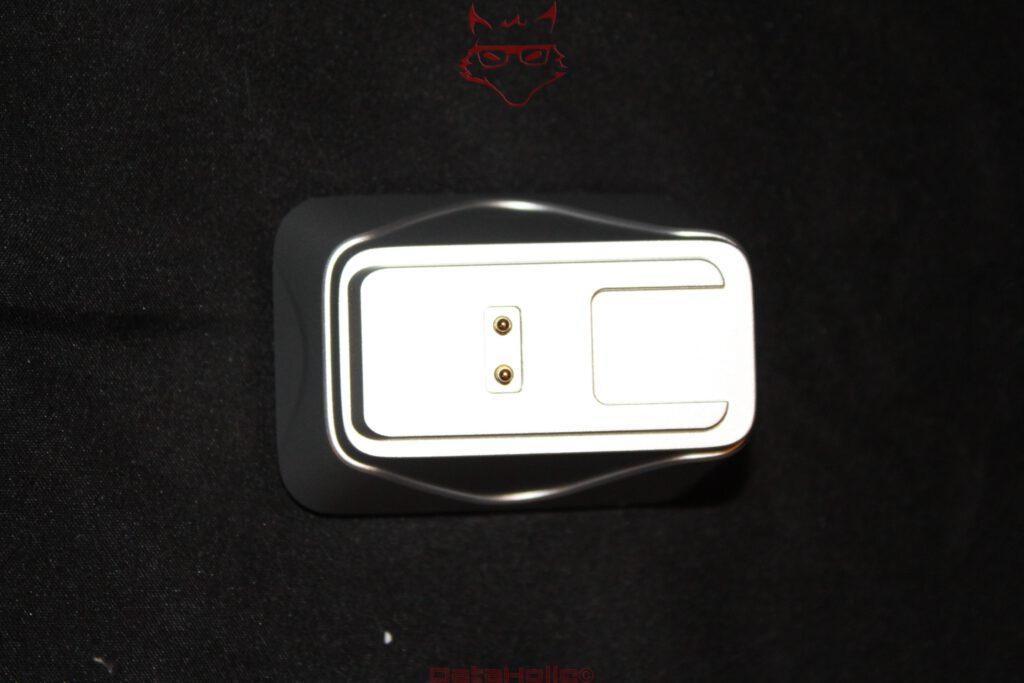
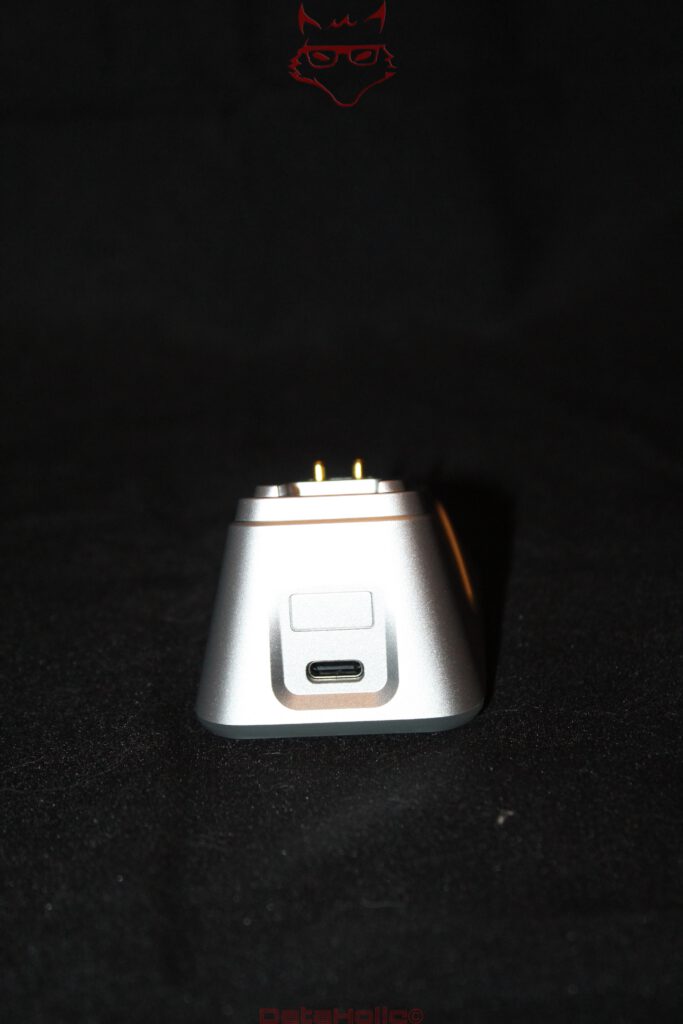
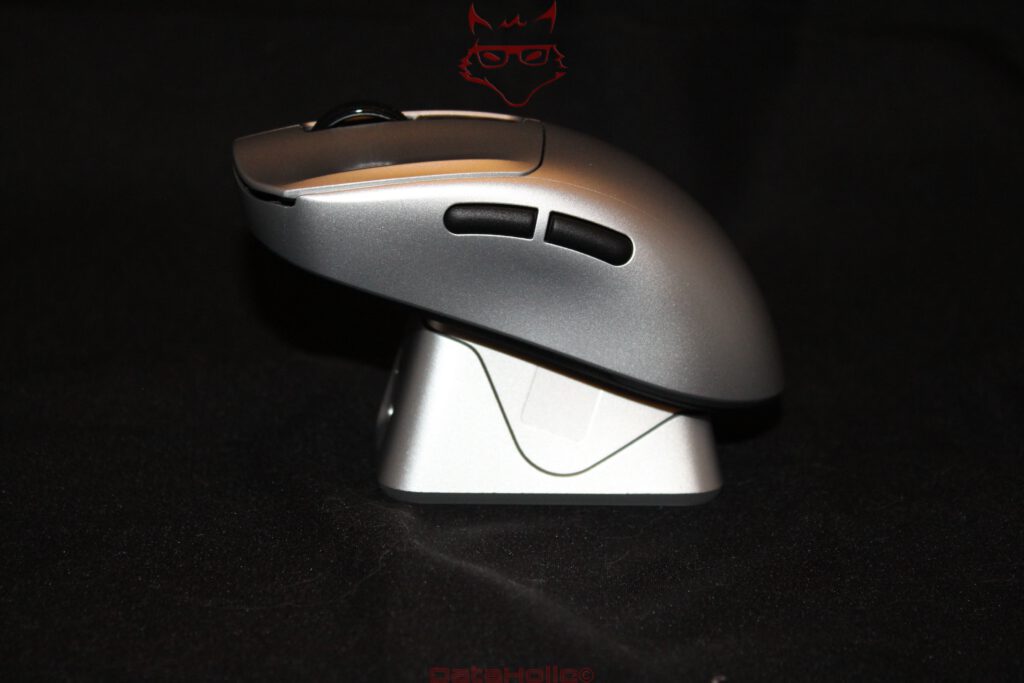
Once the session is over, the NEX Pro is placed on its station. Two contacts on the underside handle charging. The dock itself uses USB-C and simultaneously creates a defined storage location on the desk.
This sounds almost laughably simple.
That simplicity is precisely why it works.
The dock also integrates lighting for status information. Instead of checking software or trying to remember when the mouse was last connected to a cable, charging becomes part of the normal routine. The mouse has a parking space, and that parking space happens to refill the battery.
The concept is similar to an electric toothbrush. Two charging contacts are hardly revolutionary engineering, yet the system works exceptionally well because the device charges whenever it returns to its natural storage position.
This is one of those features that looks secondary on a specification sheet and quickly becomes more useful than 42,000 DPI in everyday life.
500 mAh: 8K sends the battery to the gym
Inside the NEX Pro sits a 500 mAh battery.
Battery endurance changes significantly depending on polling rate, which illustrates an important reality behind high-frequency wireless communication: more data costs energy.
A mouse reporting its position thousands of times per second has to keep the sensor, controller and wireless system considerably busier than a device operating at a much lower polling rate. Eight kilohertz therefore does not come for free.
This creates an interesting choice.
Running at 8,000 Hz permanently rarely makes technical sense outside specific gaming scenarios. Office work, web browsing, image editing and general desktop applications gain little from such an aggressive polling rate. Dropping to 1,000 or 2,000 Hz can substantially reduce power consumption while still providing extremely responsive input.
The dock changes the equation again.
If the NEX Pro regularly returns to its charging station after use, absolute battery endurance becomes much less important. A mouse that receives small, frequent charging sessions does not need to survive for weeks between visits to a cable.
This is another reason why the NEX Pro and its dock work better as a system than as two independently evaluated products.
The battery provides mobility. The dock removes the inconvenience created by that mobility.
Buttons and scroll wheel: the art of the uneventful click
Despite all the sensor technology, a mouse remains a collection of buttons under the fingers.
The two primary buttons occupy most of the upper shell, separated by the scroll wheel. Two additional buttons sit on the left side beneath the thumb. The layout is familiar, which is a compliment rather than criticism.
Gaming peripherals occasionally fall into the trap of redesigning controls simply to appear different. The NEX Pro largely avoids that.
A good primary button should provide clear tactile confirmation without requiring excessive force. At the same time, it should not be so sensitive that merely resting a finger on the shell creates unintended input.
The side buttons are clearly separated and easy to distinguish by touch. That matters more than an exotic shape. In games they can handle melee attacks, push-to-talk, weapon switching or other frequently used commands. During ordinary desktop work they naturally fit browser navigation and similar shortcuts.
The scroll wheel remains similarly conventional.
Again, that restraint works in the mouse’s favor. Familiar movement patterns are valuable. A peripheral disappears into the workflow more effectively when basic controls behave as expected.
Switch durability figures running into tens of millions of clicks sound impressive, although such numbers should be treated as technical classifications rather than literal predictions for the lifespan of an individual mouse.
Very few desks contain a mechanical click counter waiting to celebrate click number 99,999,999 with cake.
What matters far more is whether the buttons continue to feel consistent and whether their placement makes sense.
Here the NEX Pro concentrates on fundamentals rather than theatrics.
Skates and lift-off distance: small details with a large effect
Large glide surfaces cover important areas of the underside. Their purpose sounds trivial: reduce friction.
In reality, they influence the entire character of the mouse.
A superb sensor inside a shell that drags across the pad would be the peripheral equivalent of fitting a high-performance engine to a car and leaving the parking brake engaged. The combination of approximately 65 grams and sufficiently large skates allows the NEX Pro to move with relatively little resistance.
The adjustable lift-off distance complements this behavior.
Lift-off distance describes how far the mouse can be raised from the surface before the sensor stops tracking. This becomes particularly important for low-sensitivity players who regularly lift the mouse, reposition it and continue moving.
If tracking continues too far above the surface, unwanted pointer movement can occur during repositioning.
Settings around 0.7, 1 and 2 millimeters therefore offer useful flexibility. A low value suits frequent repositioning, while a slightly higher setting can improve compatibility with particular surfaces.
This is exactly the sort of technical feature that deserves more attention than another decorative RGB strip.
It directly changes how the mouse behaves.
Browser-based configuration: no software empire required for changing DPI
The NEX Pro uses browser-based configuration, allowing important settings to be changed without installing a large traditional peripheral suite.
That approach deserves attention.
Gaming hardware has spent years developing an impressive ecosystem of background services, startup applications, update agents, RGB controllers, account systems and telemetry components. Some peripheral packages have grown to a point where changing the sensitivity of a mouse can feel suspiciously close to administering a small server farm.
A web-based interface can avoid much of that complexity.
Open the configuration page, adjust DPI stages, polling rate, button assignments, macros or profiles, save the settings and continue using the device.
No permanent background process needs to exist merely so a mouse remembers how quickly its pointer should move.
The concept has limitations, of course.
Browser compatibility becomes important, and long-term convenience depends on the continued availability of the configuration platform. A completely local alternative would still be desirable for long-term product ownership.
Nevertheless, the general direction makes sense.
Peripheral hardware should remain functional without requiring a miniature software ecosystem to live permanently in the operating system.
42,000 DPI, 8K and 50 G: numbers need context
The NEX Pro is a useful example of why modern gaming hardware should not be evaluated solely by maximum values.
Forty-two thousand DPI sounds impressive but is barely useful in ordinary operation. Eight thousand hertz is technically fascinating but not equally relevant to every computer or display. Fifty G of acceleration demonstrates the sensor’s available tracking reserve rather than describing something a hand should actively attempt to achieve.
The important point is that those reserves exist without compromising sensible everyday settings.
A useful comparison is a powerful amplifier. The advantage is not that it must operate at maximum output continuously. The reserve allows normal operating conditions to remain comfortably within the hardware’s capabilities.
The NEX Pro therefore feels particularly sensible somewhere between moderate DPI settings and polling rates from 1,000 to 4,000 Hz. Eight kilohertz remains available when the surrounding hardware and workload justify it.
That is how high-performance hardware should work: as an option, not an obligation.
Everyday use instead of benchmark obsession: the NEX Pro has two personalities
After extended use, the NEX Pro develops an interesting dual identity.
During gaming, weight, sensor performance and the 2.4 GHz connection dominate the experience. Fast movements feel direct, the shell remains controllable and the PAW3950 offers far more technical headroom than ordinary gaming situations are likely to exhaust.
Outside games, completely different qualities become more important.
Bluetooth simplifies use with secondary devices. USB-C provides a universal wired fallback. The dock removes much of the usual battery anxiety. The restrained silver shell looks closer to premium workplace equipment than stereotypical gaming hardware.
That dual-purpose character is a genuine strength.
Some gaming mice are optimized so aggressively for competitive play that they become awkward or unnecessarily specialized outside games. Other models are excellent productivity devices but feel heavy or sluggish when movements become fast.
The NEX Pro occupies a comfortable position between those extremes.
It can spend the morning moving through browser tabs, documents and image editing applications, then switch to a low-latency 2.4 GHz connection for gaming without suddenly feeling like the wrong tool.
That versatility matters more than another few thousand DPI.
Not everything is perfect: ergonomics remain personal and 8K remains a luxury
The weaknesses of the NEX Pro arise less from obvious faults and more from the fundamental nature of its design.
The right-handed shape effectively excludes left-handed use. That is a consequence of ergonomic asymmetry rather than a manufacturing problem, but it remains an important limitation. Smaller hands may also find the dimensions less comfortable than medium or larger hands.
At approximately 65 grams, the NEX Pro is light but no longer exceptional within the ultra-light competitive segment. Gaming mice below 50 grams are now readily available. Anyone pursuing the absolute minimum possible weight will therefore find more extreme alternatives.
The same applies to 8,000 Hz.
The technical difference from 1,000 Hz is real, but the practical benefit depends heavily on the rest of the system. A high-refresh gaming monitor, high frame rates and a responsive game engine create conditions where increased polling rates become more meaningful. Office applications will barely care.
Bluetooth should also be viewed for what it is: a convenience connection. It is useful for notebooks, tablets and secondary systems but is not intended to replace the high-performance 2.4 GHz connection during competitive gaming.
Finally, browser-based configuration remains a two-sided concept. Avoiding a large local software suite is refreshing, but long-term hardware ownership benefits from configuration options that remain available independently of external services.
None of these points fundamentally undermines the NEX Pro. They simply define where its strengths are located.
The real highlight sits underneath the mouse
After discussing 42,000 DPI, 8,000 Hz, acceleration figures and tracking speeds, the most memorable component turns out to be one of the simplest.
The charging dock.
The PAW3950 is excellent. Eight-kilohertz polling is technically impressive. Sixty-five grams works well. Tri-mode connectivity is practical.
Similar combinations can now be found across a growing number of gaming mice.
The dock changes everyday behavior.
The mouse gains a permanent location on the desk. Returning it to that location also charges the battery. No cable needs to be plugged into the front of the mouse every few days. Battery warnings become far less relevant. The peripheral is simply ready again when needed.
There is something almost comical about two small gold contacts on the underside leaving a stronger practical impression than a sensor capable of 42,000 DPI.
Yet that difference illustrates the gap between impressive specifications and thoughtful product design.
Good technology does not exclusively solve complicated problems.
Sometimes it removes small annoyances so reliably that their previous existence is eventually forgotten.
Conclusion: The EPOMAKER NEX Pro succeeds through balance, not 42,000 DPI
The EPOMAKER NEX Pro introduces itself with large numbers. Forty-two thousand DPI. Eight thousand hertz. Hundreds of inches per second of tracking capability. Enormous acceleration tolerance and switches designed for huge numbers of actuations.
Its specification sheet occasionally reads like a device desperately trying to prove that it understands gaming.
After practical use, something considerably more grounded remains.
The mouse simply works as a coherent system.
Not because 42,000 DPI suddenly becomes sensible. Not because 8,000 Hz automatically transforms every game. And certainly not because a large number printed on packaging magically creates a better peripheral.
The NEX Pro works because its individual components fit together.
The PAW3950 provides an excellent technical foundation. The closed ABS shell combines a relatively low weight of around 65 grams with a solid and practical construction. The right-handed shape offers useful support without turning the mouse into a bulky ergonomic office device. The 2.4 GHz connection handles performance-oriented wireless operation, Bluetooth broadens compatibility, and USB-C provides both wired operation and charging.
Adjustable polling rates allow a sensible compromise between responsiveness and battery life rather than forcing 8K operation at all times.
Then there is the charging dock.
It solves one of the most mundane yet persistent disadvantages of wireless peripherals. Instead of turning charging into a separate task, it becomes part of putting the mouse away.
That is an extremely simple idea executed in exactly the right place.
The restrained visual design deserves similar praise. A mouse capable of 8K polling does not need to look as though a spacecraft accidentally dropped an escape pod onto the desk. Silver, black and a relatively conventional shape are enough.
The NEX Pro also demonstrates how strange the specification race in gaming mice has become. Forty-two thousand DPI will rarely be needed. Eight thousand hertz is more reserve than necessity for a large proportion of users. During ordinary office work, the PAW3950 is probably about as challenged as a sports car circling a supermarket parking garage.
Yet unused reserve is not inherently pointless.
The deciding factor is whether that reserve makes the product more complicated or less enjoyable. Here it largely remains in the background. Lower polling rates are available. Sensible DPI stages are available. Bluetooth can transform the NEX Pro into a perfectly civilized everyday mouse when maximum wireless performance is irrelevant.
That may ultimately be the most pleasant surprise.
The packaging suggests another gaming mouse determined to attract attention through 8K polling and enormous DPI figures. What remains after extended use is a light, fast and surprisingly mature all-round mouse whose most useful accessory happens to rely on two tiny charging contacts.
A quotation often attributed to Leonardo da Vinci states, “Simplicity is the ultimate sophistication,” although the historical attribution itself is disputed.
As an idea for good peripheral design, however, it remains remarkably appropriate.
Complex technology is allowed to be complicated on the inside. On the desk, as little of that complexity as possible should remain visible.
That is where the EPOMAKER NEX Pro works particularly well. Select the connection, choose a sensible sensitivity, set the desired polling rate and start working or gaming. Afterwards, the mouse returns to the dock and charges.
Everything else can remain on the specification sheet.
Transparency notice in accordance with EU requirements:
The EPOMAKER NEX Pro featured in this review was provided to us by EPOMAKER as a non-binding long-term review sample for testing purposes. This is not paid advertising.
EPOMAKER had no influence on the content, evaluation or editorial independence of this article. All opinions expressed are based exclusively on our own practical experience.
We would like to thank EPOMAKER for providing the mouse and for the trust placed in dataholic.de.