
EPOMAKER Luma40 Review: 47 Keys, Plenty of Aluminum, and the Question of How Little Keyboard Is Really Enough
- Housing, Construction, and Accessories: Compact, Slim, and Unusually Designed
- The 40 Percent Layout: Fewer Keys Do Not Automatically Mean Less Effort
- Low-Profile Switches, Hot-Swap, and Keycaps: An Unusual Combination
- VIA and the Importance of a Well-Designed Key Configuration
- Connectivity and Battery: Three Operating Modes for Different Applications
- RGB Lighting: Light Becomes Part of the Construction
- Everyday Usability: Between a Mobile Keyboard and a Specialized Input Device
- Conclusion: Technically Interesting, Visually Distinctive, and Deliberately Compromised
- Transparency Statement
Mechanical keyboards have become not only more technically versatile in recent years, but also increasingly smaller. While traditional full-size models with a numeric keypad, function keys, and generous spacing continue to have their established place on desks, manufacturers have long been experimenting with significantly more compact designs. Tenkeyless, 75 percent, and 65 percent layouts have become familiar options. Even keyboards in the 60 percent format are hardly considered unusual anymore. With the Luma40, however, EPOMAKER takes things a step further, entering a category where reducing the size no longer affects only the amount of desk space required, but directly changes the way the keyboard is operated.
The EPOMAKER Luma40 features 47 keys arranged across four rows. A traditional function key row is absent, as is a dedicated number row. Nevertheless, arrow keys are present, and the spacebar has not been eliminated either. This distinguishes the model from particularly uncompromising miniature keyboards whose layouts are almost entirely based on freely programmable layers. Instead, the Luma40 attempts to preserve some of the familiar keyboard experience, even though a substantial portion of the conventional keys is missing.
What makes the keyboard interesting is less its actual size than its technical implementation. A slim housing with a metallic appearance, transparent keycaps with circular contact surfaces, mechanical low-profile switches, hot-swap support, three connection modes, and key assignments configurable through VIA form the foundation. There is also RGB lighting, which plays a considerably greater visual role thanks to the transparent keycaps than it does on many conventional keyboards. At first glance, the result is a distinctive, almost futuristic appearance. Behind it, however, is a keyboard whose actual usefulness depends heavily on how consistently the available keys and additional assignment layers are utilized.
The central question, therefore, is not whether a mechanical keyboard can be reduced to 47 keys. Technically, that question has long been answered. What matters much more is whether such a compact input device remains sufficiently functional in everyday use and which compromises arise from its unusual construction.
Housing, Construction, and Accessories: Compact, Slim, and Unusually Designed
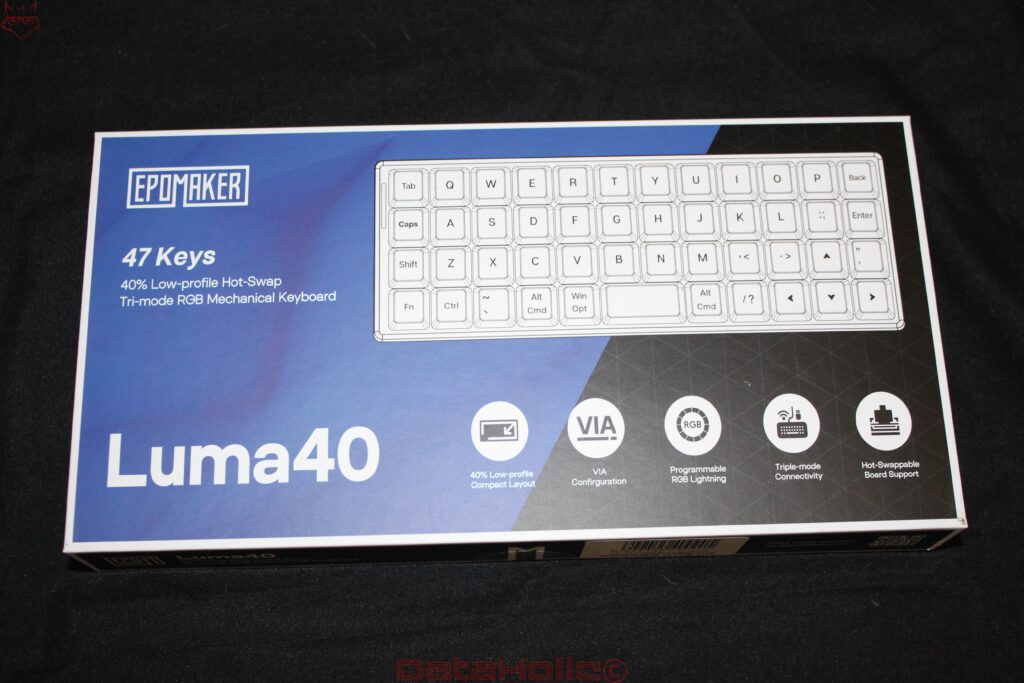
Even the packaging makes it clear that the Luma40 is not intended to be simply a smaller version of a standard keyboard. EPOMAKER describes the model as a 40 percent low-profile keyboard with hot-swap support and tri-mode connectivity. The illustrated key arrangement immediately highlights the difference from conventional layouts. The letters remain largely in their familiar positions, but the number row is completely absent. Instead, several special keys and a dedicated arrow key area are located along the right edge.
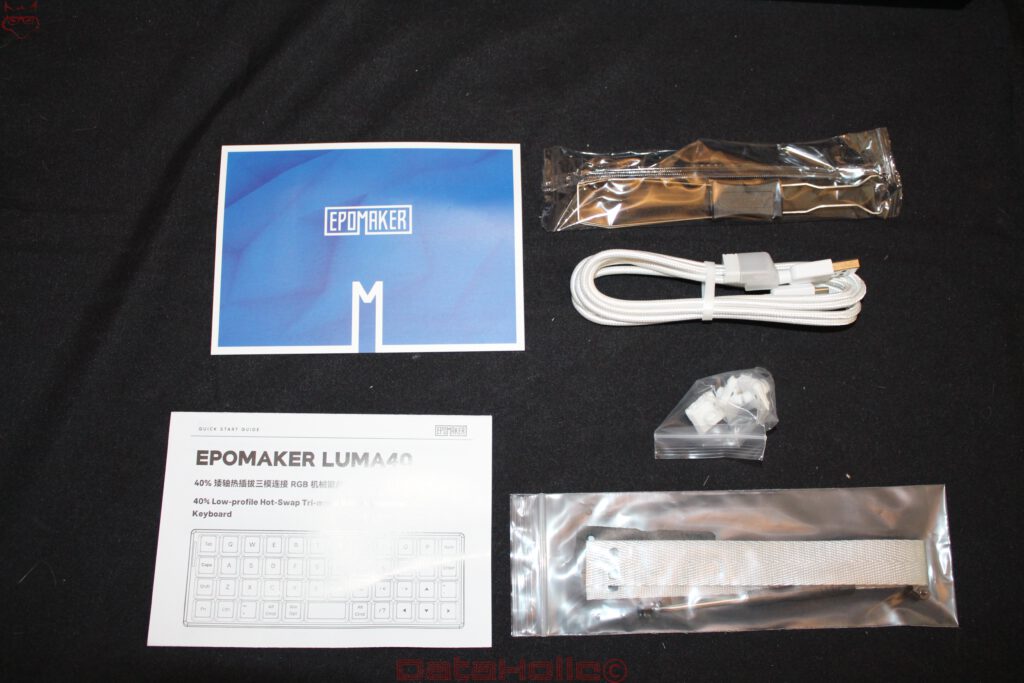
The included accessories are quite extensive for a keyboard of this size. Alongside the input device itself, the package contains a quick-start guide, a white USB cable with a braided sleeve, a tool for removing keycaps or switches, and additional small components. A carrying strap with the corresponding mounting hardware is also included. This reinforces the mobile character of the Luma40. A keyboard of this size can easily be transported alongside a notebook without having to account for the space requirements of a conventional mechanical keyboard.
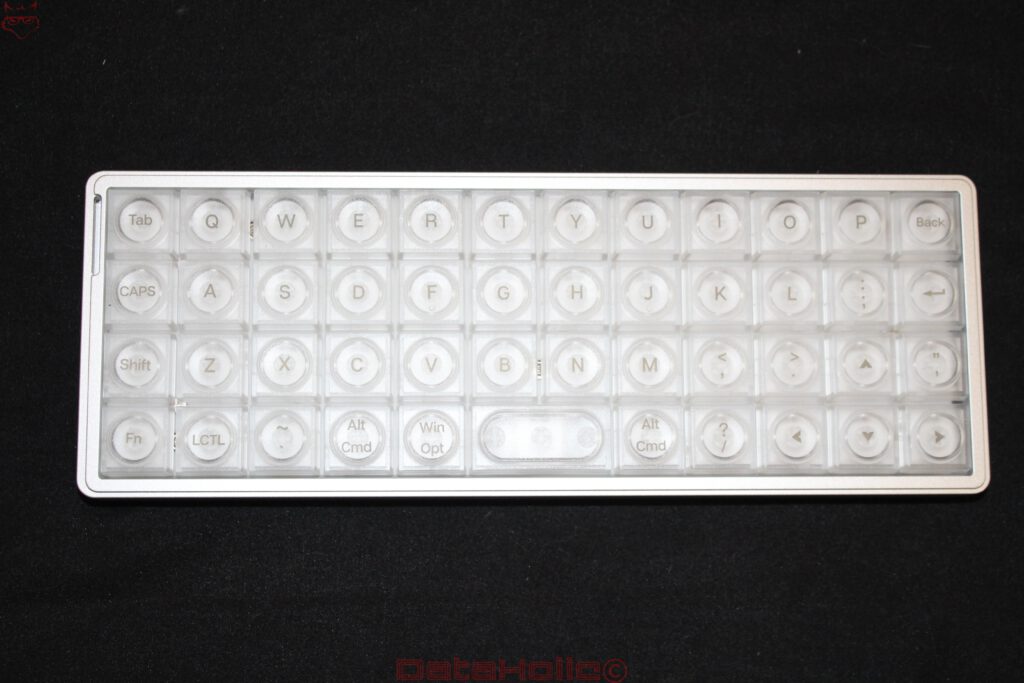
The housing design appears deliberately understated in the product photographs. A silver-colored frame surrounds the actual key area, while the keycaps themselves are almost entirely transparent. This creates a clear contrast between the restrained outer frame and the technically playful surface. Particularly striking are the circular contact areas within the square keycaps. This design is more reminiscent of individual controls on an electronic instrument than the familiar, slightly concave keycaps of a computer keyboard.
The housing has a low overall height. The flat switches and keycaps contribute to a considerably slimmer construction than that of a typical mechanical keyboard with a standard profile. A separate wrist rest appears less essential given the low construction height, although actual ergonomics cannot be determined by housing height alone. The angle of the wrists, the position of the arms, and the movements required during longer typing sessions are equally important.
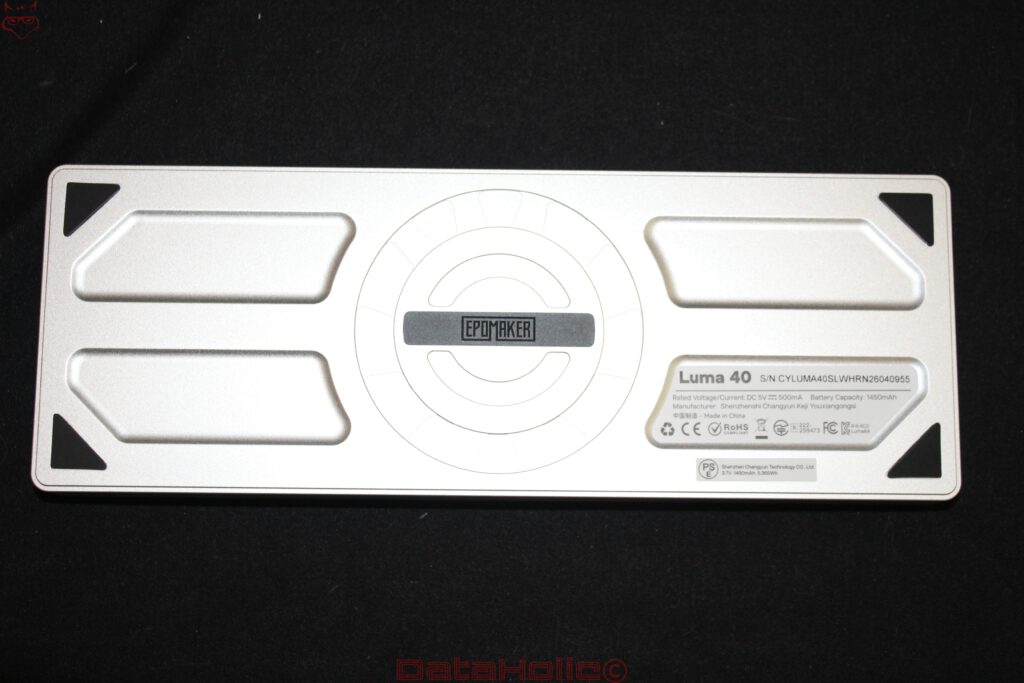
The underside reveals a construction with four black, triangular contact pads positioned in the corners. Between them are several large recesses and a circular structure in the center. These elements give the bottom plate a distinctive appearance, although no additional technical functions can be directly inferred from them. Separate fold-out feet are not visible in the photographs. The typing angle therefore appears to be largely determined by the shape of the housing.
One important difference compared with many inexpensive compact keyboards lies in the visual and structural design. The Luma40 does not attempt to attract attention through as many visible controls or additional displays as possible. Instead, the design concentrates on the interaction between the slim frame, transparent keycaps, and lighting. This reduction feels consistent, but it also raises practical questions. Transparent surfaces can show fingerprints and signs of use more clearly than matte PBT keycaps. Furthermore, the specific surface texture determines how securely the fingers rest on the small circular contact areas.
The 40 Percent Layout: Fewer Keys Do Not Automatically Mean Less Effort
The actual character of the Luma40 is defined by its key arrangement. With 47 physical keys, it falls considerably below what is typical even for a conventional compact keyboard. This reduction does not affect only rarely used functions. Above all, the missing number row changes fundamental input processes. Numbers, additional special characters, and numerous system functions must be accessible through alternative assignments unless they are already present on the visible keys.
EPOMAKER uses a largely conventional, horizontally staggered letter layout. This is noteworthy because particularly compact keyboards frequently experiment with ortholinear or column-oriented arrangements. The Luma40, by contrast, remains closer to the familiar QWERTY structure. This makes the initial transition to the letter keys less radical than with a completely rearranged layout.
One limitation remains, however: The photographed model uses an ANSI-like arrangement with English key legends. There are no dedicated keys for German umlauts. Using the keyboard with a German operating system layout or an individually programmed configuration therefore requires deliberate character assignments. Missing physical key positions cannot simply be replaced by different legends. Particularly when writing longer German texts, additional layers or key combinations may become necessary.
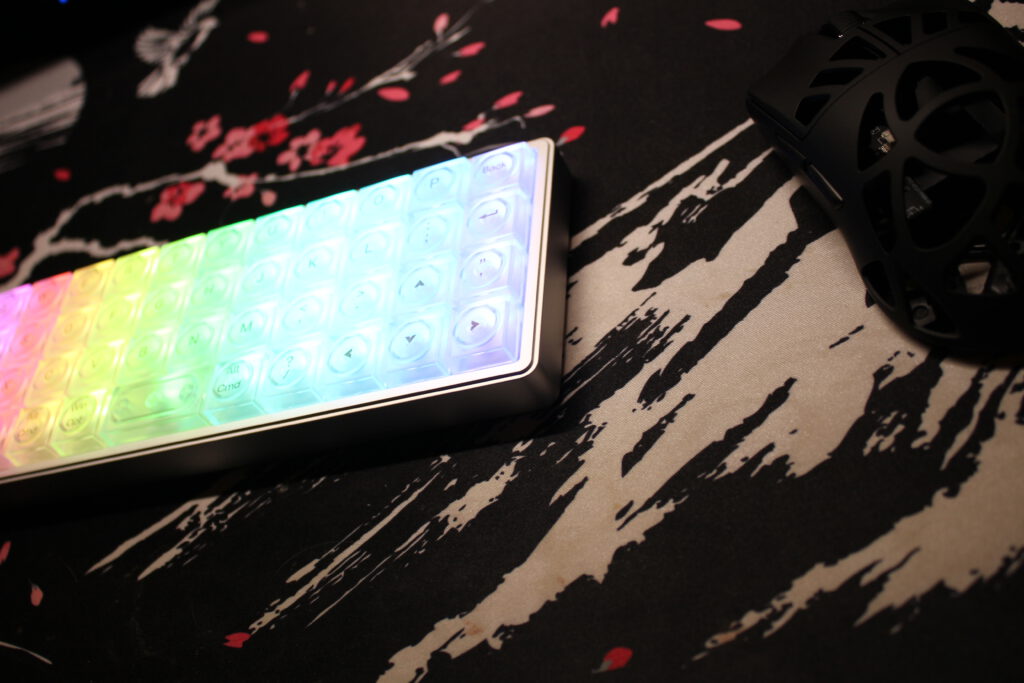
The decision to retain four separate arrow keys despite the limited space is particularly practical. Many 40 percent keyboards move these functions entirely to a second layer. On the Luma40, they are positioned directly along the right edge. This means basic navigation tasks remain possible without additional key combinations. For text editing, simple spreadsheets, and navigation within applications, this is a relevant advantage.
However, this convenience comes at the expense of valuable space. The arrow keys occupy positions that could otherwise be used for additional modifiers or freely programmable functions on other compact layouts. The spacebar is also significantly shorter than on a normal keyboard. After all, the entire bottom row must accommodate Fn, Control, Alt, the operating system key, the spacebar, and additional functions within a very limited area.
The Luma40 therefore follows a different approach from the ergonomic keyboards previously examined from Dygma. A Dygma Defy distributes the keys across two separate halves, uses a column-oriented arrangement, and integrates extensive thumb clusters. The Dygma Sonsei also reduces the number of keys, but attempts to move additional functions into ergonomically accessible positions as consistently as possible. With the EPOMAKER Split70, meanwhile, the spatial separation of the two keyboard halves takes center stage, while a larger portion of the familiar key arrangement is retained.
The Luma40 follows none of these ergonomic concepts. It primarily reduces the external dimensions without fundamentally redesigning the arrangement of the letters. While this makes the transition easier, it does not automatically reduce strain on the hands. On a very narrow keyboard, the hands are positioned closer together. Whether this position is comfortable depends on body proportions, desk height, and individual typing habits.
There is also the additional effort associated with function layers. A keystroke that is immediately possible on a normal keyboard may require a combination of Fn and another key on the Luma40. This is unproblematic for occasional inputs. However, frequently used numbers, special characters, or keyboard shortcuts can make the difference noticeable. Particularly in programming, terminal commands, or extensive spreadsheets, the number of required inputs becomes a decisive factor.
The small size is therefore both the greatest strength and the most significant limitation of the Luma40. On a small desk or while traveling, it creates space. For complex workflows, however, it requires a carefully considered key configuration and a willingness to change familiar movement patterns.
Low-Profile Switches, Hot-Swap, and Keycaps: An Unusual Combination
One of the special characteristics of the Luma40 is the combination of mechanical low-profile switches and transparent keycaps. On conventional mechanical keyboards, switch height, keycap profile, and housing construction collectively determine how far the fingers must move during a keystroke. Low-profile switches reduce the vertical construction height and therefore allow slimmer input devices. However, this does not automatically result in a better typing experience. The actual actuation travel, required actuation force, and mechanical guidance of the switch are decisive factors.
The Luma40 uses a hot-swappable switch design. This means individual switches can generally be replaced without soldering. This is particularly interesting on a keyboard with only 47 keys, because even small changes in switch characteristics affect a large proportion of the entire input device. Different actuation forces or switch types can significantly change the typing experience. However, particular caution is necessary with low-profile keyboards. Unlike many standard MX switches, there is no universally consistent mechanical and electrical compatibility between all low-profile switch families. Hot-swap support therefore does not mean that arbitrary low-profile switches can be installed.
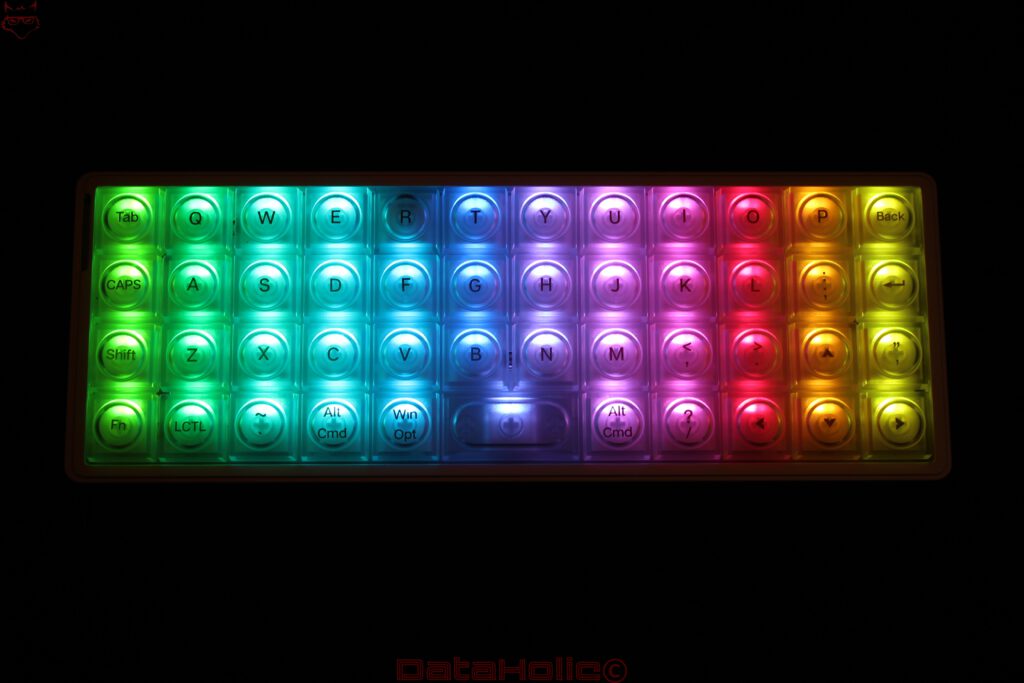
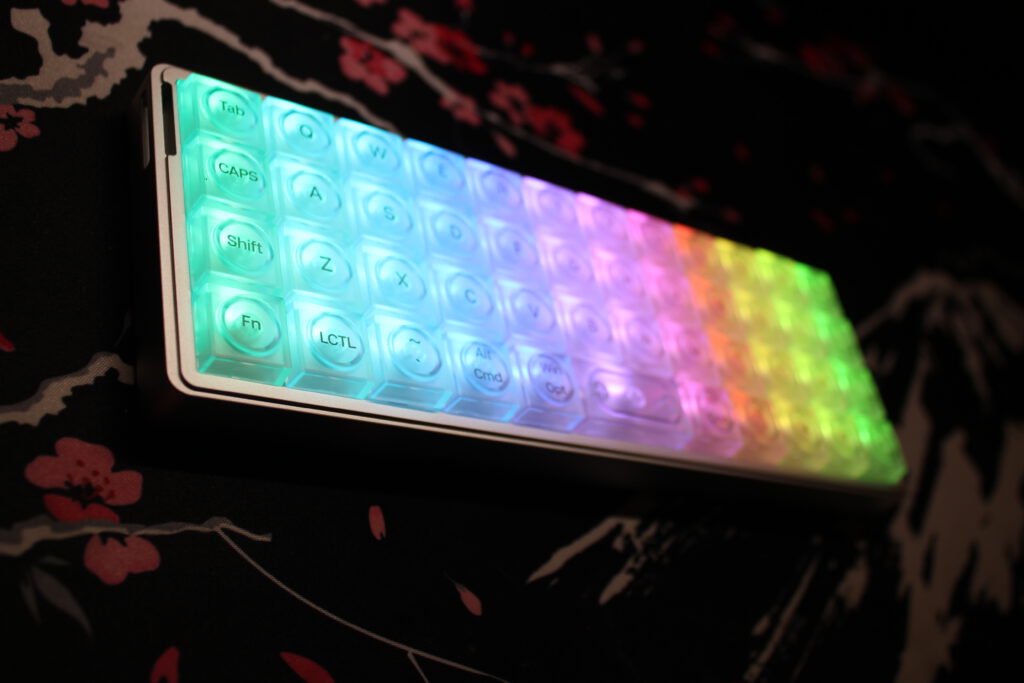
The transparent keycaps are visually the most striking element of the Luma40. Each key has a square base with a circular, slightly raised contact surface. The legend is positioned within this round structure. When the lighting is switched off, the result is an almost entirely white, slightly milky surface. Only when the lighting is activated does it become clear how strongly the material has been designed around light distribution.
However, this design also has functional consequences. Conventional keycaps often feature a concave surface that gently centers the finger. On the Luma40, the circular elements perform this task differently. The clearly recognizable separation between the contact surface and the transparent outer area may help with orientation. Whether this construction provides the same security as traditional profiles at high typing speeds cannot be determined from the shape alone.
The small number of keys is particularly relevant. While many keys on a large keyboard are used only occasionally, individual keys on the Luma40 perform several tasks. This increases the importance of reliable switch actuation. An accidental press on a function layer can trigger a completely different input than originally intended. The quality of the mechanical guidance and clear feedback during actuation are therefore more important than the small size might initially suggest.
Noise development also deserves attention. Although flat mechanical switches often have a shorter travel distance, they are not necessarily quieter. The sound is generated by several factors, including the impact of moving switch components, the return movement of the key, and possible resonances within the housing. The metallic construction can influence these resonances. However, reliable statements about volume, reverberation, or the acoustic tuning of the Luma40 require corresponding practical measurements.
VIA and the Importance of a Well-Designed Key Configuration
On a keyboard of this size, software is not an optional accessory but an essential part of the operating concept. EPOMAKER advertises the Luma40 with VIA support. VIA allows compatible keyboards to have their key assignments customized through a graphical interface. The actual importance of this function only becomes apparent when considering the unusual layout.
A keyboard with 47 physical keys can provide numerous functions normally found on a significantly larger keyboard if individual keys perform different tasks depending on the active layer. The Fn key serves as the gateway to additional assignments. For example, numbers, function keys, media controls, and special characters can be placed on positions that otherwise serve as letters or other inputs when the function layer is not active.
In principle, the possibilities extend beyond simple secondary assignments. Depending on the specific firmware and supported VIA functions, multiple layers can be configured and individual keys reassigned. However, the functions actually available must be verified against the Luma40 firmware. In particular, macros, more complex tap-hold functions, or special key combinations are not automatically available in every VIA-compatible implementation.
A sensible layer structure is crucial for the Luma40. One possible configuration could reserve the base layer for normal text input, while a second layer provides the number row and frequently used special characters. Another layer could accommodate function keys and system commands. This creates an input concept that at least partially compensates for the limited number of physical keys.
The challenge lies less in the technical configuration than in sustained use. Additional layers must be learned. This is especially true for functions that were previously accessible without conscious thought. Anyone who regularly switches between different keyboards must also consider that the movement patterns differ. An individual configuration can be very efficient on the Luma40, but it partially loses its advantage when a conventional keyboard with a significantly different arrangement is used in parallel.
This is precisely where a difference from Dygma’s software strategy becomes apparent. Bazecor offers a comprehensive concept for managing different layers and advanced key inputs on the Defy, Raise 2, and Sonsei. The Luma40, by contrast, relies on the VIA ecosystem. This is fundamentally attractive because VIA is not tied exclusively to a single keyboard manufacturer. However, the actual range of functions remains dependent on the respective firmware.
VIA support is also interesting for Linux users, as configuration is not necessarily restricted to a traditional Windows application. The decisive factors are a compatible browser environment, access to the device, and, if necessary, a suitable device definition. Whether the Luma40 is recognized immediately without an additional configuration file has therefore not yet been established.
For this model, the software is consequently far more than a means of occasionally changing individual key assignments. It determines whether the Luma40 can function as a productive work device or remains an interesting but limited secondary keyboard.
Connectivity and Battery: Three Operating Modes for Different Applications
According to the packaging, the Luma40 supports three connection methods. In addition to wired operation via USB-C, Bluetooth and a wireless 2.4 GHz connection are available. This combination has become common among modern mechanical keyboards, but it has a particularly practical purpose in an exceptionally compact model.
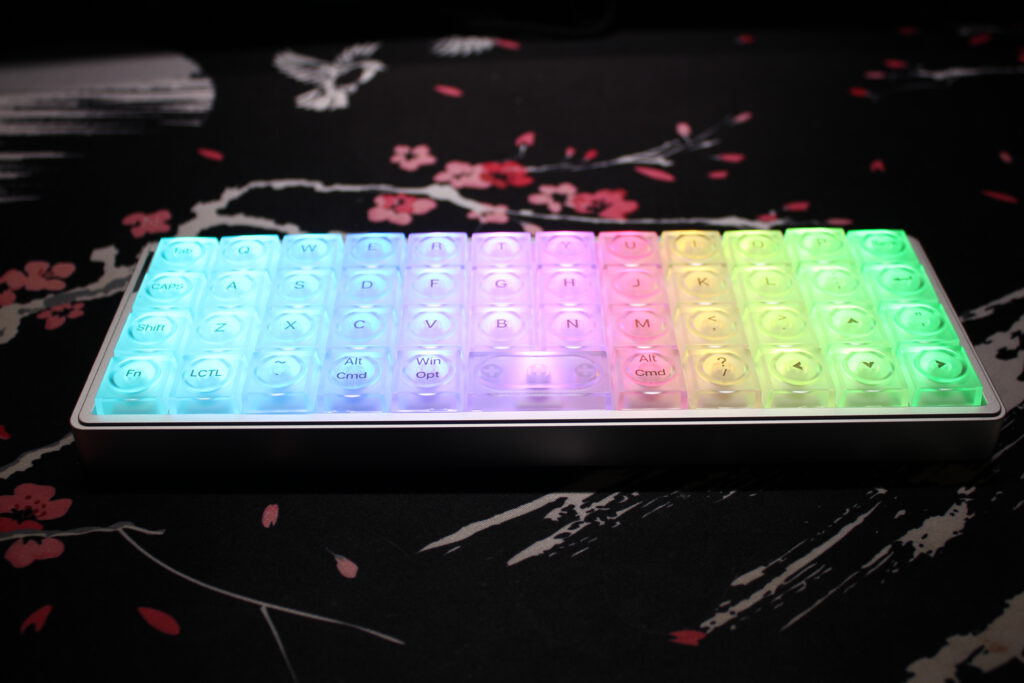
The wired connection provides direct power and eliminates dependence on the battery charge level. It is also relevant for configuration and potential firmware operations. The USB-C port is located on the side of the housing. Immediately next to it is a small sliding switch used to control the operating modes. The exact assignment of its switch positions cannot be clearly determined from the photographs.
Bluetooth is primarily suitable for operation with notebooks, tablets, or other mobile devices where additional USB receivers are undesirable. The 2.4 GHz connection, meanwhile, is aimed more at applications where a dedicated wireless connection is preferred. Whether this produces measurable advantages in input latency or connection stability depends on the technical implementation. Merely supporting both wireless standards does not yet permit a reliable assessment of their performance.
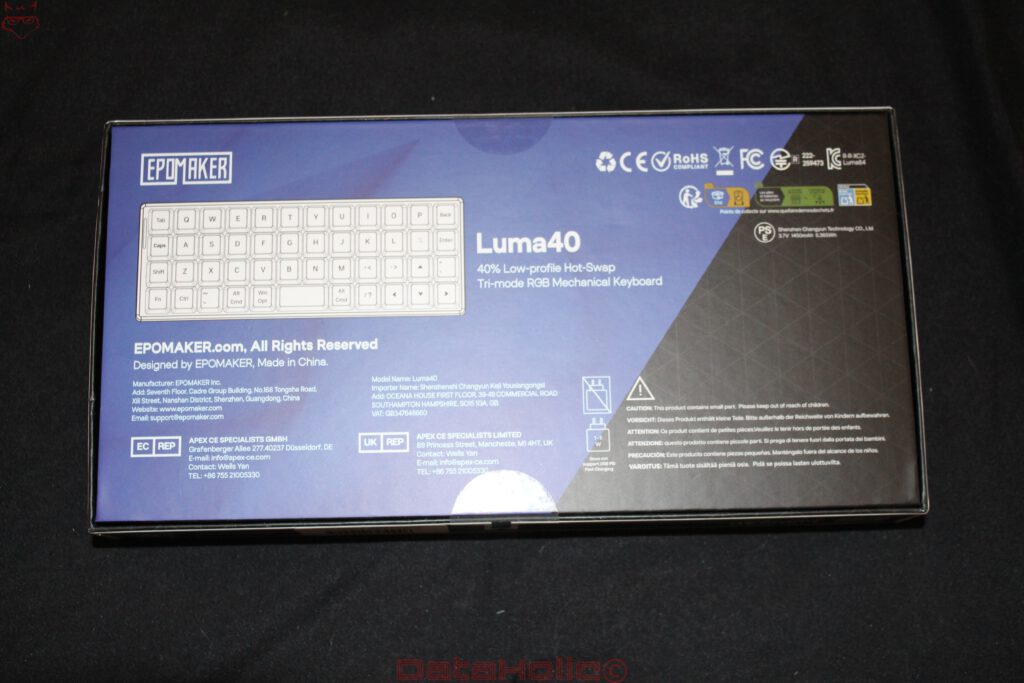
The label on the underside of the Luma40 specifies a battery capacity of 1,450 mAh. For such a small keyboard, this is a relevant figure, although it does not allow a reliable runtime to be calculated. Power consumption depends on several factors, including the selected connection, lighting intensity, the number of active LEDs, and the firmware’s power management.
RGB lighting in particular is likely to influence energy requirements. With the lighting switched off, a wireless input device can operate considerably more efficiently than with permanently active, bright RGB effects. However, without documented battery life measurements, quoting specific operating times would be speculative.
The packaging also includes a note that higher-power USB-PD fast charging is not supported. A suitable standard USB power supply in accordance with the manufacturer’s specifications is therefore recommended for charging.
The included USB cable has a braided sleeve and matches the color of the housing. Such a cable is certainly sensible for a compact keyboard because it can easily be transported alongside the device. However, the side-mounted connector should be taken into account when using the Luma40 in particularly confined workspaces.
RGB Lighting: Light Becomes Part of the Construction
The lighting is one of the most striking characteristics of the Luma40. While many mechanical keyboards primarily use RGB to highlight individual keys or provide decorative background illumination, EPOMAKER uses light here much more extensively as a design element.
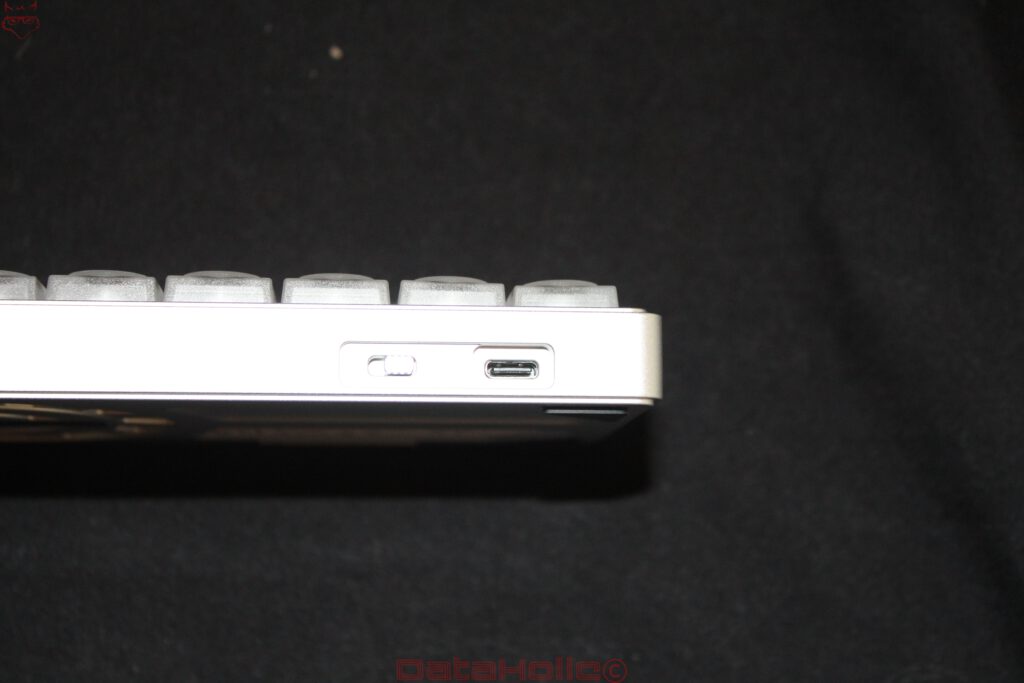
The transparent keycaps allow large portions of the generated light to pass through. As a result, not only the legends but also the surrounding surfaces are illuminated. In the photographs, a continuous color gradient extends across almost the entire width of the keyboard. The individual keys remain recognizable, but visually merge into a continuous illuminated surface.
This effect is particularly noticeable in low ambient lighting. The circular contact surfaces stand out clearly, while the square outer areas distribute the light further. The result is visibly different from conventional keyboards with black keycaps and only translucent legends.
The lighting also changes the character of the material. With the lighting switched off, the Luma40 appears restrained and almost monochromatic. With RGB lighting activated, however, the appearance becomes exceptionally colorful. The construction was clearly designed to create a distinct contrast between these two states.
However, this form of light distribution is not exclusively advantageous. The more the entire keycap is illuminated, the more important the contrast between the legend and its background becomes. In the photographs, the legends remain visible under different colors, although actual readability depends on brightness, viewing angle, and ambient lighting. Particularly bright colors can visually weaken the outlines of individual characters.
There is also the potential for glare. A keyboard with a large illuminated surface produces more visible light than a model where only small characters are backlit. In a darkened room, reduced brightness may therefore be more comfortable. RGB lighting should not be evaluated solely according to its visual effect, but also according to whether it supports orientation during extended use or becomes a distraction.
Nevertheless, the Luma40 demonstrates how consistently lighting and material design can be combined. The transparent keycaps do not appear to be a design decision added afterward, but instead form the actual visual identity of the product together with the LEDs.
Everyday Usability: Between a Mobile Keyboard and a Specialized Input Device
The practical classification of the Luma40 depends heavily on its intended application. For a mobile working environment, the small size offers obvious advantages. The keyboard requires very little space, can easily be positioned next to a notebook, and can also be used in situations where a full-size mechanical keyboard would be impractical.
The combination with a tablet or compact computer is also interesting. In such scenarios, the Luma40 can serve as a mechanical alternative to flat membrane keyboards. The wireless connection options and integrated battery support this application.
The assessment changes when it comes to longer typing sessions. Although the letters are arranged in largely familiar positions, the missing number row and reduced number of special keys lead to additional inputs. When writing German texts, the absence of dedicated umlaut keys becomes another factor. This can be resolved through individual layers, but requires a deliberate adjustment to the working method.
For programming and system administration, this limitation is particularly relevant. Terminal commands regularly contain numbers, slashes, brackets, hyphens, and other special characters. On a conventional keyboard, many of these characters are accessible directly or through a familiar modifier combination. On the Luma40, additional layers may be required.
This creates an interesting contradiction. A small keyboard reduces the physical distances between keys, but can simultaneously increase the number of inputs required. Less hand movement therefore does not necessarily translate into greater working speed.
On the other hand, this disadvantage can be partially compensated for through a consistently optimized configuration. Frequently used characters can be assigned to easily accessible positions. For example, anyone who regularly works with shell commands could place certain special characters close to the home position. However, this requires the selected configuration to be used permanently and practiced accordingly.
The Luma40 is also a special case when it comes to gaming. Many titles require only a relatively small area of the keyboard. In such situations, a compact layout can be sufficient. However, as soon as numerous additional functions, numbers, or function keys are required, dependence on additional layers increases. The Luma40 is therefore not automatically a particularly suitable gaming keyboard simply because it requires little space.
Another consideration is ergonomics. Unlike the Dygma Defy or the EPOMAKER Split70, the Luma40 does not have separate keyboard halves. The hands remain positioned on a shared, very narrow input surface. The low construction height may encourage a comfortably flat hand position, but it does not change the fundamental orientation of the hands relative to each other. Anyone specifically looking for an ergonomic keyboard to improve wrist positioning will therefore find a different concept in the Luma40.
Conclusion: Technically Interesting, Visually Distinctive, and Deliberately Compromised
The EPOMAKER Luma40 belongs to a category of keyboards whose distinctive character cannot be explained by technical specifications alone. Forty-seven keys, low-profile switches, hot-swap support, VIA configuration, and three connection modes are not revolutionary features in themselves. Only their combination within such a compact housing gives the model its individual character.
The visual implementation appears particularly successful. The slim silver-colored housing and transparent keycaps form an unusual combination. RGB lighting is not merely an additional equipment feature, but defines the appearance of the entire keyboard. The decision to retain four separate arrow keys is also understandable. It preserves a fundamental navigation function that is accessible only through additional layers on many other 40 percent keyboards.
From a technical perspective, VIA support is particularly important. Without an individually customized configuration, a keyboard with 47 keys inevitably remains limited. With sensibly arranged layers, however, the available range of functions can be expanded considerably. The necessary learning period should not be underestimated.
The greatest compromises arise from the layout itself. A missing number row, the English-labeled key arrangement, and the limited number of directly accessible special characters make the Luma40 a specialized input device. For extensive text work, programming, and complex workflows, careful configuration is practically indispensable. At the same time, it lacks the ergonomic separation that distinguishes larger split keyboards such as the Dygma Defy or the EPOMAKER Split70.
The Luma40 is therefore primarily interesting for users who are looking for an exceptionally small mechanical keyboard and are willing to adapt their working habits to a reduced layout. As a mobile addition or individually configured secondary device, the concept offers understandable advantages. As a complete replacement for a conventional keyboard, however, it demands a considerable willingness to compromise.
Ultimately, the essential strength of the Luma40 does not lie in accommodating as many functions as possible within the smallest possible space. Rather, it demonstrates how far a mechanical keyboard can be reduced without completely abandoning familiar controls. Whether this balance proves convincing in everyday use depends less on the hardware than on the individual willingness to work differently with 47 keys.
Transparency Statement
The EPOMAKER Luma40 was provided to DataHolic by EPOMAKER as a review unit for independent editorial evaluation.
This review is neither sponsored nor paid advertising. EPOMAKER had no influence on the editorial content or the evaluation.
Special thanks go to EPOMAKER and the entire team for providing the review unit and supporting independent technology journalism.