
MSI MPG X870E CARBON WIFI – A Technical Unboxing of a No-Compromise AM5 Platform
- Packaging and Exterior Presentation: What the Box Already Reveals
- Opening Without Theater: Tabs, Inlay, and Transport Protection
- Documentation: Quick Guide Instead of a Paper Flood
- The Accessories Compartment: Cables, Adapters, and Why None of This Is Trivial
- The Wi-Fi Antenna: More Than Just Signal Reception
- First Look at the Motherboard: Layout, Weight, and Surface Design
- The Backside: Backplate, Reinforcement, and Hidden Structure
- Rear I/O Panel: The Connection Hub as a Statement
- Packaging Logic: Why the Order Matters
- Labels and Silkscreen: Readability as a Feature
- Slot and Connector Layout: A First Reality Check
- Small Extras: Stickers, Cards, and Cable Ties
- Final Order in the Box: Nothing Loose, Nothing Random
Packaging and Exterior Presentation: What the Box Already Reveals
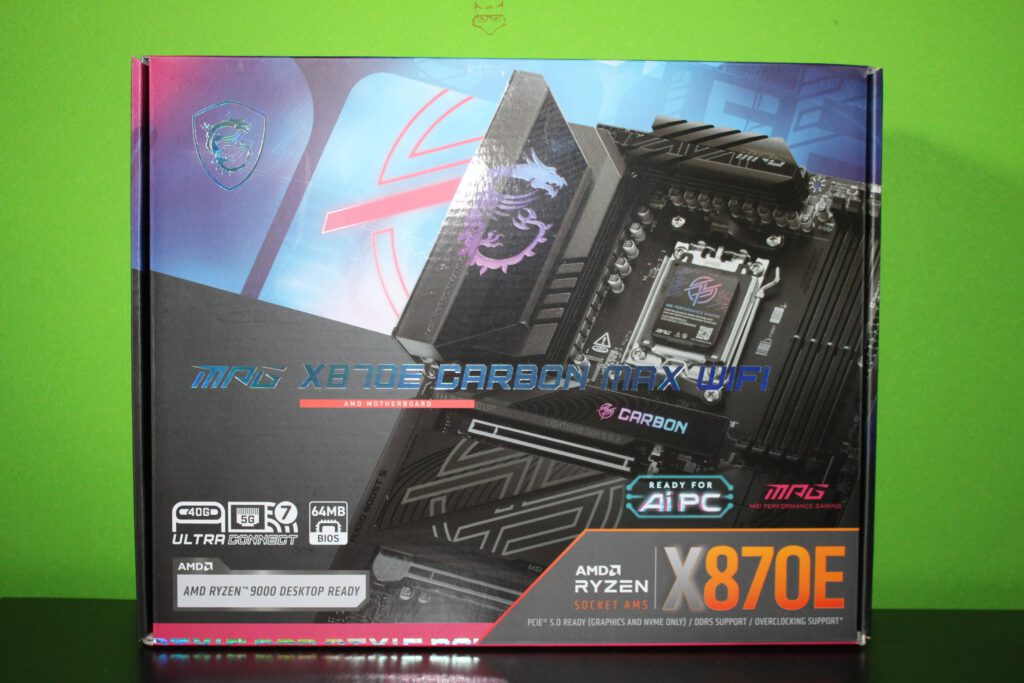
The outer packaging immediately makes it clear which performance class this motherboard belongs to. With the MPG X870E CARBON WIFI, MSI relies on a sturdy, vividly printed box in the familiar MPG design language: carbon-style textures, sharp edges, strong contrasts, and prominent platform references to AMD X870E and Socket AM5. The box does not aim to be decorative but functional, almost like a datasheet disguised as retail packaging.
On the front, the keywords appear that ultimately define this board in practice: support for the latest Ryzen generation, DDR5, PCI Express 5.0, high-speed networking, and USB4. This external communication is not marketing noise but a positioning statement. Anyone familiar with PC hardware immediately understands the underlying concept: high bandwidth across as many interfaces as possible, without turning the layout into a compromise-driven design. Or, to quote a classic principle of industrial design:
“Form follows function.” – Louis Sullivan
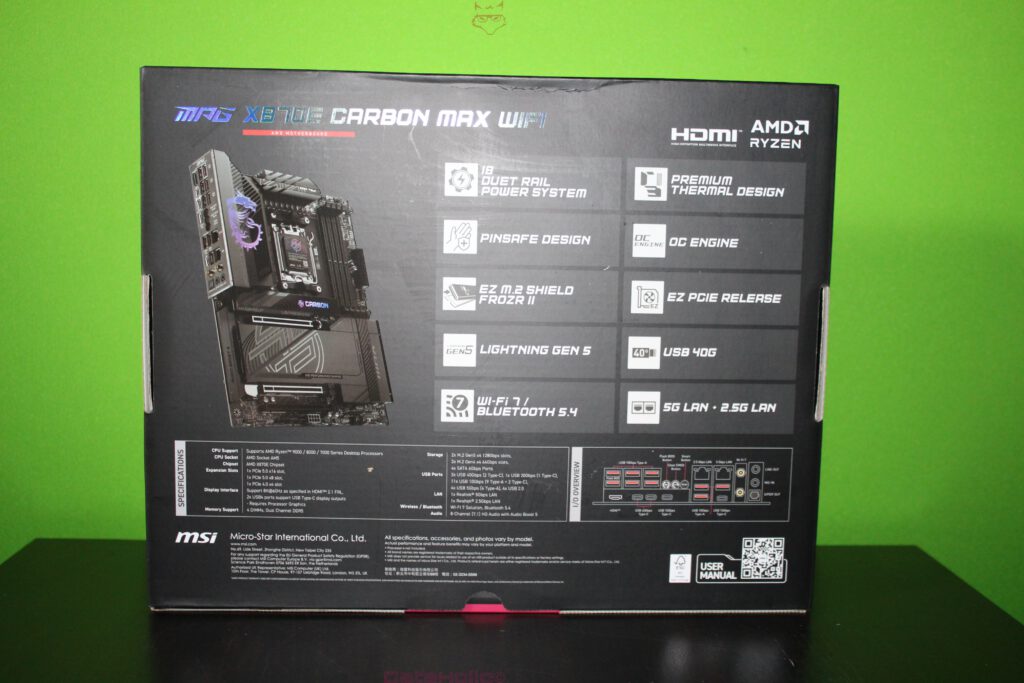
Turning the box around reveals a more concrete feature matrix. This is where MSI’s familiar terminology comes into play, even before the first cut of the sealing tape: EZ-DIY mechanics, thermal shielding for M.2 storage, debug indicators, and high-speed I/O. An unboxing effectively begins here, not with opening the lid, but with reading: which promises are printed on the outside, and how are they secured on the inside?
Opening Without Theater: Tabs, Inlay, and Transport Protection
Once opened, the packaging structure feels closer to professional electronics logistics than to retail showmanship. Tabs, cardboard inlays, and clearly defined layers dominate the experience. The motherboard itself is placed in a dedicated tray at the top, immobilized against movement, while the accessories are stored in a separate compartment below. This two-level layout is standard for high-end boards, as heavy heatsinks and metal covers would otherwise create pressure points during transport.
An anti-static bag is mandatory in this class of hardware. With densely populated VRM sections, numerous solder points, and large heatsinks, protection is not just about ESD but also abrasion: cardboard dust and microfibers have no place in slots or headers. The type of cardboard matters as well. Rigid edges provide protection but can cause friction during vibration, which is why an additional cardboard “cover” or separator is typically used to stabilize the board. Independent unboxings confirm exactly this approach for the MPG X870E Carbon WiFi.
Documentation: Quick Guide Instead of a Paper Flood
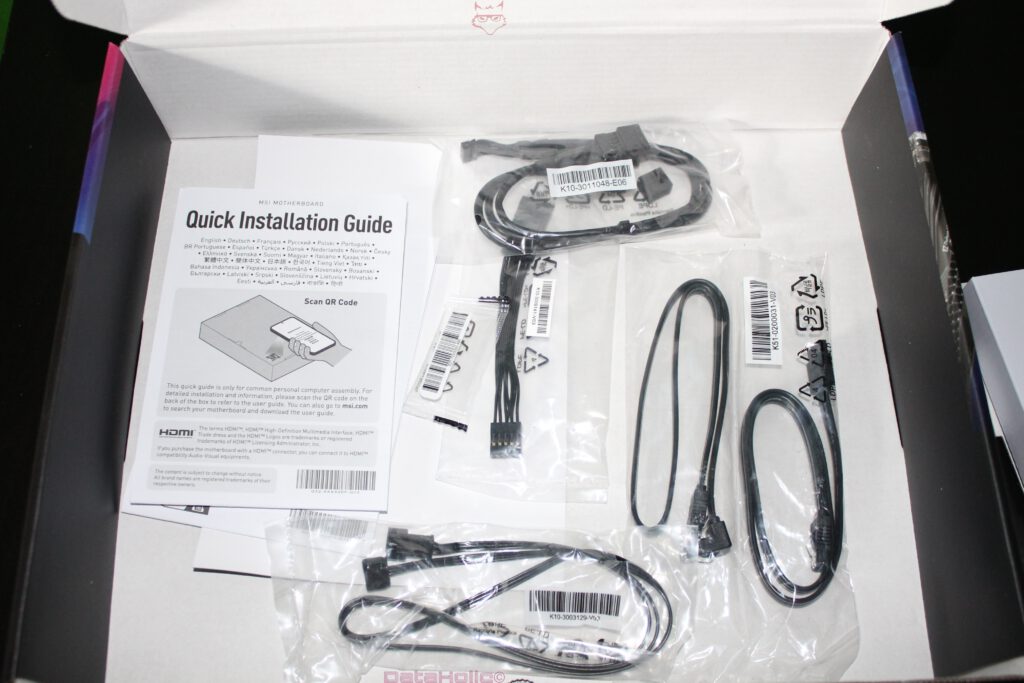
Placed prominently in the upper section is the printed documentation. What stands out is its deliberate minimalism: a Quick Installation Guide instead of a thick printed manual. This is not cost-cutting, but a trend seen across the industry in recent years. The printed guide enables a fast start, while in-depth documentation is provided digitally.
In practical terms, the guide covers CPU installation, memory population, power connectors, front-panel headers, and M.2 mounting in a visual, language-independent format. MSI’s approach here is to reduce early-stage errors: incorrect DIMM slot usage, missing CPU power connectors, or improperly mounted NVMe drives. This “first contact” philosophy is reflected in MSI’s official documentation strategy.
A fitting quote from the world of design applies here perfectly:
“The details are not the details. They make the design.” – Charles & Ray Eames
Nowhere is this more true than with motherboards, where a well-placed label or a clearly drawn diagram can mean the difference between a smooth first boot and unnecessary troubleshooting.
The Accessories Compartment: Cables, Adapters, and Why None of This Is Trivial
Beneath the motherboard tray sits the accessories package, neatly organized in individual bags and compartments. This separation is not just about presentation but also about preventing scratches. SATA connectors, antenna bases, or metal components rubbing against heatsinks or I/O shields during shipping would undermine the entire premium concept.
SATA Cables: Classic, but Still Relevant
Despite the dominance of NVMe storage, SATA remains part of real-world system builds. MSI equips the board with SATA 6 Gb/s ports, and the included cables reflect this. Large-capacity HDDs, archive drives, or older SSDs are still commonly reused in modern systems. The cables are neatly bundled, often with angled connectors to ease cable routing in tight GPU configurations.
Front Panel Adapter: Underestimated Until It’s Missing
A front panel adapter is one of those accessories that rarely makes headlines but quickly becomes indispensable. Power switch, reset switch, and LED connectors can be assembled outside the case and then attached as a single block. Especially in compact cases or water-cooled builds, this small detail saves time and frustration.
RGB / ARGB and Extension Cables
As part of the MPG gaming-oriented lineup, MSI typically includes extension or adapter cables for RGB and ARGB headers, depending on the bundle. Their purpose is practical rather than cosmetic: RGB headers are not always placed where case manufacturers expect them. A short extension often results in cleaner cable routing and a more structured interior.
M.2 Screws, Standoffs, and Clips: Small Parts, Big Impact
User-friendliness often reveals itself in M.2 installation. MSI advertises EZ-DIY mechanisms such as tool-less clips and integrated heat spreaders. The reasoning is simple: NVMe drives are replaced more frequently than before, especially in test systems or upgrade cycles. Reducing tiny screws and delicate handling lowers the risk of damage and speeds up maintenance.
The Wi-Fi Antenna: More Than Just Signal Reception
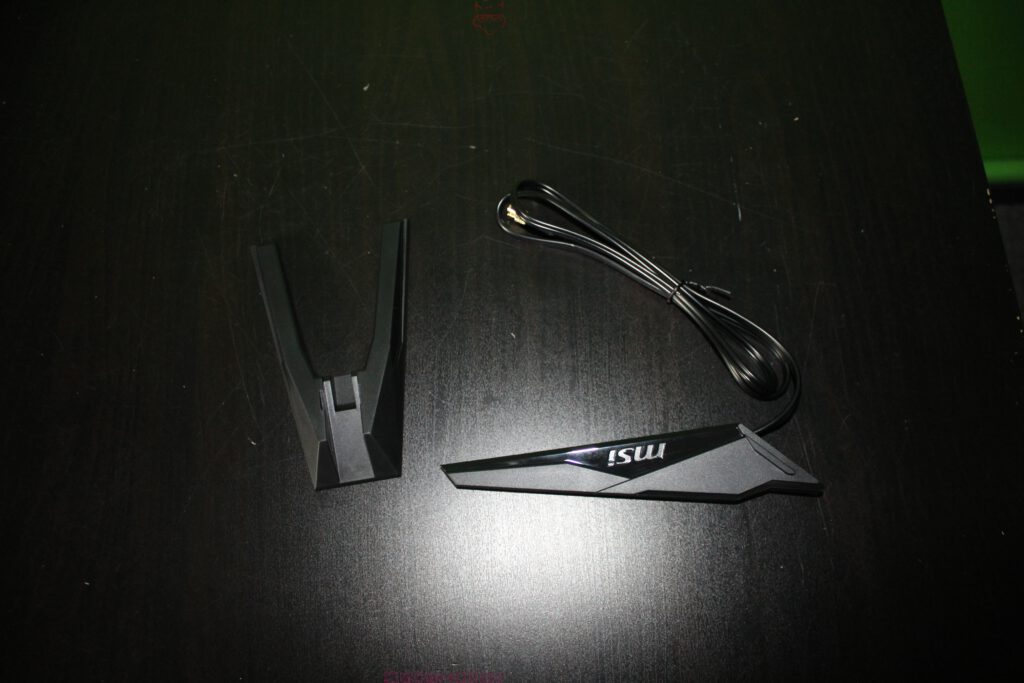
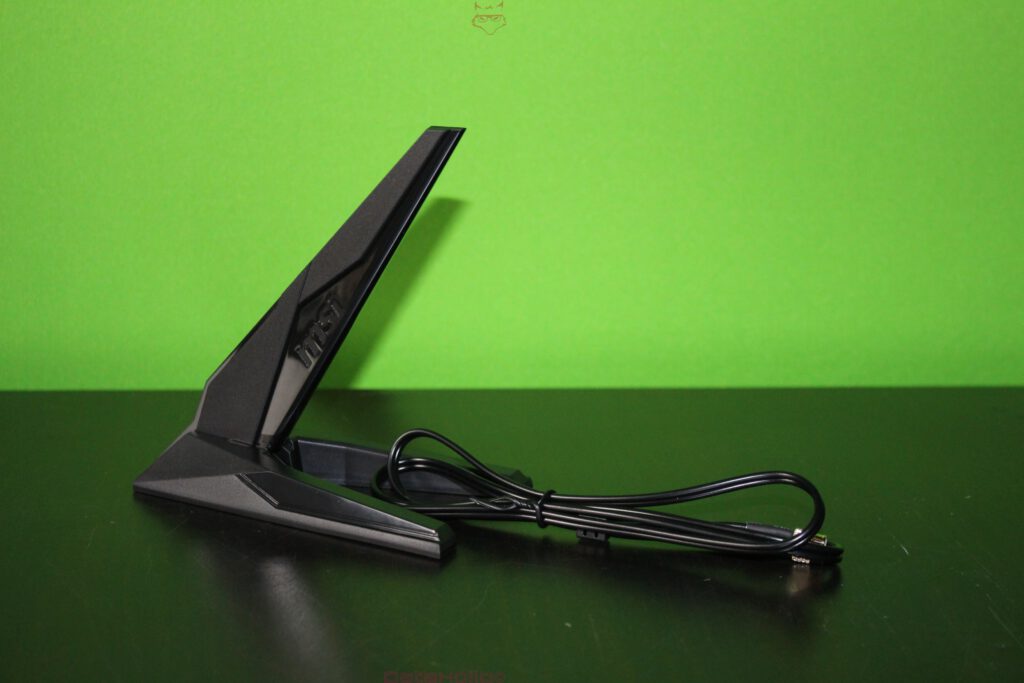
Included in the package is an external antenna that connects to the rear I/O Wi-Fi module. Rather than a simple stick antenna, MSI provides a flat, stable unit with a cable and base that allows flexible positioning. This matters in real-world setups where the PC case is rarely placed in an ideal orientation relative to the router.
The MPG X870E Carbon WiFi supports Wi-Fi 7 and Bluetooth 5.4, positioning it at the forefront of consumer wireless standards. Independent reviews identify the Qualcomm FastConnect 7800 module as the underlying solution, delivering strong throughput and stability.
A well-known quote captures the everyday perception of such advancements:
“Any sufficiently advanced technology is indistinguishable from magic.” – Arthur C. Clarke
Wi-Fi 7 may feel ordinary on paper, until multiple high-bandwidth workloads run simultaneously without congestion.
First Look at the Motherboard: Layout, Weight, and Surface Design
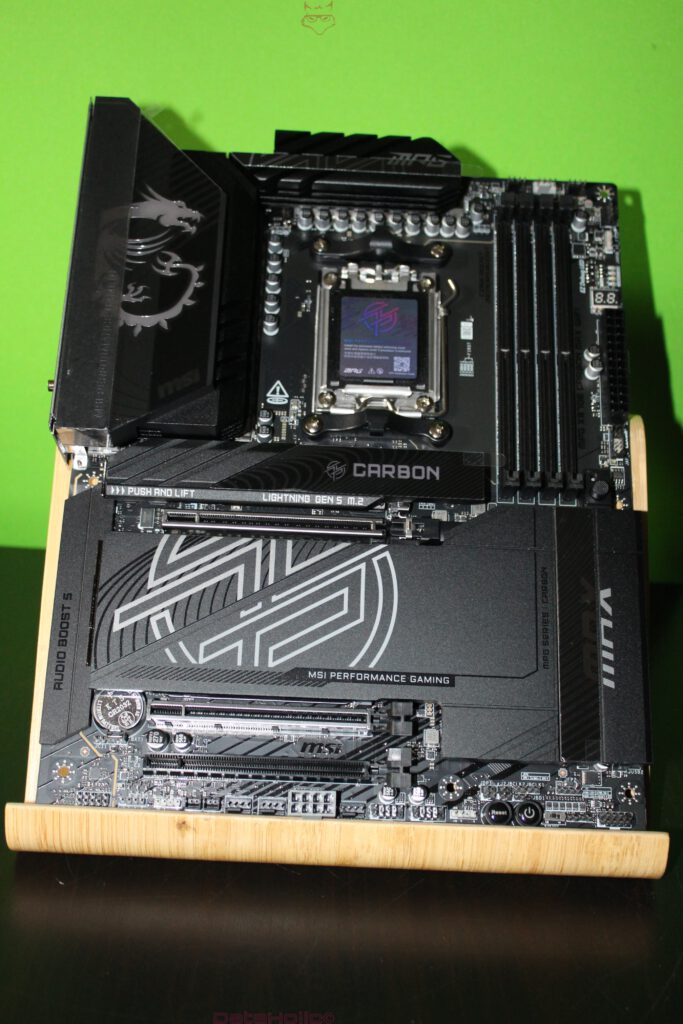
Once removed from its anti-static bag, the board immediately feels dense and purposeful. This is typical for X870E designs, where high I/O density, strong power delivery, and multiple M.2 zones demand both space and structural reinforcement.
Form Factor and Core Layout
The board follows the ATX standard with dimensions of 243.84 × 304.8 mm. The layout adheres to a classic enthusiast structure: VRM and heatsinks along the top, four DDR5 DIMM slots on the right, the CPU socket centered, with PCIe and M.2 zones below, and a full header row along the bottom edge.
VRM Area and Heatsinks: Mass with Purpose
The upper-left section is dominated by large heatsinks. This is not merely aesthetic. Modern Ryzen CPUs exhibit aggressive boost behavior, and VRM cooling must handle transient loads without throttling. MSI promotes a robust power design here, and visually the heatsinks suggest genuine thermal mass rather than decorative covers.
M.2 Covers: Shielding as a Baseline
With four M.2 slots, including PCIe 5.0 options, the board heavily emphasizes storage performance. The extensive M.2 shielding serves both thermal and mechanical purposes: it spreads heat across a larger surface and protects installed SSDs during handling and installation.
The Backside: Backplate, Reinforcement, and Hidden Structure
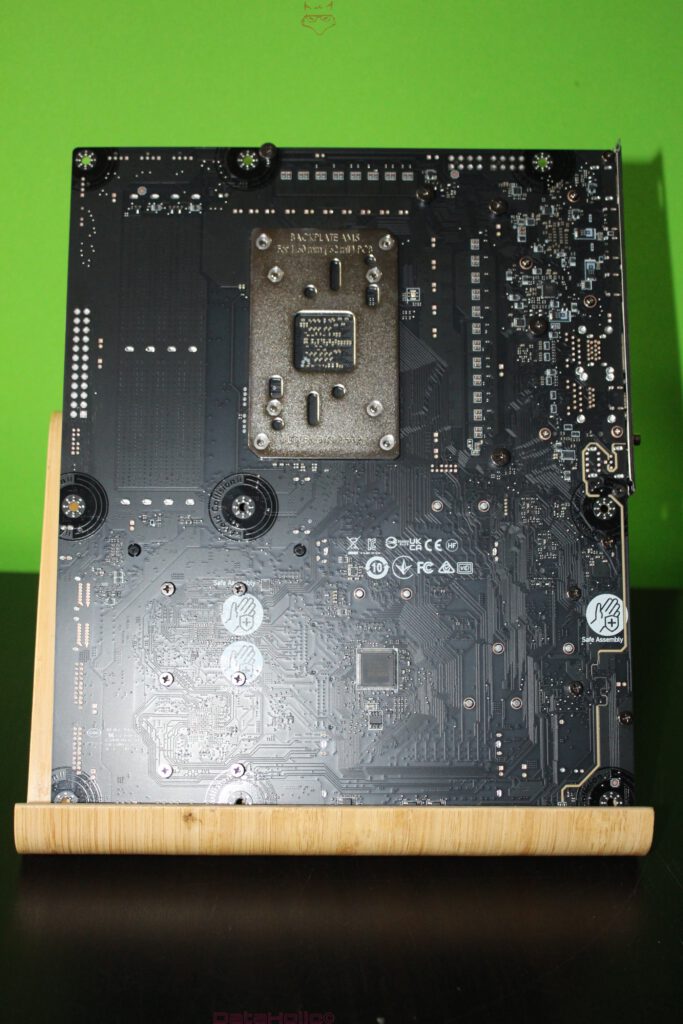
The rear of the board features a large CPU backplate that reinforces the socket area. This is critical when heavy air coolers or water blocks are installed. Additional mounting points, isolation zones, and certification markings round out the underside.
Inspecting the back of a motherboard is more than ritual. Clean soldering, orderly trace routing, and the absence of residue often reflect the overall manufacturing quality.
Rear I/O Panel: The Connection Hub as a Statement
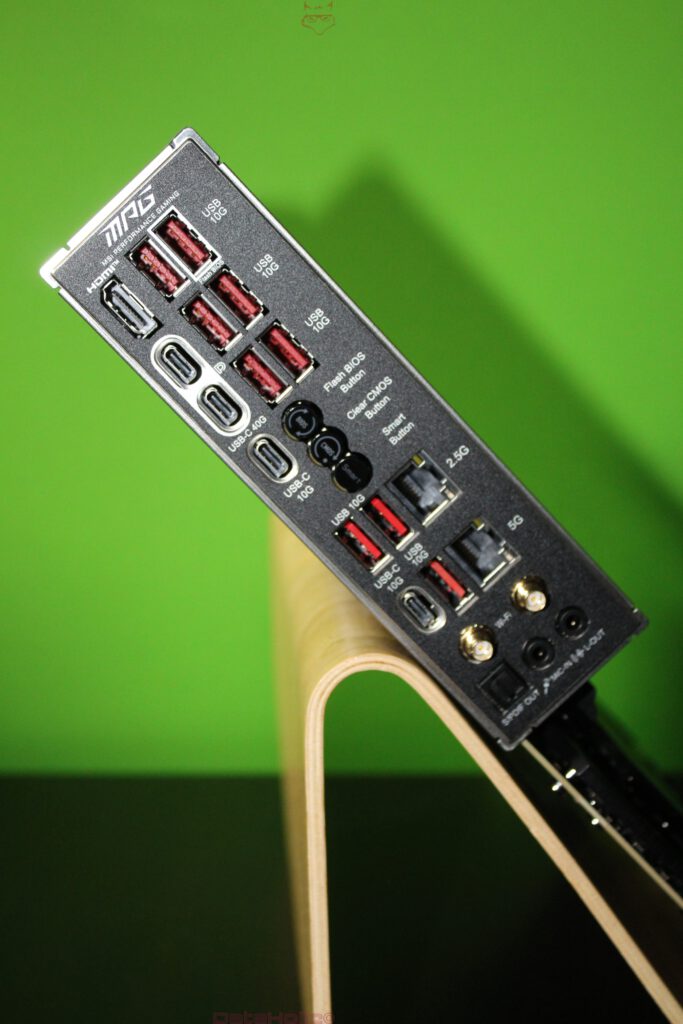
The rear I/O of the MPG X870E CARBON WIFI is a clear declaration of intent. MSI equips the board with USB4 at 40 Gbps, dual LAN (5G + 2.5G), advanced wireless connectivity, and dedicated hardware buttons.
USB: Multiple Speed Classes, Clearly Labeled
The rear panel includes two USB4 Type-C ports alongside several 10 Gbps USB ports. Clear labeling directly on the I/O shield is a practical advantage, eliminating guesswork in everyday use.
Networking: Dual LAN Without Compromise
With Realtek 5G and 2.5G LAN controllers, the board supports advanced networking scenarios. Whether separating traffic, connecting to high-speed NAS systems, or maintaining redundancy, the options are there.
Buttons: Flash BIOS, Clear CMOS, Smart Button
Physical buttons for BIOS flashing and CMOS reset are invaluable. Flash BIOS enables updates without a CPU installed, while Clear CMOS remains a classic recovery tool. The Smart Button adds programmable flexibility, reinforcing the board’s enthusiast orientation.
Audio: Focused and Modern
The audio section includes optical S/PDIF and analog outputs, driven by the Realtek ALC4080 codec with MSI’s Audio Boost 5 design. The emphasis is on clean digital connectivity rather than an overload of analog ports.
Packaging Logic: Why the Order Matters
A well-executed unboxing reflects careful planning:
- Heavy components are placed below lighter ones
- Accessories are separated to avoid friction
- Anti-static protection is standard
- Cardboard trays absorb shocks
Independent reviews consistently describe this exact structure for the MPG X870E Carbon WiFi.
Labels and Silkscreen: Readability as a Feature
Clear labeling across DIMM slots, PCIe lanes, M.2 positions, and headers is a practical strength. In low-light builds with predominantly black components, high-contrast silkscreen printing significantly improves usability.
Slot and Connector Layout: A First Reality Check
Even before installation, the board’s intent is obvious:
- Three PCIe x16 slots
- Four M.2 slots with extensive cooling
- Additional 8-pin PCIe power connector on the motherboard
This extra power connector signals preparation for extreme configurations and high slot power demands, even if most systems will never fully exploit it.
Small Extras: Stickers, Cards, and Cable Ties
Depending on the batch, MSI includes branding stickers and small extras. While not technically essential, they reinforce the idea of the MPG line as a build-focused platform rather than a hidden component.
Final Order in the Box: Nothing Loose, Nothing Random
At the end of the unboxing, the impression is purely technical: weight, structure, protection, labeling, and connectivity density. The MPG X870E CARBON WIFI does not present itself as a showpiece, but as a robust foundation for high-end systems.
A final quote from engineering culture encapsulates this approach:
“Perfection is achieved, not when there is nothing more to add, but when there is nothing left to take away.” – Antoine de Saint-Exupéry
Notice in accordance with EU transparency requirements:
The MSI MPG X870E CARBON WIFI featured in this review was provided to us by MSI as a non-binding loan unit for testing purposes. This is not paid advertising.
MSI had no influence on the content, evaluation, or editorial independence of this article. All opinions expressed are based solely on our own practical experience.
We would like to thank MSI for providing the motherboard and for the trust placed in dataholic.de.