
Conclusion: The MoErgo Glove80 Is Not a “Keyboard Purchase,” but a Transition
- Ergonomics That Truly Matter in Everyday Use
- For Large Hands: Finally No More “Too Small” Keyboard
- The Learning Curve Is Real – and Longer Than with Many Alternatives
- Typing Feel and Speed: Absurdly Fast Once You’re In
- Layers: The Moment You Understand Why Professionals Love Them
- Software: Web-Based, Constantly Evolving, and Strongly Community-Driven
- Maintenance Mode and Changes: Functional, but Not Casual
- No Hot-Swap Switches: A Clear Drawback for Tinkerers
- Initial Setup: Fiddly Screws, but Only Once
- RGB: Nice to Have, but (So Far) Not Really Yours
- Who It Is Perfect For – and Who It Is Not
- The Real Conclusion in One Sentence
You cannot meaningfully evaluate the Glove80 if you treat it like a regular keyboard. It is not a “sleek input device” that you plug in and type on exactly as before after five minutes, just with nicer lighting. Rather, it is a decision to adopt a different approach to typing, posture, muscle memory, and workflow. And that is precisely why the conclusion here is so clear: anyone willing to invest time will get one of the most convincing ergonomic split keyboards on the market. Anyone expecting instant familiarity will likely pack it away again far too soon.
You notice this after just a few days: the Glove80 rewards patience, and it punishes haste. Not because it is “hard to use,” but because it consistently follows a different logic: split hand positions, a pronounced keywell shape, thumb clusters, layer-based thinking, firmware instead of driver habits. It is a mental shift. And at the same time, it is the reason why it is so interesting for professionals and heavy typists.
Ergonomics That Truly Matter in Everyday Use
There are many products that print “ergonomic” on the box. With the Glove80, ergonomics are not decoration but the foundation. Two aspects stand out in particular:
First: “Split” here does not mean “two halves connected by a cable,” but true decoupling. Hands can rest shoulder-width apart, forearms no longer need to rotate inward, and you quickly notice how much pressure disappears from shoulders and wrists when you are no longer forced into the typical “laptop posture.”
Second: the contoured keywell shape is not just visually striking, it changes how your fingers move. Instead of constantly gliding flat across a single plane, the fingers work deeper and with shorter movements. This feels unfamiliar at first, but in the long run it comes across as a reduction of unnecessary motion.
This aligns with what classic ergonomics guidelines have been emphasizing for years: hands and wrists should remain as straight and neutral as possible, without constant bending. Exactly this posture is much easier to achieve with a well-positioned split keyboard than with a standard board.
And then there is a point that is often overlooked in reviews: even the best ergonomic keyboard is useless if you never move. A nice reminder of this comes from an article in Die Welt, which essentially states that anyone who works at a computer for long periods needs variety, changes in position, and breaks, otherwise the monotony will take its toll. This is not a dramatic moral lecture, just a simple truth. The Glove80 is not a free pass against discomfort, but it is a strong tool to reduce risk, especially when combined with a sensible workstation setup and short breaks.
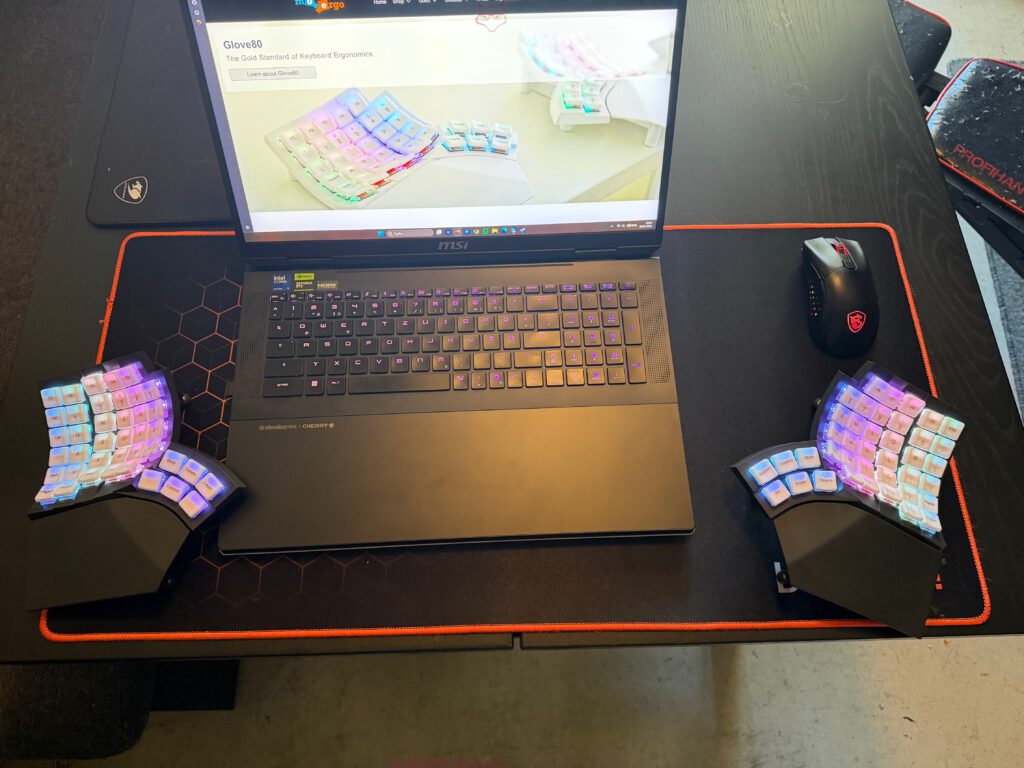
For Large Hands: Finally No More “Too Small” Keyboard
One point that turns out to be surprisingly important for many people: the Glove80 works really well with large hands. Not “it’ll do,” but genuinely well. The geometry, the thumb clusters, the spatial separation – all of this ensures that you no longer constantly feel like you are tying yourself into knots on a surface that is too cramped.
In everyday use, this is a real quality-of-life improvement. Anyone with large hands knows this subtle, ongoing problem: you type correctly from a technical standpoint, but you never quite feel “at home.” With the Glove80, that feeling of being at home appears more readily – though only after the learning phase. And that brings us to the most important counterargument.
The Learning Curve Is Real – and Longer Than with Many Alternatives
It is important to be honest here: the acclimation period is not just “a few days.” Depending on your starting point (classic ISO layout, flat keyboard, lots of laptop typing), it can take weeks before everything feels natural. This is not because the keyboard is “complicated,” but because your brain is extremely good at preserving old movement patterns.
A fitting little anecdote: during the first sessions, you often catch yourself reaching “blindly” for keys that simply are no longer there. It feels like walking the familiar path to the kitchen in a new apartment: you automatically turn left – and walk straight into a wall. None of this is disastrous, but it costs concentration.
What helps is a mental shift in perspective: stop chasing speed and focus on precision. This also aligns with recommendations that MoErgo itself gives in its guidance: practice daily in small sessions first, and only switch over completely later.
Those who accept this will eventually notice that “click moment”: it becomes quieter in your head. Finger travel shortens. Hands remain relaxed. And suddenly, a flat standard keyboard feels like a compromise from another era.
Typing Feel and Speed: Absurdly Fast Once You’re In
One of the strongest arguments is the typing feel combined with very fast key actuation. The Glove80 is built to support fluid, fast typing. And once you get used to the shape, that speed tends to come “on its own,” because less unnecessary movement is required.
The soft POM keycaps play a major role here as well. MoErgo itself describes POM as a material that delivers a “buttery smooth” typing feel, is durable, and does not shine as quickly as ABS. That may sound like marketing language, but it accurately captures the experience: POM not only feels pleasant, it also dampens that harsh plastic sensation many keycaps have.
There is also another point that is rarely discussed: key actuation force. Research has explored a connection between higher actuation force and muscular discomfort. If a keyboard manages to guide you toward a lighter, more relaxed typing style, that is not just “comfortable,” but potentially relevant in the long term.
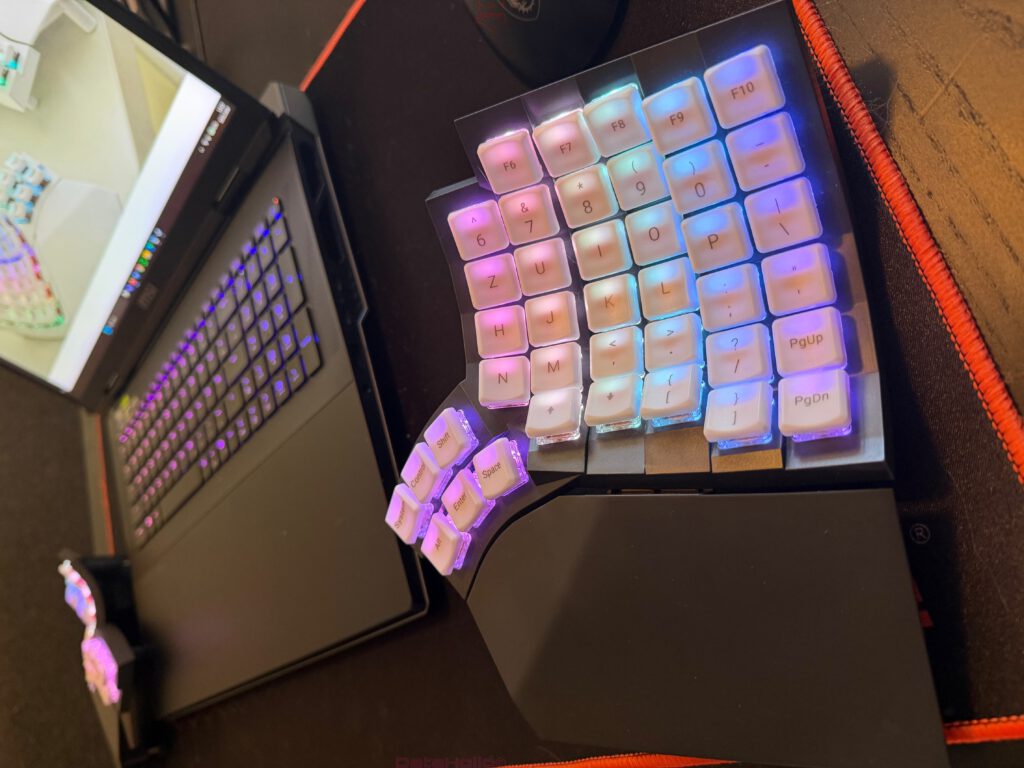
Layers: The Moment You Understand Why Professionals Love Them
The topic of “layers” may sound like nerd territory at first, but it quickly becomes the core of productivity. Being able to add multiple layers is not just a bonus; it is the trick that allows a compact split keyboard to suddenly replace everything: function keys, navigation, shortcuts, media controls, macros, special characters.
The decisive effect is this: you shift complex key combinations from “finger acrobatics” to “logical recall.” Instead of contorting your wrist for Ctrl-Alt-something, you hold a layer with your thumb and press the target key with your index finger. It is a different way of thinking. Anyone who writes a lot, programs, edits, or lives inside tools will eventually notice how relieving this is.
A small anecdote from real-world work: once you have a navigation layer set up cleanly (arrow keys, Home, End, PgUp, PgDn), text editing suddenly stops feeling like “searching” and starts feeling like “playing an instrument.” You no longer reach for arrow keys; you stay in the flow. People have been building layer layouts for exactly this reason for years – here, it is simply a central feature.
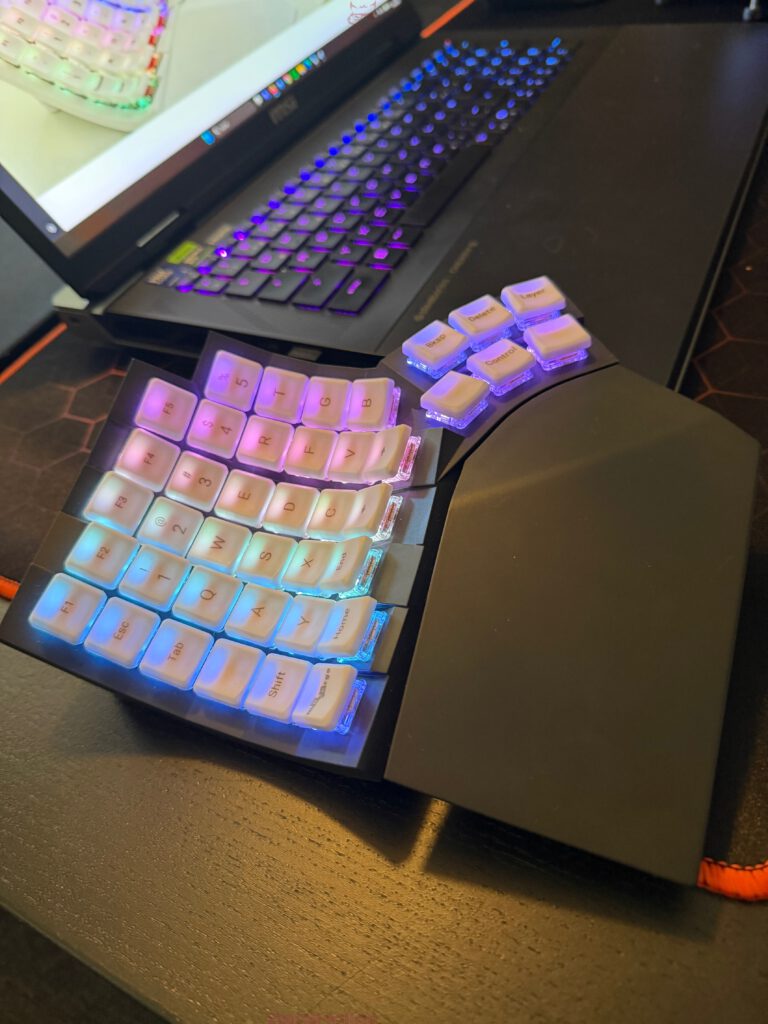
Software: Web-Based, Constantly Evolving, and Strongly Community-Driven
The downside: the software is purely web-based and is constantly being expanded and changed. This is both a blessing and a curse.
A blessing because new features, fixes, and improvements do not have to wait for a classic “driver version.” It feels alive, and you can sense that the product is not frozen in time.
A curse because workflows can change. Anyone who values stability needs to be prepared for menus, options, or processes to look different over time. On top of that, the community is listened to – which is great, but also means that development does not feel strictly “top-down,” instead following currents shaped by feedback.
At best, it feels like you are not buying a static device, but a system that matures. At worst, it can be annoying if you simply want to be “done.”
Maintenance Mode and Changes: Functional, but Not Casual
A very practical point that belongs in the conclusion: the keyboard must be put into maintenance mode to change key mappings. This is not dramatic, but it does slow down spontaneous experimentation. If you like to “quickly rearrange something while working,” this can be a point of friction. It fits more with a “plan first, then implement” style.
On the flip side, it also forces you to do something that is sensible with layer-based keyboards anyway: design layouts consciously instead of constantly rearranging everything every day. It is like a well-organized workbench: you do not want to reshuffle your screwdrivers every hour; at some point, you just want to work.
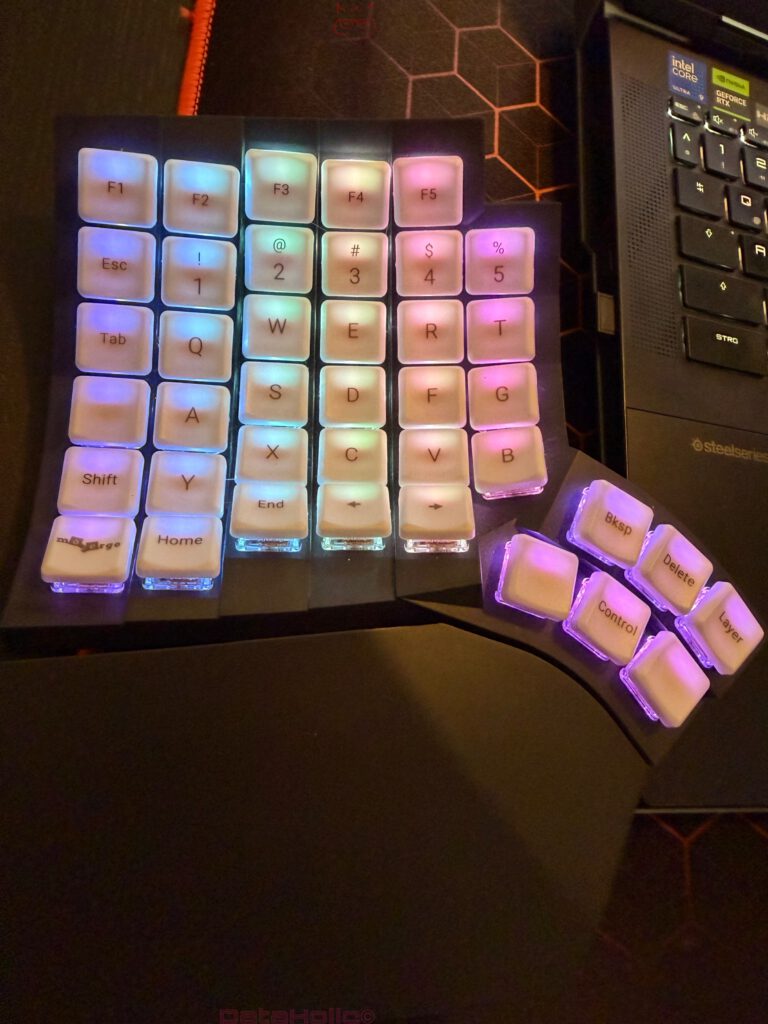
No Hot-Swap Switches: A Clear Drawback for Tinkerers
Unfortunately, swapping switches is not easy – and for many enthusiasts, this is a real downside. MoErgo states very clearly in its FAQs that the Glove80 does not have hot-swap sockets, explaining this in part with reliability concerns given the strongly curved construction.
In practical terms, this means you should be fairly certain about the switch characteristics you want when purchasing. For people who enjoy trying something new every couple of months, this is not ideal. For those looking for a work tool, it is more a case of deciding once and then using it for years.
Initial Setup: Fiddly Screws, but Only Once
This also needs to be stated honestly in the conclusion: the initial screw setup is fiddly, depending on how dexterous you are, how the lighting is, and how much patience you have at the moment. But: it only has to be done once.
And that is exactly how it should be evaluated. It is like adjusting a good chair or doing proper cable management under your desk: it is not a fun moment, but ideally you never think about it again afterward. Anyone who is put off by this may miss out on a setup that gives back far more in everyday use than it initially demands.
RGB: Nice to Have, but (So Far) Not Really Yours
Another realistic point: no individual RGB setup – at least not yet in the sense many people know from gaming keyboards. This could change with future updates, but as it stands, it is more “lighting present” than “light show as a feature.”
This is not a deal-breaker, but it helps to calibrate expectations. The Glove80 primarily wants to be a tool. If RGB is a central part of your enjoyment, you will not find the same playground here.
Who It Is Perfect For – and Who It Is Not
The Glove80 is perfect for:
- professionals and heavy typists who spend many hours typing every day
- people with large hands who are looking for space and natural hand positioning
- users who are willing to invest time in layer-based thinking
- those who want an ergonomic tool, not just a “cool gadget”
It is less ideal for:
- people who need to be back at 100 percent typing speed immediately
- tinkerers who constantly want to swap switches
- users who dislike web-based configuration and firmware workflows
- anyone who simply wants “just a keyboard”
And here is a small but fitting reminder from practice: many aches and problems do not arise from a single mistake, but from thousands of small repetitions. That is precisely why RSI is such a prominent topic, especially among people who work extensively at a computer. The Glove80 is not the only solution, but it is one of the more consistent answers to how these repetitions can be made more comfortable and often more neutral.
The Real Conclusion in One Sentence
If you are willing to invest the time to adapt, the Glove80 is an extremely strong keyboard that feels like a proper tool: fast, comfortable, excellently suited for large hands, and powerful with layers like a small operating system under your fingers. If you are not willing to put in that effort, it may feel like an expensive project rather than an upgrade.
And perhaps this is the most honest closing anecdote: there is that moment when, after a few weeks, you briefly switch back to a flat standard keyboard. Not because you want to, but because you have to. Suddenly everything feels cramped. The wrists tilt slightly. The thumbs have nothing to do. You look for layers that do not exist. That is the moment you realize the transition was not just “nice to have.” It changed how you perceive good typing.
Notice in accordance with EU transparency requirements:
The MoErgo Glove80 featured in this review was provided to us by MoErgo as a non-binding loan for testing purposes. This is not paid advertising.
MoErgo had no influence on the content, evaluation, or editorial independence of this article. All opinions expressed are based solely on our own practical experience.
We would like to thank MoErgo for providing the Glove80 and for the trust placed in dataholic.de.