
MSI Vision X AI Unboxing: A Compact Powerhouse with an RTX 5090, Front Display, and Serious Ambitions
When a Desktop Wants to Be More Than Just a Box
The MSI Vision X AI belongs to a category of PCs that makes one thing immediately clear the moment it comes out of the box: traditional desktop computers are no longer defined solely by sheet metal, airflow, and packing as much hardware as possible into every litre of space. This system is meant to be seen. Not through an aggressive gaming aesthetic or flashy RGB effects, but through a combination of compact high-end performance, thoughtful engineering, and a front-mounted display that gives the chassis a distinctly modern identity. Rather than simply sitting beside the monitor, the computer becomes an integral part of the entire setup.
The first thing that stands out when lifting it out of the packaging is its form factor. The Vision X AI is compact, yet by no means small in the sense of a NUC or mini PC. The chassis occupies a noticeable amount of desk space, but it feels more like a piece of modern technical furniture than a conventional tower. Its proportions are compact and well balanced, the front panel is clean and understated, and the integrated display immediately draws attention—the kind of effect many high-end systems only achieve after they have been powered on. “Form follows function” is not interpreted in the strict traditional sense here, but rather in a more contemporary way: functionality is allowed to become visible, provided it never turns into style without substance.
That is precisely what makes this system so appealing. The MSI Vision X AI is not built around specifications alone, even though there is certainly no shortage of impressive numbers. With 128 GB of DDR5 memory, a 2 TB SSD, and an MSI GeForce RTX 5090, this desktop sends a very clear message. It is not intended for users who occasionally launch a game while leaving a few browser tabs open in the background. Instead, it is designed for gaming at extremely high resolutions, content creation, local AI workloads, rendering, demanding multitasking, and workflows that require substantial performance reserves even under sustained heavy load.
Packaging and First Impressions
The packaging is practical and perfectly suited to the weight of the system. The computer arrives securely protected, the internal packaging holds everything firmly in place, and removing it requires a bit of space on either a desk or the floor. This is certainly not a device that casually slides out of the box with one hand. The initial impression is closer to that of a professional workstation than a typical pre-built gaming PC. Nothing rattles, nothing feels loose, and the chassis immediately conveys a reassuring sense of solidity.
The contents of the box, however, leave a slight feeling that something is missing. At this price point, a few extras would not have been a luxury but rather a fitting addition to the overall experience. A premium USB flash drive, a matching mouse, a keyboard, or at least a small accessory bundle would have complemented the presentation nicely. For a system that places so much emphasis on completeness and premium appeal, the rather minimal bundle feels somewhat restrained. The computer itself is undoubtedly the star of the show, while the accessories remain little more than supporting actors.
It brings to mind an old saying from the world of design: “The details are not the details. They make the design.” The quote is commonly attributed to Charles Eames, and it feels remarkably appropriate here. The Vision X AI gets almost everything right when it comes to the hardware itself, yet the included accessories are missing that final touch capable of turning an excellent unboxing experience into an exceptional one.
Chassis, Internal Design, and Front Display
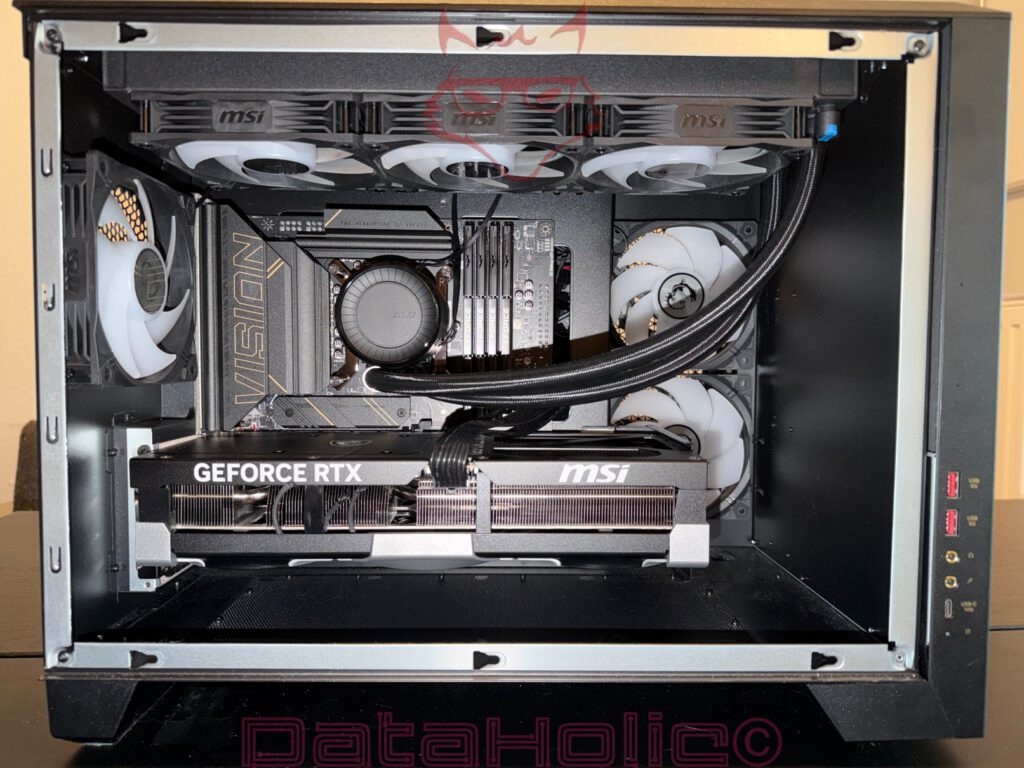
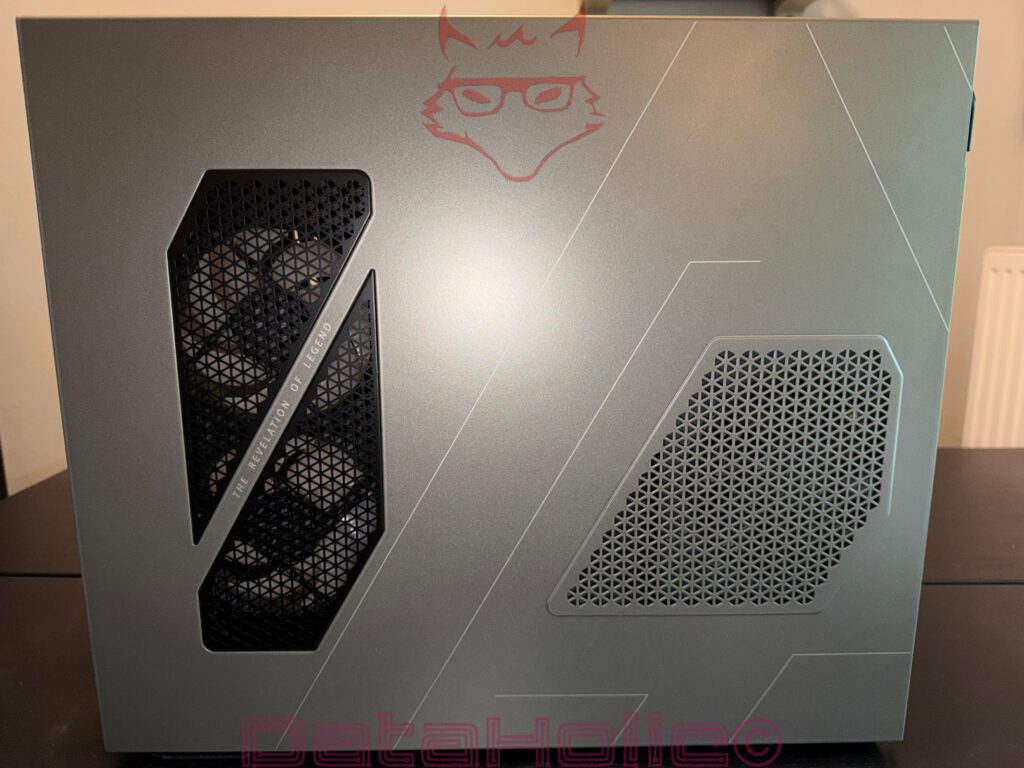
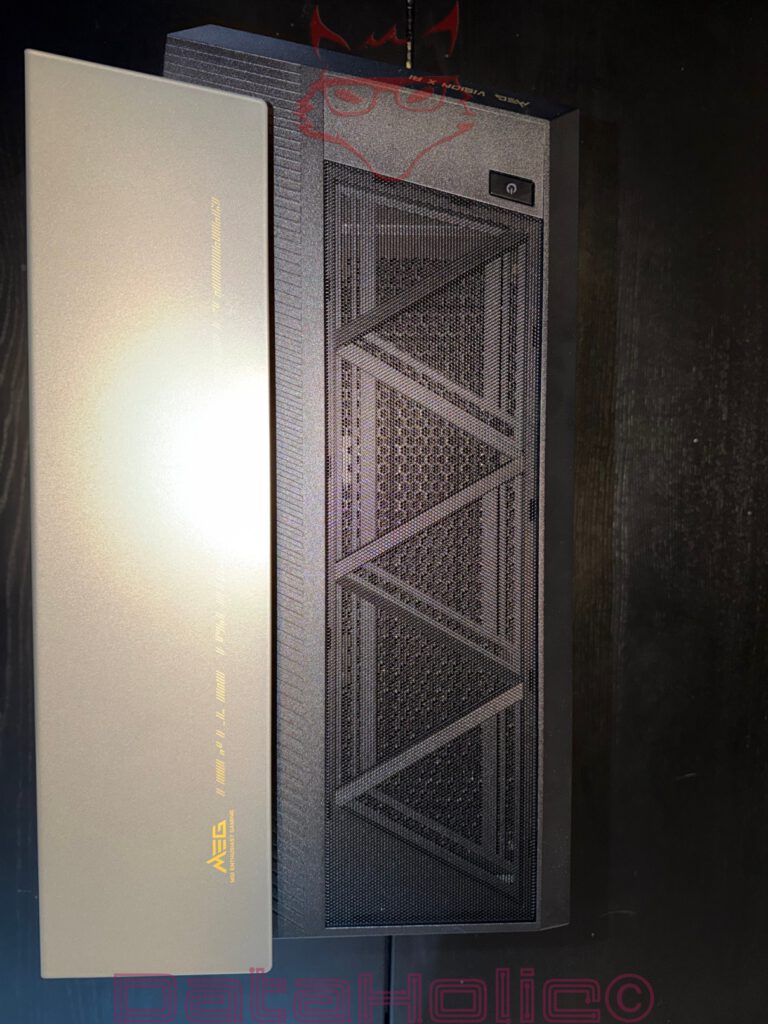
The chassis is the most obvious feature that sets the Vision X AI apart from many conventional pre-built desktop PCs. MSI has opted for a compact, clean design that does not attempt to imitate the appearance of a massive full tower. The Vision X AI feels denser, more modern, and clearly designed with the desktop environment in mind. That is both one of its greatest strengths and one of its compromises. While the system fits beautifully into a premium workstation or gaming setup, it occupies noticeably more desk space than a typical office PC or a slim small form factor system. Placing the tower underneath the desk would take away part of its appeal, as the front display is clearly intended to remain visible.
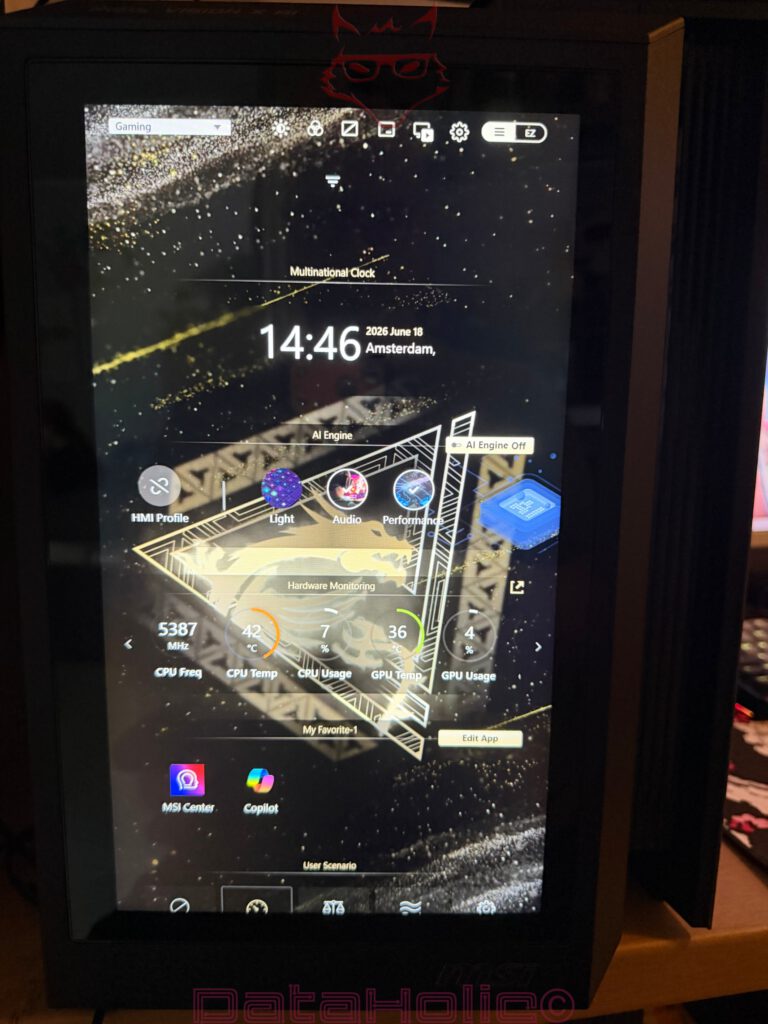
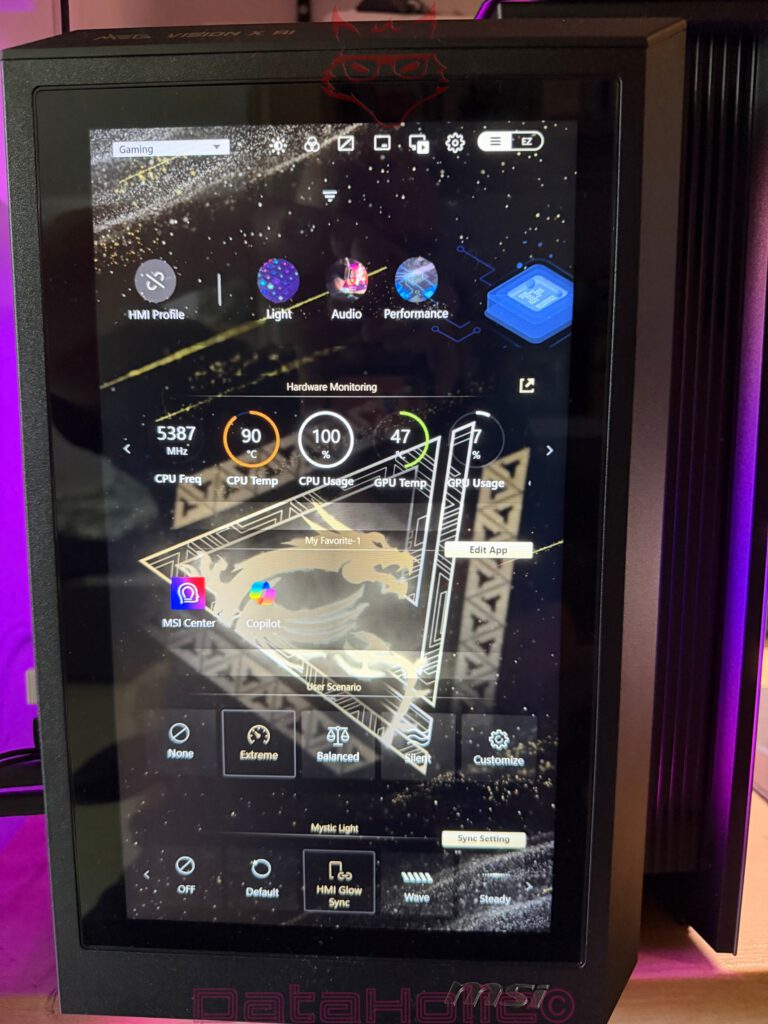
This display is much more than a simple visual highlight. It gives the system something of a technical identity. Status indicators, system information, and graphical elements on the front panel fundamentally change the way the computer is perceived. Rather than appearing as a closed box, the PC becomes an active part of the workspace. Solutions like this can easily become gimmicky, but the Vision X AI remains pleasantly restrained. The front panel never feels cluttered; instead, it presents itself with a clean, technical appearance.
The internal design is clearly engineered with performance in mind. With an RTX 5090, 128 GB of DDR5 memory, and significant power consumption, cooling is far more than a secondary consideration—it becomes one of the defining engineering challenges. A high-end desktop of this class ultimately succeeds or fails based on how effectively airflow, the power supply, the graphics card, system memory, and storage devices work together. Raw performance can be purchased, but sustained performance is the result of careful engineering.
Connectivity and Everyday Usability
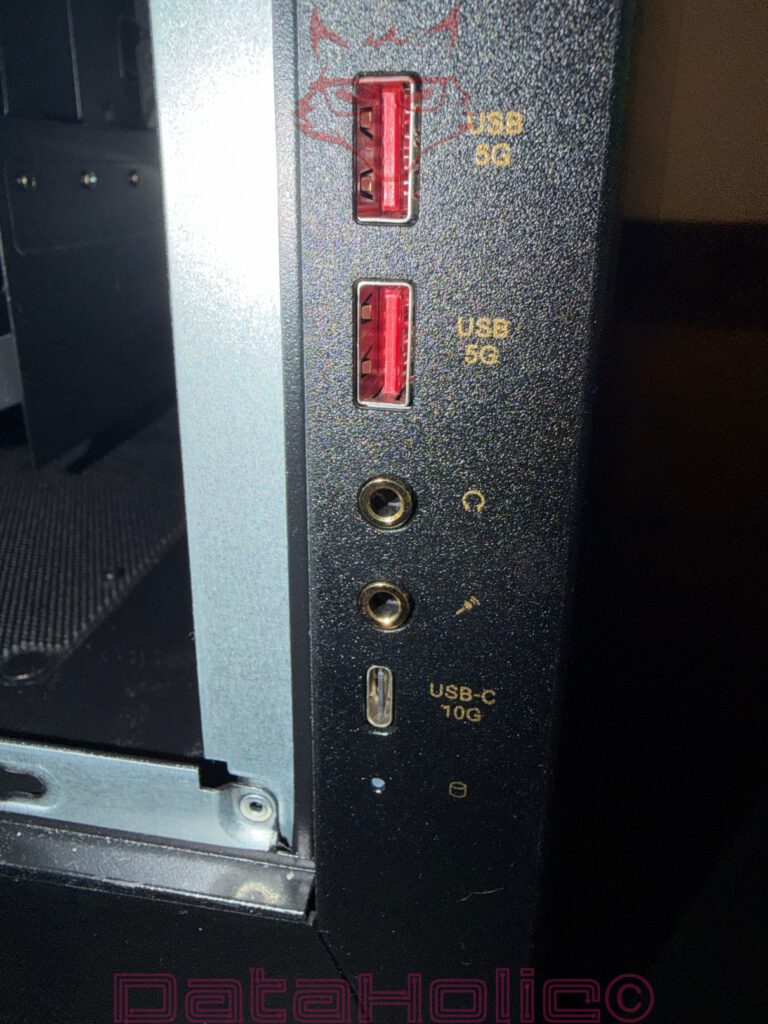
One of the Vision X AI’s greatest strengths is its extensive connectivity. A generous selection of ports is not a luxury on a desktop of this caliber—it is a necessity. External SSDs, audio interfaces, input devices, cameras, card readers, capture hardware, multiple monitors, VR equipment, and peripherals for professional workflows consume available ports far more quickly than the specifications alone might suggest. This is where the MSI system truly shines. The wide range of available connections ensures that the desktop does not immediately require USB hubs or additional adapters.
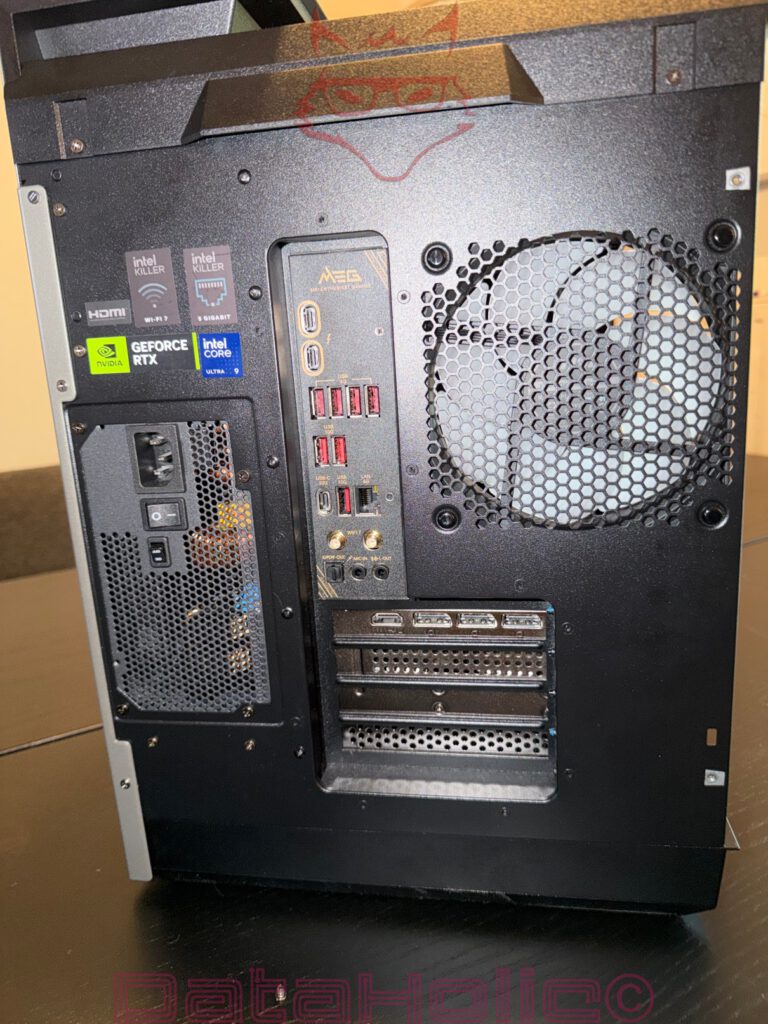
In everyday use, this becomes far more important than benchmark numbers alone. A powerful computer that constantly requires extra adapters never feels completely finished. The Vision X AI largely avoids that impression. Its extensive connectivity perfectly matches its intended audience. Gaming, streaming, video production, AI workloads, photo editing, external storage devices, and multi-monitor setups are not exceptional scenarios—they are exactly what this system is designed to handle.
Hardware: 128 GB DDR5, 2 TB SSD, and an RTX 5090
The inclusion of 128 GB of DDR5 memory immediately makes a statement. For gaming alone, this amount of memory is generous, while for professional workloads it is extremely welcome. Large Adobe projects, virtual machines, extensive RAW photo libraries, local AI models, or multiple demanding applications running simultaneously all benefit directly from this considerable memory reserve. Additional memory does not automatically translate into higher frame rates, but it effectively eliminates the bottlenecks that begin to appear once systems equipped with 32 or 64 GB start relying on virtual memory.
The 2 TB SSD fits perfectly within the overall philosophy of the system. Modern games frequently require well over one hundred gigabytes of storage, and project files, cache folders, videos, benchmark software, and local working data quickly consume the remaining capacity. Two terabytes therefore represent a practical foundation rather than an unnecessary luxury. Even so, a high-end desktop of this class should ideally offer straightforward storage expansion, as it is likely to serve as the primary workstation for many years.
The MSI GeForce RTX 5090 is unquestionably the centerpiece of the entire system. It transforms the Vision X AI into a desktop that excels at extremely high resolutions and DLSS-enhanced gaming. The benchmark results recorded at 3840 × 2400 clearly demonstrate that this machine was never designed to chase Full HD performance records. Instead, it is built to deliver exceptional performance at ultra-high resolutions while maintaining maximum image quality. The graphics card is equally valuable beyond gaming. CUDA workloads, rendering applications, AI processing, and professional GPU-accelerated software all benefit significantly from hardware of this class.
Gaming Performance at 3840 × 2400
All of the following results represent average frame rates measured at 3840 × 2400, using either DLSS or Ultra/Low settings, depending on the individual game’s testing profile.
| Game | Average FPS |
|---|---|
| PUBG | 270 |
| Kingdom Come: Deliverance II | 80 |
| Elden Ring | 60 |
| Cyberpunk 2077 (Maximum Settings, DLSS) | 174.22 |
| Overwatch | 559 |
| Counter-Strike 2 | 540 |
| Fortnite | 148 |
| Baldur’s Gate 3 | 165 |
| Elite Dangerous | 120 |
| Diablo IV | 184 |
| Dave the Diver | 60 |
| ARK: Survival Ascended | 192 |
| Red Dead Redemption 2 | 172 |
| GTA V Enhanced (DLSS) | 305 |
| Indiana Jones and the Great Circle (DLSS) | 60 |
| Escape from Tarkov | 196 |
| Minecraft | 216 |
| Dead Island 2 | 197 |
The table illustrates a remarkably wide performance range. Esports titles such as Overwatch and Counter-Strike 2 achieve exceptionally high frame rates, while games with built-in frame rate limits or particularly demanding game engines naturally deliver lower results. Elden Ring, Dave the Diver, and Indiana Jones and the Great Circle remain around the 60 FPS mark due to frame rate caps or individual game profiles, whereas Cyberpunk 2077, running with maximum settings and DLSS enabled, clearly demonstrates the performance headroom available from the RTX 5090 with an impressive 174.22 FPS.
Power Consumption and Noise Levels
| Scenario | Power Consumption |
|---|---|
| Idle | 230 W |
| Average | 369 W |
| Gaming | 750 W |
| Prime95 | 520 W |
| FurMark | 830 W |
| Prime95 + FurMark | 1,069 W |
| Maximum Power Consumption | 1,100 W |
| Measurement | Value |
|---|---|
| Average Noise Level | 49.5 dB(A) |
| Distance | 30 cm |
| Environment | Office |
Power consumption is high, but hardly surprising considering the hardware installed inside the system. The combination of Prime95 and FurMark in particular demonstrates that the Vision X AI reaches levels under synthetic full load that demand both a very capable power supply and serious cooling performance. 1,069 watts under combined load and a recorded peak of 1,100 watts are anything but insignificant. This is not a system that should be connected to a low-quality power strip tucked underneath a desk.
An average noise level of 49.5 dB(A) measured at a distance of 30 centimeters is clearly audible. The system never becomes unobtrusive, yet it also remains comfortably below the threshold of becoming an unpleasant distraction. Under heavy load, it is obvious that an RTX 5090 and a powerful high-end system are at work. In a typical office environment the cooling system is certainly noticeable, while in a gaming setup with a headset it quickly fades into the background. Silent-PC enthusiasts are not the target audience here. For the level of performance packed into such a compact chassis, the measured noise level remains entirely understandable.
Benchmark Overview
| Benchmark | Result |
|---|---|
| VRMark Blue Room | 10,412 points |
| PCMark 10 Extended | 16,785 points |
| FurMark 2 (4K) | 29,865 points (≈497 FPS) |
| Unigine Superposition (4K Optimized) | 39,184 points |
| Cinebench 2026 Single-Core | 2,340 points |
| Cinebench 2026 Multi-Core | 45,980 points |
| 3DMark Steel Nomad Light | 24,963 points |
| 3DMark Steel Nomad | 14,382 points |
Real-World Experience
The MSI Vision X AI feels less like a traditional gaming PC and more like a modern high-performance workstation. That is exactly what makes it so compelling. The combination of the front display, compact design, exceptionally powerful graphics hardware, generous memory capacity, and extensive connectivity creates a desktop that should not be judged solely by its gaming performance. The frame rate results are certainly impressive, but the real strength of this system lies in its versatility.
Day-to-day use is defined by consistency between periods of heavy workload. Applications launch quickly, large datasets remain effortless to handle, and running multiple demanding programs simultaneously rarely pushes the system anywhere near its limits. The installed 128 GB of DDR5 memory fundamentally changes the way large projects are handled, as there is far less need to worry about keeping numerous applications open at the same time. Large browser sessions, photo editing software, game launchers, monitoring tools, capture applications, and modern games can all run simultaneously without the system ever appearing overwhelmed.
The premium purchase price nevertheless remains one of the most significant considerations. A desktop in this category is not a conventional purchase. It is aimed at users who want immediate access to exceptional performance without having to select components, assemble the hardware, manage the cabling, and optimize every aspect of the system themselves. That is precisely where the value of a premium pre-built desktop lies—not only in the individual components, but in the integration of the complete package. The real question is therefore not whether the individual parts could be purchased separately at a lower cost, but whether the chassis, cooling system, connectivity, design, engineering, and warranty justify the package as a whole.
Update: More Than a Gaming PC: Why the Vision X AI Is Also Built for Artificial Intelligence
Artificial Intelligence Is No Longer a Buzzword
For years, artificial intelligence remained little more than an abstract concept for desktop users. Voice assistants answered simple questions, image recognition gradually became more reliable, and cloud services performed increasingly sophisticated calculations somewhere inside remote data centers. The desktop PC itself rarely played more than the role of a terminal. It collected input, sent requests across the internet, and waited for the results to return. The real computational work happened elsewhere.
Whether it was translating text, recognizing objects in photographs, removing backgrounds from images, or generating content, almost every request relied on cloud infrastructure. The advantages were obvious: enormous computing power was available without requiring expensive local hardware. At the same time, however, this dependency introduced unavoidable compromises. Every request required an internet connection, processing times depended on server availability, subscription models became increasingly common, and sensitive data often had to leave the local machine before any results could be produced.
Artificial intelligence is steadily moving away from centralized cloud infrastructures and toward local hardware. Improvements in GPU architecture, dedicated AI accelerators, and increasingly efficient software frameworks have fundamentally changed what a desktop PC is capable of accomplishing on its own. Tasks that once required enterprise-class servers can now be executed directly on consumer hardware, often within seconds rather than minutes.
Modern desktop systems are therefore expected to do considerably more than launch applications or render graphics. They are increasingly becoming local AI workstations capable of generating images, transcribing speech, running large language models, assisting with software development, accelerating creative applications, enhancing videos, improving photographs, and performing countless inference tasks entirely on the local machine. Instead of sending every calculation across the internet, many workloads remain exactly where they originate: on the user’s own computer.
It fundamentally changes the relationship between users and artificial intelligence. Local execution dramatically reduces latency, eliminates dependence on remote server availability, increases privacy, and provides immediate responsiveness regardless of network conditions. Particularly in professional environments where confidential documents, intellectual property, research data, or customer information are involved, processing information locally becomes a significant advantage rather than a simple convenience.
Unlike many gaming desktops that simply happen to include a powerful graphics card, the Vision X AI has been engineered as a complete platform capable of addressing several rapidly converging disciplines simultaneously. Gaming remains one of its defining strengths, but it is no longer the only performance metric that matters. Modern creative workflows increasingly rely on AI-assisted editing, developers routinely integrate AI into their daily programming environments, designers use generative tools during concept creation, and content creators depend on neural-network acceleration for everything from noise reduction to automatic scene detection.
Instead of acting solely as a machine for productivity during the day and entertainment in the evening, systems such as the Vision X AI have become versatile computing platforms where gaming, professional creation, artificial intelligence, software development, virtualization, simulation, and content production coexist within the same hardware ecosystem.
This development also explains the system’s hardware configuration. A graphics card such as the MSI GeForce RTX 5090 is no longer evaluated exclusively by rasterization performance or gaming frame rates. Its Tensor Cores, CUDA architecture, memory bandwidth, and AI acceleration capabilities have become equally important performance indicators. Likewise, 128 GB of DDR5 memory is not simply an impressive specification on paper. Local language models, multiple virtual machines, AI frameworks, large datasets, high-resolution media projects, and complex development environments all consume enormous amounts of system memory long before gaming becomes the limiting factor.
The Vision X AI therefore reflects a broader transformation occurring across the PC industry. Desktop computers are gradually evolving from highly specialized gaming machines into comprehensive high-performance platforms capable of adapting to entirely different workloads throughout the day. In the morning, the system may be compiling software projects or processing AI-generated assets. During the afternoon, it may render complex video timelines or train machine-learning models. By evening, the same hardware effortlessly transitions into one of the fastest gaming platforms currently available.
It reflects a fundamental shift in desktop computing itself. Artificial intelligence is no longer a feature added to existing software as an afterthought. It is becoming an integral component of the operating system, creative applications, developer tools, productivity suites, and even everyday workflows. Hardware designed to support these technologies locally is increasingly defining what a modern high-end desktop is expected to deliver.
The RTX 5090: Much More Than a Graphics Card
The GeForce RTX 5090 is naturally associated with gaming first. Ray tracing, DLSS, extremely high frame rates, and ultra-high resolutions dominate most discussions surrounding NVIDIA’s flagship graphics card, and for good reason. Few consumer GPUs are capable of delivering this level of performance across such a broad range of modern games. Yet reducing the RTX 5090 to a gaming component alone no longer reflects what modern graphics processors have become. Over the past decade, NVIDIA’s GPUs have undergone one of the most significant technological transformations in desktop computing. What was once designed primarily to render three-dimensional graphics has gradually evolved into a highly specialized parallel computing platform capable of accelerating workloads that extend far beyond traditional rendering.
At the heart of this evolution lies the realization that modern computing is changing. While central processing units continue to excel at sequential tasks, operating system management, and complex instruction handling, artificial intelligence requires an entirely different approach. Neural networks, language models, image generation, scientific simulations, and countless professional applications depend on billions of mathematical operations being executed simultaneously. This is precisely where a modern GPU demonstrates its greatest advantage. Thousands of CUDA cores working in parallel provide a level of computational throughput that conventional desktop processors simply cannot achieve on their own.
The RTX 5090 represents the latest stage of that development. Alongside its CUDA cores, NVIDIA integrates dedicated RT Cores for hardware-accelerated ray tracing and increasingly sophisticated Tensor Cores that have become one of the defining technologies behind modern artificial intelligence. While ray tracing primarily enhances visual realism in games, Tensor Cores address an entirely different class of problems. They were originally developed to accelerate deep-learning operations inside enterprise servers and large-scale data centers, where researchers trained neural networks containing billions of parameters. At the time, few would have expected this technology to become an everyday feature of consumer desktop PCs. Today, however, Tensor Cores have become indispensable components of modern AI workloads, accelerating matrix multiplication, mixed-precision arithmetic, transformer models, neural-network inference, and numerous machine-learning algorithms that would otherwise require dramatically longer processing times.
Interestingly, many users already benefit from Tensor Core acceleration every single day without ever realizing it. DLSS is perhaps the most recognizable example. Rather than rendering every pixel traditionally, NVIDIA’s neural networks reconstruct portions of each frame through AI-assisted upscaling, allowing significantly higher frame rates while maintaining outstanding image quality. What appears to be a gaming feature is, in reality, one of the most widely adopted consumer AI technologies available today. Every generated frame represents millions of mathematical calculations executed by dedicated AI hardware in fractions of a second.
Gaming, however, is only the beginning. The same hardware architecture increasingly powers professional applications across nearly every creative discipline. Adobe Premiere Pro uses GPU-accelerated AI for automatic scene detection, speech enhancement, object tracking, intelligent reframing, and content-aware editing. Photoshop relies on neural filters, generative fill, automatic masking, image restoration, and object removal that would have required painstaking manual work only a few years ago. DaVinci Resolve integrates artificial intelligence into facial recognition, subtitle generation, voice isolation, smart color grading, and advanced video processing. Blender continues to expand GPU-accelerated rendering and AI-assisted workflows, while applications such as Topaz Photo AI and Topaz Video AI perform sophisticated noise reduction, image sharpening, resolution enhancement, and video restoration almost entirely through neural-network processing.
Generative AI has accelerated this transition even further. Applications such as Stable Diffusion, Flux, ComfyUI, and numerous locally executed large language models rely heavily on GPU acceleration to produce practical response times. Image generation that once required remote cloud servers can now be performed directly on a desktop workstation. Large language models capable of answering complex questions, summarizing documents, translating technical material, assisting with software development, or generating creative content increasingly execute locally without requiring sensitive information to leave the user’s computer. This represents a fundamental shift in how artificial intelligence is used. Instead of functioning merely as a gateway to cloud services, the desktop itself becomes the primary computing platform.
This evolution also changes the role of the graphics processor inside systems such as the Vision X AI. Rather than acting solely as a rendering device responsible for displaying graphics, the RTX 5090 becomes the central computational engine for a wide variety of professional workloads. AI-assisted image processing, video production, software development, scientific computing, simulation, local inference, rendering, and machine learning all benefit from the same hardware resources that also deliver exceptional gaming performance. The GPU effectively becomes a universal accelerator capable of supporting entirely different disciplines throughout the course of a single working day.
The Vision X AI therefore represents considerably more than a powerful gaming desktop. It combines one of the fastest consumer graphics processors currently available with hardware specifically designed for the rapidly growing demands of artificial intelligence. As software continues to integrate AI into everyday workflows, the importance of Tensor Cores, CUDA acceleration, and GPU-based computation will only continue to increase. From that perspective, the RTX 5090 is no longer simply the graphics card inside the Vision X AI—it has become the technological foundation upon which the entire concept of a modern AI workstation is built.
128 GB of Memory Open New Possibilities
Local AI Instead of the Cloud
Artificial intelligence quickly exposes one of the most underestimated limitations of conventional desktop PCs: system memory. For many years, RAM capacity was largely discussed within the context of gaming. Once 16 GB became the standard, 32 GB was considered generous, while 64 GB represented the upper end of enthusiast systems. For most games, that remains true today. Modern AAA titles certainly benefit from additional memory, but relatively few are capable of utilizing more than 32 GB in a meaningful way. As a result, many users naturally assume that anything beyond that capacity offers diminishing returns.
Unlike games, which generally allocate memory within well-defined limits, AI workloads continue expanding alongside the complexity of the tasks being performed. Large language models, vector databases, neural networks, extensive image datasets, machine learning frameworks, software development environments, Docker containers, multiple virtual machines, scientific simulations, and professional creative applications all compete for the same pool of system memory. What appears to be an enormous amount of RAM in a gaming PC can suddenly become a limiting factor once several AI-driven workloads begin running simultaneously. The installed 128 GB of DDR5 memory fundamentally changes that equation.
Rather than constantly monitoring memory usage or deciding which applications need to be closed before launching another demanding workload, the Vision X AI provides enough headroom for significantly more complex scenarios. A large Photoshop project can remain open while Stable Diffusion generates images in the background, DaVinci Resolve continues rendering a video timeline, Visual Studio Code compiles software, Docker hosts multiple development containers, and a locally executed large language model remains available for documentation, programming assistance, or research. Instead of competing aggressively for memory resources, these applications coexist far more comfortably within the same environment.
This becomes particularly important as local AI continues to replace cloud-based services. Running inference locally often requires loading substantial models directly into system memory before any calculations begin. Depending on the model size, memory requirements can increase dramatically, especially when multiple AI applications are active at the same time. Developers experimenting with different language models, researchers analyzing large datasets, or content creators combining AI-assisted image generation with traditional editing workflows quickly discover that memory capacity often becomes the first hardware limitation encountered—not graphics performance.
Virtualization represents another area where large amounts of memory provide immediate advantages. Software developers frequently maintain multiple virtual machines for testing different operating systems, server configurations, or deployment environments. Security researchers isolate applications inside virtual environments, while enterprise administrators reproduce production infrastructures locally before deploying updates. Each virtual machine reserves a dedicated portion of system memory, and several simultaneously running environments can consume tens of gigabytes within minutes. Combined with AI development frameworks and creative applications, conventional desktop configurations quickly approach their practical limits.
Large browser sessions also deserve mention, despite often being overlooked. Modern browsers have effectively evolved into application platforms of their own. Development documentation, cloud dashboards, communication platforms, streaming services, AI assistants, project management tools, and hundreds of open tabs can occupy a surprising amount of memory over the course of a working day. While browsers alone rarely justify 128 GB of RAM, they contribute significantly to overall memory pressure once professional software joins the workload.
The transition to DDR5 further complements this generous capacity. Beyond simply increasing available memory, DDR5 offers higher bandwidth, improved efficiency, and architectural refinements that benefit data-intensive workloads. AI applications frequently move enormous amounts of information between system memory, storage, and the graphics processor. Higher memory bandwidth helps maintain a steady flow of data, reducing potential bottlenecks during complex computational tasks and improving overall system responsiveness under sustained load.
Interestingly, memory capacity rarely receives the same attention as processors or graphics cards. Benchmark charts generally focus on frame rates, rendering times, or synthetic performance scores, while RAM quietly performs its work in the background. Yet its contribution becomes increasingly apparent during long production sessions. Productivity depends less on achieving the highest benchmark score and more on maintaining uninterrupted workflows. Every application that remains open, every project that stays resident in memory, and every virtual machine that continues running without forcing data onto slower storage devices contributes directly to a smoother and more efficient working experience.
This is where the Vision X AI demonstrates one of its most practical strengths. The 128 GB of DDR5 memory are not included simply to create an impressive specification sheet. They reflect the reality that modern desktop workloads have become significantly more demanding than they were only a few years ago. Artificial intelligence, professional content creation, software development, virtualization, and data analysis increasingly overlap within the same workstation, requiring a system capable of handling all of them simultaneously. In that environment, abundant memory becomes far more than a luxury—it becomes an essential foundation for uninterrupted productivity.
AI in Content Creation
Few industries are evolving as rapidly as digital content creation. Artificial intelligence has fundamentally changed the way creative professionals approach their daily work, not by replacing human creativity but by automating countless repetitive tasks that previously consumed valuable time. What once required painstaking manual editing can now often be completed within seconds, allowing creators to concentrate on the artistic and conceptual aspects of their projects instead of repetitive technical processes.
Photographers increasingly rely on AI-assisted object removal, intelligent masking, automatic subject selection, and image restoration to simplify even the most demanding editing tasks. Video editors benefit from automatic scene detection, content-aware reframing, speech transcription, subtitle generation, and AI-powered color correction, while audio engineers use neural networks to isolate voices from background noise, remove unwanted artifacts, and significantly improve recording quality. Designers are able to generate multiple visual concepts within minutes, developers receive real-time code suggestions and automated debugging assistance, and writers can summarize thousands of pages of documentation, research material, or technical reports almost instantly. Artificial intelligence has quietly become another creative tool—one that works continuously in the background without interrupting the creative process itself.
The MSI Vision X AI has clearly been engineered to support precisely these modern workflows. Rather than focusing exclusively on gaming performance, the system is equally suited to the growing number of professional applications that increasingly rely on GPU-accelerated artificial intelligence. Software suites such as Adobe Photoshop, Lightroom, Premiere Pro, DaVinci Resolve, Blender, Unreal Engine, Visual Studio Code, Topaz Labs, Blackmagic Design applications, and countless others continue expanding their AI capabilities with every major release. Features that only a few years ago required separate cloud services or third-party plug-ins are now deeply integrated into everyday creative workflows.
Perhaps the most significant advantage of this development is that artificial intelligence rarely replaces creative decision-making. Instead, it removes repetitive work that contributes little to the creative outcome. Complex object masking, background removal, image denoising, texture upscaling, subtitle generation, speech enhancement, automatic media organization, scene recognition, preview generation, and intelligent asset management increasingly happen automatically, reducing processes that once required hours of manual effort to just a few minutes. The result is not only a faster workflow but also a more uninterrupted creative process, allowing ideas to move from concept to completion with fewer technical obstacles.
Supporting this new generation of software requires considerably more than raw CPU performance. AI-assisted applications frequently execute multiple GPU-intensive tasks simultaneously while large creative projects remain open in memory. It is no longer unusual to edit high-resolution photographs in Photoshop while DaVinci Resolve renders a video timeline, Blender processes a complex scene, Visual Studio Code compiles software, and additional AI utilities continue generating assets or enhancing media in the background. The RTX 5090 provides the computational resources necessary to keep these parallel workloads responsive, enabling creative professionals to work naturally without constantly waiting for one demanding process to finish before beginning the next. In many ways, this ability to maintain fluid multitasking has become just as valuable as benchmark scores or gaming performance, making the Vision X AI a workstation that is as comfortable inside a professional studio as it is in a high-end gaming setup.
Windows Is Becoming an AI Platform
Microsoft has made its long-term strategy increasingly clear: artificial intelligence is no longer being developed as a standalone feature but is steadily becoming a native component of Windows itself. What initially began with isolated AI-powered tools has evolved into a broader transformation of the operating system, where intelligent assistance is gradually becoming part of everyday computing. Instead of launching separate applications for AI-related tasks, users are beginning to encounter artificial intelligence throughout Windows, integrated directly into familiar workflows and system functions.
Copilot is perhaps the most visible example of this transition. Originally introduced as an intelligent assistant, it continues to evolve into a far more comprehensive productivity tool capable of assisting with content creation, research, document management, coding, scheduling, and system interaction. At the same time, Windows Search is becoming increasingly context-aware, allowing information to be located based not only on filenames or keywords but also on semantic meaning. Microsoft’s Studio Effects automatically improve webcam quality by applying background blur, eye contact correction, automatic framing, and noise reduction in real time, while AI-enhanced voice processing continues to deliver clearer communication during meetings and video conferences. Even accessibility features are increasingly benefiting from machine learning, providing more accurate live captions, improved speech recognition, and smarter assistive technologies that continue to expand with every major Windows update.
This gradual integration represents a significant change in how desktop operating systems are evolving. Artificial intelligence is no longer limited to creative software or professional applications; it is becoming part of the operating system itself. As Microsoft continues to expand local AI capabilities, everyday tasks that previously required dedicated software—or even cloud-based services—are increasingly handled directly within Windows. Whether summarizing documents, organizing files, improving communication, searching large collections of information, or assisting with routine productivity tasks, AI is steadily becoming another layer of the operating system rather than an optional feature.
Hardware such as the MSI Vision X AI has clearly been designed with exactly this transition in mind. Rather than focusing exclusively on today’s gaming performance, the system provides the computational resources required to support the growing number of AI-assisted services that are expected to become standard features of Windows over the coming years. The combination of a GeForce RTX 5090, 128 GB of DDR5 memory, and high-end system architecture provides considerably more headroom than current AI features require, ensuring that future workloads are less likely to demand immediate hardware upgrades.
This level of forward-looking performance may ultimately prove just as valuable as today’s benchmark results. Gaming performance will always evolve with each new graphics generation, but the growing role of artificial intelligence within Windows suggests that future desktop PCs will increasingly be evaluated not only by frame rates but also by their ability to execute AI workloads locally, efficiently, and without compromise. From that perspective, the Vision X AI is not simply prepared for the next generation of Windows—it already possesses much of the hardware foundation that Microsoft’s long-term AI strategy is steadily moving toward.
A Workstation by Day, a Gaming System by Night
Perhaps the Vision X AI’s greatest strength is not its benchmark performance, nor the impressive specifications listed on its technical data sheet. Instead, it is the remarkable versatility with which the system adapts to entirely different workloads throughout the day. Many desktop PCs are designed with a single primary purpose in mind. Some focus almost exclusively on gaming performance, sacrificing productivity features in favor of maximum frame rates. Others are optimized for professional rendering, engineering simulations, scientific computing, or software development. While these specialized systems often excel within their respective disciplines, they are rarely expected to perform equally well outside them.
Rather than being built around a single use case, MSI has developed a platform capable of handling a wide variety of demanding workloads without feeling compromised in any particular area. During the course of a typical working day, the system can compile complex software projects, edit and render high-resolution 8K video, generate AI-created images, process extensive datasets, host multiple virtual machines, execute local large language models, or accelerate professional creative applications—all while maintaining the responsiveness expected from a flagship desktop. These workloads may appear unrelated at first glance, yet they increasingly represent the reality of modern computing, where developers, content creators, designers, researchers, and engineers frequently rely on the same workstation for vastly different tasks.
This versatility becomes particularly valuable as artificial intelligence continues to integrate itself into virtually every professional discipline. Software development increasingly relies on AI-assisted coding tools, photographers incorporate generative editing into their workflows, video editors use neural-network-based enhancement, architects generate concepts through AI-powered visualization, and researchers process growing amounts of structured and unstructured data with machine learning models. Rather than switching between specialized systems, many professionals now expect a single workstation to support all of these disciplines simultaneously.
Once the working day comes to an end, the Vision X AI reveals another side of its personality. The very same hardware that spent hours rendering video timelines, generating AI assets, or compiling software projects effortlessly transitions into one of the fastest gaming platforms currently available. There is no need to compromise between productivity and entertainment, because both workloads benefit from the same underlying hardware architecture. The GeForce RTX 5090 delivers exceptional gaming performance at ultra-high resolutions while simultaneously serving as a powerful computational accelerator for professional applications throughout the day.
This flexibility ultimately defines the Vision X AI far more accurately than benchmark charts alone ever could. Synthetic tests and gaming frame rates remain valuable indicators of raw performance, but they reveal only part of the picture. The true strength of the system lies in its ability to apply that performance across an exceptionally broad spectrum of modern workloads without forcing users to choose between creative productivity, software development, artificial intelligence, or high-end gaming.
Artificial intelligence is no longer a glimpse into the future or a technology reserved for research laboratories and enterprise data centers. It has become another everyday workload, quietly integrating itself into operating systems, creative software, development environments, communication tools, and countless professional applications. Desktop hardware is evolving accordingly, and systems capable of supporting these increasingly demanding workflows will define the next generation of high-performance computing.
Viewed from that perspective, the MSI Vision X AI feels less like a conventional gaming desktop and more like a workstation built for the realities of modern computing. Its greatest achievement is not simply delivering outstanding gaming performance, but providing a hardware platform capable of adapting to technologies and workflows that continue to evolve at an extraordinary pace. As artificial intelligence becomes an increasingly natural part of everyday desktop computing, the Vision X AI appears exceptionally well prepared for exactly that future.
Verdict: Tremendous Performance, Serious Ambitions, and No Compromises
The MSI Vision X AI is an impressive desktop PC because it follows its concept with remarkable consistency. This system does not aspire to be a quiet office computer, an affordable entry-level machine, or a discreet mini PC hidden beneath a desk. Instead, it is a compact high-end desktop with a strong technical identity, exceptional gaming performance, enormous performance reserves, and a chassis design that is intentionally meant to be seen.
Its strengths are immediately apparent. The 128 GB of DDR5 memory provide an enormous amount of working capacity, making the system equally comfortable handling demanding professional workloads and modern games. The 2 TB SSD offers a solid foundation for extensive game libraries, creative projects, and large datasets. The MSI GeForce RTX 5090 delivers exactly the level of performance required to drive modern titles at 3840 × 2400 with high image quality and DLSS enabled. The extensive range of connectivity ensures excellent everyday usability, particularly in setups that rely on multiple peripherals. Finally, the integrated front display gives the Vision X AI a distinctive visual identity that clearly separates it from conventional desktop towers.
There are, however, a few compromises worth mentioning. Despite its compact construction, the chassis still occupies a noticeable amount of desk space. The purchase price is undeniably high and requires a clear understanding of the intended workload before making the investment. In addition, the package could have benefited from a few premium accessories. A branded USB flash drive, a matching mouse, or even a keyboard would have complemented a system in this price category and enhanced the overall unboxing experience. They would not have been necessities, but rather thoughtful finishing touches worthy of a flagship desktop.
An average noise level of 49.5 dB(A) measured at a distance of 30 centimeters demonstrates that this level of performance naturally comes with an audible cooling system. The Vision X AI remains clearly noticeable under load, yet never reaches a level that could reasonably be described as distracting considering the hardware involved. Power consumption is equally significant and deserves to be viewed in the proper context. Peak values approaching 1,100 watts under maximum synthetic load are entirely consistent with the performance class represented by this hardware, but they also make it clear that efficiency has not been the primary engineering objective. Performance comes first.
The MSI Vision X AI performs at its best when expected to fulfill several demanding roles simultaneously: ultra-high-resolution gaming, content creation, intensive multitasking, streaming, AI-assisted workflows, and professional desktop applications. Users whose workloads consist primarily of occasional gaming will undoubtedly find quieter and more affordable alternatives. Those looking for a fully integrated high-end desktop with modern aesthetics, exceptional hardware, extensive connectivity, and consistently strong overall engineering, however, will find the Vision X AI to be one of the most compelling complete desktop systems currently available.

Transparency Notice in accordance with EU regulations:
The MSI Vision X AI featured in this review was provided to us by MSI as a loan unit for testing purposes. This review does not constitute paid advertising.
MSI had no influence whatsoever on the content, evaluation, or editorial independence of this article. All opinions expressed are based exclusively on our own hands-on experience.
We would like to sincerely thank MSI for providing the system and for the trust placed in dataholic.de.