
MoErgo Go60 in Conclusion: The Rare Art of Losing Nothing Essential on the Road
- A closing statement that is really a beginning
- Why the Go60 basically gets more things right than much of the market
- Typing feel and acoustics: the underestimated strength of this keyboard
- Ergonomics that do not preach, but work
- Modular thinking instead of an accessory graveyard
- Mobility that actually deserves the name
- The online software as a pragmatic middle ground
- Price, origin, and that reality marketing texts like to hide behind the houseplant
- The charging port and the small gap in an otherwise very closed system
- The security criticism: small in everyday use, big in principle
- For whom the Go60 is an excellent idea and for whom it is not
- Conclusion: Coherent, well thought out – and stronger than the price might initially suggest
A closing statement that is really a beginning
Ergonomic keyboards often carry a quiet contradiction within them. Either they stand immovably and confidently on the desk like a specialized tool for people with long working days, or they present themselves as mobile, compact, and travel-friendly—yet in doing so, they lose exactly those qualities that make an ergonomic keyboard interesting in the first place. One camp delivers comfort, the other compromises. The MoErgo Go60 attempts not only to blur this long-established divide, but to eliminate it entirely. And that is exactly where the real conclusion begins.
This keyboard does not follow a classic “smaller, lighter, simpler” doctrine, where mobility inevitably results in a stripped-down compromise. The Go60 wants to be taken seriously on the go. Not as a secondary device, not as a drawer solution, not as a technical excuse for hotel rooms, coworking spaces, or train rides. The product is built on the premise of being a true split ergonomic keyboard that can transition into mobile use without losing its identity. That ambition is high—almost bold—and precisely for that reason, it deserves a closer look. Officially, MoErgo positions the Go60 as a highly mobile, fully featured split keyboard with 60 keys, dual trackpads, Bluetooth LE, an optional palm rest system, modular tenting, and a clearly ergonomic layout. In addition, it offers hot-swappable Kailh Choc v1 switches, premium POM keycaps, support for up to four Bluetooth profiles, and the option to run the entire system fully wired.
The Go60’s greatest strength does not lie in spectacularly dominating individual disciplines. Its real appeal emerges from the sum of its decisions. This keyboard feels like a product where the development team did not only ask what is technically possible, but what actually becomes annoying on the road. Weight is annoying. Noise is annoying. Unstable constructions are annoying. Fiddly adjustments are annoying. Cheap keycaps are annoying. Half-finished travel cases are annoying. Poor transitions between mobile and stationary use are annoying. Anyone who types extensively knows these small friction points. They accumulate faster than any benchmark score. That is why a quote from Louis Sullivan fits surprisingly well here: “form follows function.” The shape of a tool should ideally follow its purpose. This exact idea is clearly reflected in the Go60.
The Go60 is not a keyboard that eliminates every doubt with a single keystroke. The pricing, however, deserves a more nuanced perspective than it might at first glance. With a starting price of €266.95 for the keyboard itself and optional accessories such as palm rests and mounting pucks, there is no fixed total cost, but rather a deliberately modular system. Especially in the context of high-end keyboards, this pricing structure feels less like a barrier and more like a flexible, scalable offering. At the same time, it is worth noting that prices across the keyboard market have generally increased, with many models now averaging €250 and above.
The company’s headquarters in New Zealand is not a disadvantage in technical terms, but in a European context it should be clearly acknowledged with regard to customs, logistics, and expectation management. Import costs, VAT, and shipping times are part of the reality here and should be factored in before purchasing.
Most importantly, however, there is one point that should not be downplayed in 2026: Bluetooth pairing is performed without a passkey prompt by default, but can be secured through the software if desired. At the same time, ZMK provides the option to enforce passkey entry for new connections, which increases the security of the pairing process. The functionality is therefore technically present, but not enabled by default.
In the end, the verdict is still surprisingly clear. The MoErgo Go60 is not a keyboard for impulse purchases, nor one for decorative desktop aesthetics. It is a tool. And a remarkably well thought-out one at that.
Why the Go60 basically gets more things right than much of the market
For years, the modern keyboard world has suffered from a certain degree of over-staging. Colorful visual worlds, interchangeable buzzwords, metallic marketing poetry, and an almost religious worship of CNC housings that are, at the end of the day, above all one thing: heavy. Very heavy. The market often seems as though it wants to turn desks into altars. The Go60 marches in the opposite direction. Lightweight construction, a travel case, a split structure, quiet switches, a magnetic ecosystem concept, and optional tenting are not show elements, but answers to real usage situations. That is exactly how a rare feeling of product clarity emerges.
This is already evident in the construction. According to the technical specifications, MoErgo uses a combination of steel and PC/ABS injection molding, and the complete unit weighs around 600 grams, while the included travel case is listed as a compact PC/ABS travel case. On paper that sounds sober, but in practice it contains one of the most important statements this product makes: mobility is not achieved here through sacrifice, but through sensible material choice. The Go60 is light enough not to become a burden, and at the same time substantial enough not to feel like a toy. This balancing act works astonishingly well. Anyone who has ever carried a “mobile” keyboard that felt in a backpack like a brick with a USB-C port immediately recognizes the quality of this decision.
At this exact point, another quote imposes itself, this time from Mies van der Rohe: “less is more.” In the keyboard world, that sentence is often misunderstood. Less is not automatically better. Less can also simply be less. Fewer keys, less stability, less ergonomics, less everyday usability. The Go60 shows how “less” can actually work: less ballast, less noise, less friction, fewer detours. Not less utility. That is a decisive difference. The keyboard reduces without becoming impoverished. It simplifies without becoming shallow. It takes back space without surrendering comfort without a fight.
That is especially remarkable in the ergonomic segment, because many products strand at one of two extremes. On one side are ultra-compact solutions that may be transportable, but are only half-heartedly ergonomic. On the other side are desktop instruments that are ergonomically excellent, but for mobile use about as practical as an armchair in a train compartment. The Go60 lands in between, and with significantly more consistency than many direct or indirect competitors. MoErgo even states officially that the device is not intended to distinguish between a main keyboard and a travel keyboard. Such claims often sound larger in marketing than the product itself. Here, for once, the idea feels plausible.
Typing feel and acoustics: the underestimated strength of this keyboard
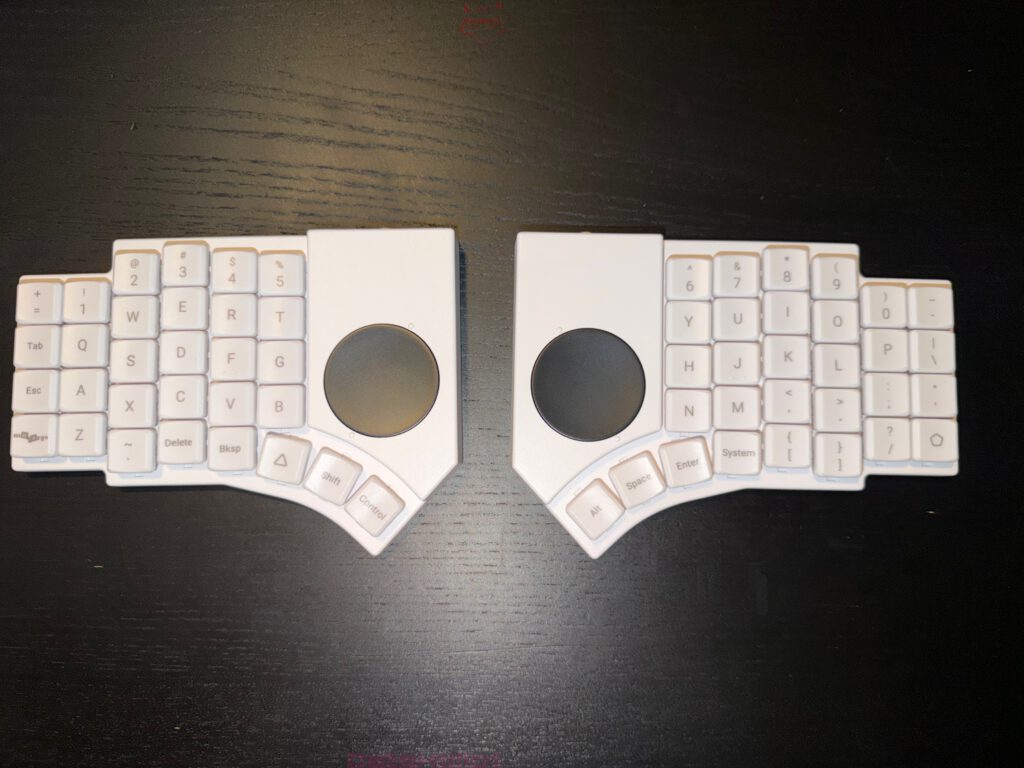
One of the Go60’s most important characteristics can only be captured inadequately in spec sheets: quietness. Not merely “quiet for mechanical,” not merely “acceptable for the office,” but genuinely strikingly quiet. In the tested configuration, Cherry Blossom switches are installed, meaning exclusive, Kailh Silent-based linear low-profile switches with 30+10 gf actuation force, 1.5 ± 0.5 mm actuation travel, and 3.0 ± 0.5 mm total travel. Even the official specifications already suggest a very gentle, low-resistance character. What matters, however, is the character in everyday use: the Go60 does not sound like mechanical self-display. It sounds like work. Like concentration. Like productivity without an acoustic commentary.
That is not a side issue. Anyone who writes every day quickly develops a sensitive relationship with their own noise profile. In open offices, at the living-room table, on the train, in the library, during meetings, late in the evening or early in the morning, every keyboard sooner or later also becomes a social object. Some models behave like a badly raised typewriter on caffeine. Others promise silence and ultimately deliver only dull clattering in designer packaging. The Go60 lands pleasingly far on the civilized side of the spectrum. The keystroke feels dampened, controlled, and mature. The result is a keyboard that has presence without constantly demanding attention.
Equally important is the quality of the keycaps. According to the specification, MoErgo uses premium POM keycaps in its own MCC profile. On the product page, the company also emphasizes the material advantages of POM: resistant to shine, chemically robust, cool in feel, and naturally slightly slippery in a pleasant way. In the keycap world, POM has been considered a high-quality material for years, even though production is more complex and more expensive. On the Go60, this material unfolds exactly the effect that good keycaps should produce: no show, no artificial luxury, but immediate everyday quality. The fingers find grip, still glide cleanly, and the surface remains free from that cheap plastic warmth that unnecessarily devalues so many otherwise solid keyboards.
This also shows why the Go60 cannot be reduced to mere feature addition. Dual trackpads, Bluetooth, hot-swap, tenting, magnetic accessories, and a modular desk-system idea sound impressive. But all of that would be worth only half as much if the actual core task, typing, were solved merely competently rather than convincingly. Fortunately, that is not the case. The Go60 is convincing precisely because it does not fail at the center of its reason for existing. The typing feel is quiet, finely controlled, and surprisingly confident. There are keyboards that awaken the need to formulate an excuse after only ten minutes. The Go60 rather triggers the opposite: the impression emerges quite quickly that this keyboard needs no justification at all.
A small anecdote from the reality of modern workplaces almost forces itself into the picture here. Hardly any office exists without that notorious person whose keyboard acoustically announces every email to the entire building. Three lines in Teams, but acoustically a complete Wagner opera. The Go60 belongs to the other camp. It does not type for the audience. It types for the text. That alone contains a quality that far too rarely gets taken seriously in evaluations. Low noise is not merely comfort, but consideration in hardware form.
Ergonomics that do not preach, but work
Ergonomic products often fail because of their own communication. Hardly any field tends so strongly toward promises of salvation, posture evangelism, and pseudo-medical rhetoric. The Go60 remains clearly in the ergonomic camp, but is refreshingly sober in the process. Officially, MoErgo points to the pinky-friendly split layout, optimized stagger, proximity to the Glove80 development line, and ergonomics designed for long-term health and sustainable typing speed. Such statements are to be expected. What matters more is whether the result feels plausible. And that is exactly the case here.
The split structure initially creates space. That sounds banal, but in practice it is fundamental. Shoulder position, arm movement, and hand posture benefit from the fact that the halves can be placed freely. Added to that is the low build height. According to the technical specifications, the keyboard measures 17.5 mm in height. Combined with low-profile switches, this results in a setup that brings significantly less height between finger and desk than many classic mechanical boards. That noticeably lowers the barrier for longer typing sessions. An ergonomic product does not need to look spectacular, it needs to generate less resistance over the course of the day. That is exactly where the Go60 has a strength.
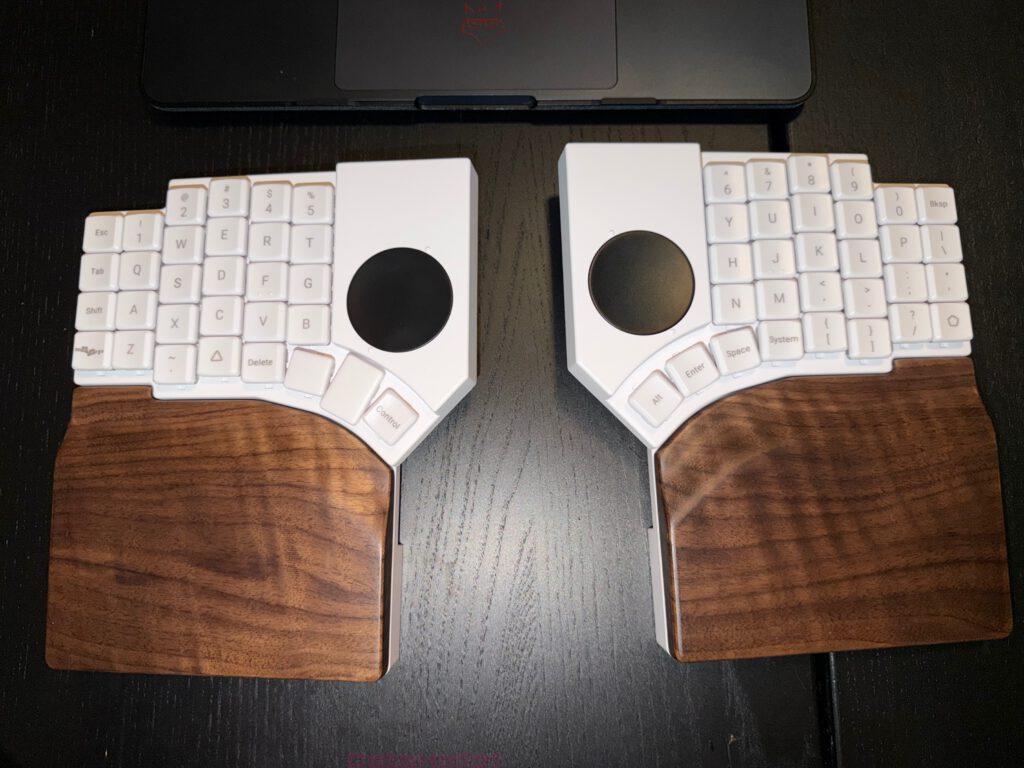
Particularly successful is the way MoErgo integrates the topic of tenting. On the product page, the company mentions a six-stage, travel-friendly tenting solution directly on the Go60 with angles from 6.2 to 17.0 degrees. For the optional palm rests, another modular system is added which, according to the documentation, ranges from 6.0 to 21.5 degrees. This means that one of the central aspects of ergonomic use is not hidden away as an accessory footnote, but treated as a core component of the overall concept. Many split keyboards feel improvised in this discipline, as if tenting had been an afterthought. On the Go60, the integration is well thought out.
The optional palm rests in particular deserve special praise. The documentation speaks of magnetic attachment, natural walnut wood, integrated base tilt, and compatibility with the mounting puck. In addition, three strong magnets per side and alignment pins are used. In everyday use, this solution creates an impression that many ergonomic products painfully lack: quality without complication. The palm rests are not merely accessories, but a real extension of the system. They noticeably improve comfort and desk character without undermining the mobile basic principle.
Of course, ergonomics remain individual. No keyboard can magically neutralize every hand size, every habit, every professional requirement, and every historic posture issue. That is exactly why the Go60 feels so convincing: not as a rigid doctrine of health, but as an adaptable tool. It forces no lifestyle on anyone. It offers possibilities. That is an enormous difference. Good ergonomics rarely emerge from patronizing design. Good ergonomics emerge from degrees of freedom that have been sensibly organized.
Modular thinking instead of an accessory graveyard
Modularity is a dangerous word in the tech world. It sounds like freedom, but often ends in little bags, screws, adapters, and accessories that turn the desk into a kind of archaeological dig. The Go60 takes a pleasingly different path. Its modularity does not feel arbitrary, but purposeful.
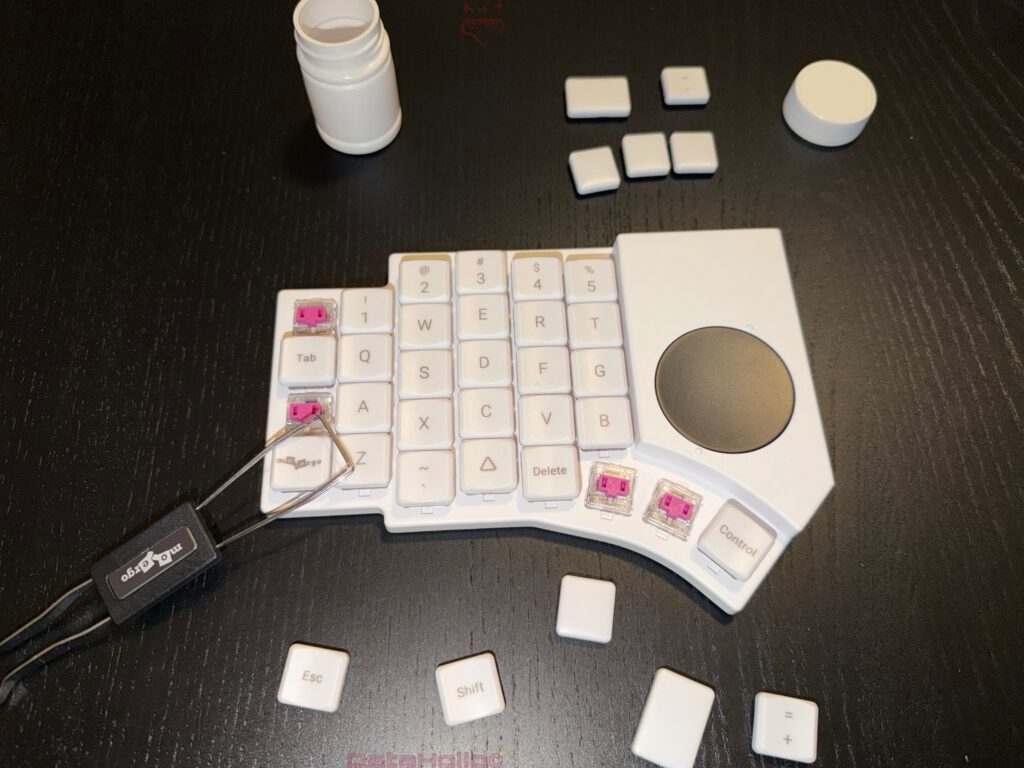
This begins with the swapping of keys and switches. According to the specifications, the Go60 supports hot-swap for Kailh Choc v1 switches. In combination with the unified profile concept and the POM keycaps, this means that layouts can be accompanied not only in software, but also physically with relative ease. Anyone working with alternative mappings, anyone wanting to arrange individual keys differently, or anyone wishing to change the switch character later on encounters a system here that does not treat that wish as a special case. That is especially important in the ergonomic field, because layout questions are rarely answered definitively after two days. Hands, habits, and workflows negotiate for weeks, sometimes months. A flexible system is therefore not a luxury, but common sense.
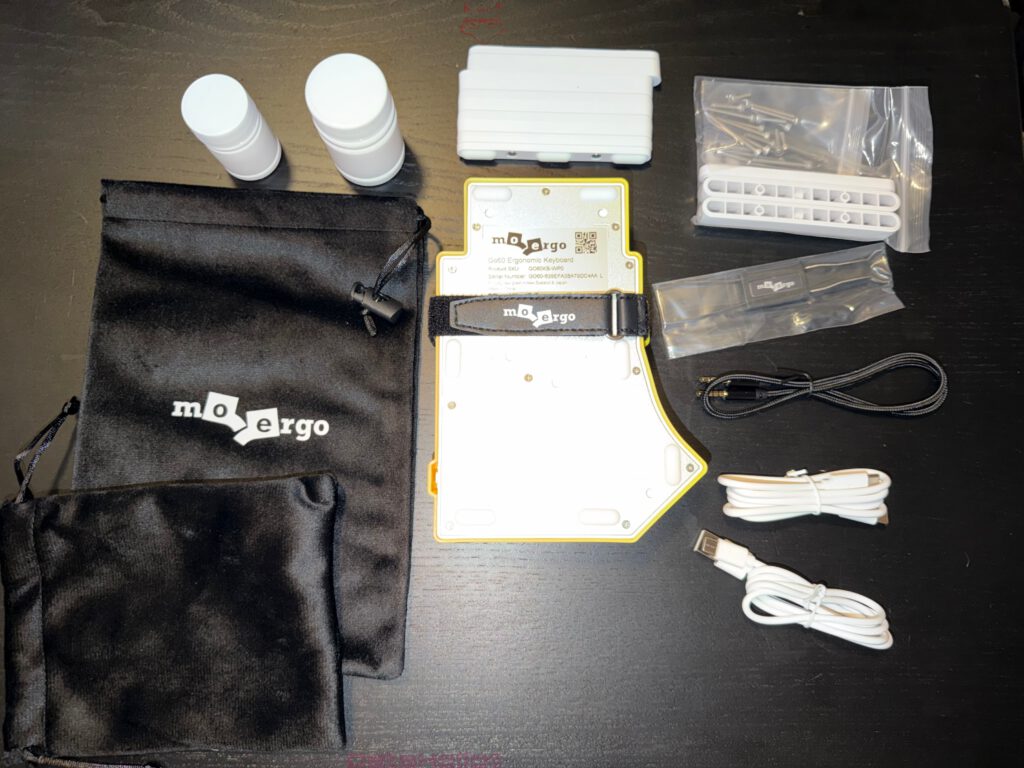
The product becomes even more interesting when looking at the magnetic architecture. According to MoErgo, the optional mounting pucks can be attached magnetically to the Go60 or the palm rest and offer a 1/4-20 UNC thread for standardized camera mounts. In the documentation, MoErgo explicitly shows examples for chair mounting, mini tripods, and desk clamps. That idea alone is remarkable, because it frees the keyboard from conventional desk logic. While other manufacturers are still debating whether two rows of rubber feet instead of one already count as innovation, MoErgo opens the door to actual mounting scenarios. That will not be relevant to everyone, but for ergonomically ambitious setups, special workspaces, or experimental positioning, it is exceptionally valuable.
Strong magnets are more than a nice convenience feature here. They change the relationship with the device. An accessory that can be attached quickly, cleanly, and repeatably gets used. An accessory that requires tools, fiddling, and patience therapy sooner or later ends up in a drawer. That is exactly where good system design separates itself from the usual marketing term “ecosystem.” The Go60 genuinely feels systemically designed at the relevant points. Palm rests, tenting, mounting pucks, wireless operation, and full wiring interlock instead of existing next to each other.
What is almost funny is how unspectacular this strength appears at first glance. No fireworks, no “game changer” shouting, no pseudo-revolutionary vocabulary. Just a product that apparently truly wanted its accessories to be used instead of merely sold. In the end, that is far rarer than glossy product pages would suggest.
Mobility that actually deserves the name
Far too many devices are called “mobile” merely because they technically fit in a bag. An anvil also theoretically fits in a bag. That does not make the idea recommendable. Real mobility consists of several levels: low weight, a robust transport concept, quick setup and takedown, minimal cable chaos, flexible connectivity, and usefulness that does not collapse while traveling. The Go60 scores strongly in almost all of these disciplines.
The weight has already been mentioned: around 600 grams for the keyboard itself, plus a compact travel case. Officially, MoErgo highlights on the product page that the Go60 fits “perfectly” into a very small travel case and can be packed and unpacked quickly. Such formulations initially sound standard, but here they meet a product that was indeed structurally designed in that direction. This is not a stationary keyboard that was given a cover at the last moment. The travel case belongs to the product’s fundamental self-understanding.
Added to that is the flexible connection technology. The Go60 supports Bluetooth LE 5.0, up to four paired BLE hosts, and additionally one USB device. At the same time, the two halves can communicate with each other either via BLE or via TRRS, with cable operation automatically activated when the TRRS cable is inserted. This architecture is more than a spec-sheet detail. It makes the device practical in very different environments: wireless on the road, fully wired at the permanent workstation, and, if needed, even with a firmware variant without BLE for environments where radio is prohibited. It is exactly this flexibility that prevents mobility from later being paid for with a loss of comfort.
The idea of full wired split operation is especially strong. MoErgo explicitly positions this mode as suitable for IT security requirements or radio-sensitive environments. That is a clever move. Mobile ergonomics often fail not because of travel itself, but because of the transition back into controlled work environments. As soon as company policies, docking setups, or radio restrictions come into play, usable hardware separates itself from chic toys. The Go60 has a real answer for that case.
There is a small, almost literary twist in this: of all things, a keyboard tailored to mobility also impresses where stability and predictability matter more than freedom. That is not a contradiction, but good product thinking.
The online software as a pragmatic middle ground
The requirement was clear: no detailed software discussion. That fits well, because the conclusion about the Go60 does not need an extensive configurator deep dive. Still, one aspect deserves mention, as it directly impacts the overall evaluation.
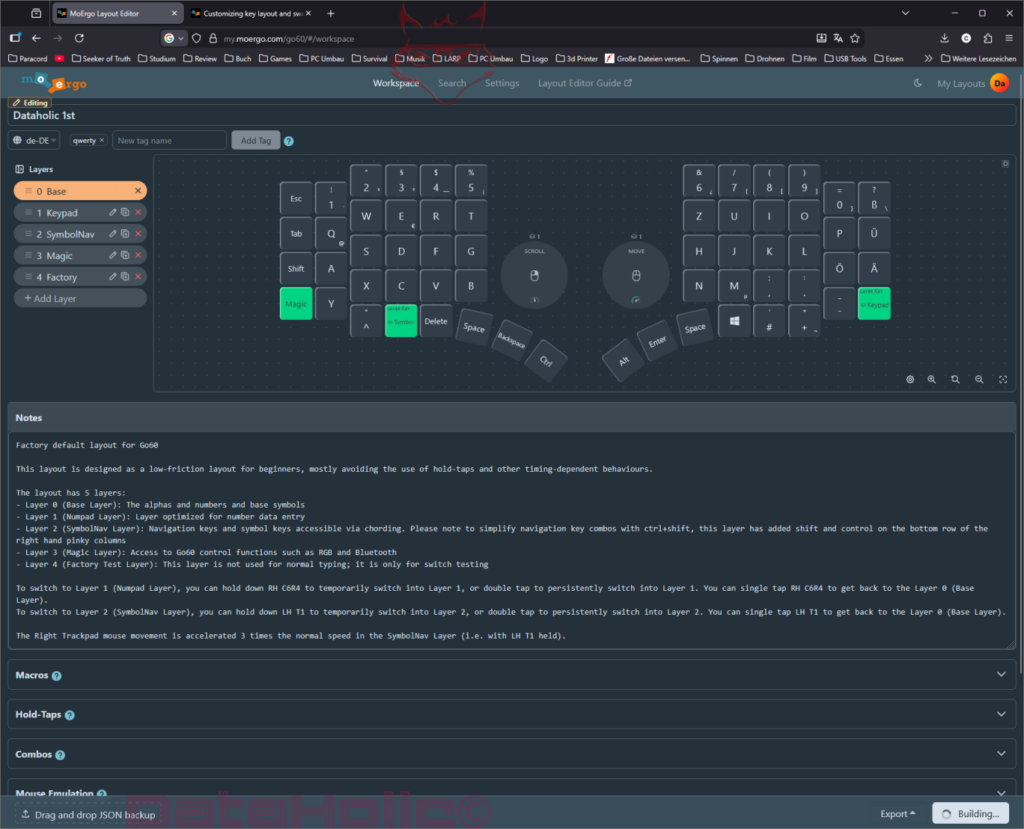
MoErgo documents that the Go60 is based on open-source ZMK and that the easiest way to customize it is via the web-based MoErgo Layout Editor. This combination is particularly interesting. On one hand, ZMK provides a technically robust and credible foundation; on the other, the web editor significantly lowers the barrier to entry. As a result, the Go60 becomes neither a niche enthusiast’s fortress nor a closed black box. That balance is remarkably well judged.
The fact that the editor is web-based can be interpreted in different ways. On the positive side, it offers a low entry threshold: no lengthy installation process, no locally installed software gathering dust, and no unnecessary platform hurdles in everyday use. At the same time, it naturally introduces a certain degree of online dependency, which not everyone will welcome enthusiastically. In the overall picture, however, this aspect leans more toward the positive. Above all because, based on available information and documented structure, the usability remains highly accessible. A complex device may be complex internally—it simply should not behave that way. This is exactly where the Go60 performs surprisingly well.
The real achievement here does not lie in any spectacular feature, but in the reduction of friction. Anyone modifying layouts, experimenting, or creating profiles does not want to feel as though they are enrolling in a crash course on firmware every time. Good tools fade into the background behind their purpose. Once again, Sullivan’s principle applies: form follows function, not the other way around.
In the end, this does not create a dependency, but a choice. Convenience or control—both are available. And that openness fits perfectly with the overall character of the Go60.
Price, origin, and that reality marketing texts like to hide behind the houseplant
A strong product is allowed to be expensive. An expensive product must be strong. That distinction matters. The Go60 clearly sits in the premium segment, which is hardly surprising given its split design, low-profile platform, dual trackpads, wireless capability, hot-swap support, POM keycaps, travel case, and modular accessory system. That said, it is not inexpensive. Even a well-justified price remains a price—and that is exactly why it deserves to be clearly addressed.
One aspect that benefits from a more precise evaluation is the pricing. The Go60 starts at €266.95 for the keyboard itself. Optional accessories such as the palm rests (€106.95) and mounting pucks (€35.95) expand the setup if needed, but are not required for basic use.
This results not in a fixed total price, but in a scalable pricing structure. And that is a key advantage: the entry point remains relatively moderate, while the system can be expanded step by step. Those who only need the keyboard stay well below many competing products. Those who want the full setup with ergonomic enhancements and mounting options can add them selectively.
Against this backdrop, the Go60 does not feel overpriced within the high-end split keyboard market—quite the opposite. It appears fairly priced. The pricing model does not follow an all-or-nothing approach, but instead allows flexible adaptation to individual needs. In a segment traditionally defined by high entry costs, this modular approach is a clear advantage.
Out of the box, the Go60 already includes:
- Bluetooth connectivity
- wireless split operation
- fully wired split operation
- two integrated touchpads
- true, adjustable tenting
- a hard case for transport
- very quiet, high-quality switches
Anyone trying to achieve a comparable setup with other manufacturers will quickly end up paying more or accepting compromises. An Apple keyboard sits at around €229, Corsair at €349.99, the Dygma Defy at €369, and the ASUS Falcata at €299. From this perspective, roughly €270 for a fully modular and portable keyboard feels entirely fair.
According to the FAQ, MoErgo is the trading name of Innaworks Development Limited, a company based in New Zealand. This is also explicitly stated in their shipping policy. Technically, this is not a drawback, but organizationally it remains relevant for buyers in Europe. Topics such as import VAT, customs handling, and shipping times should be considered before purchasing. This is not a dealbreaker, but it is certainly something that requires clear expectations.
The charging port and the small gap in an otherwise very closed system
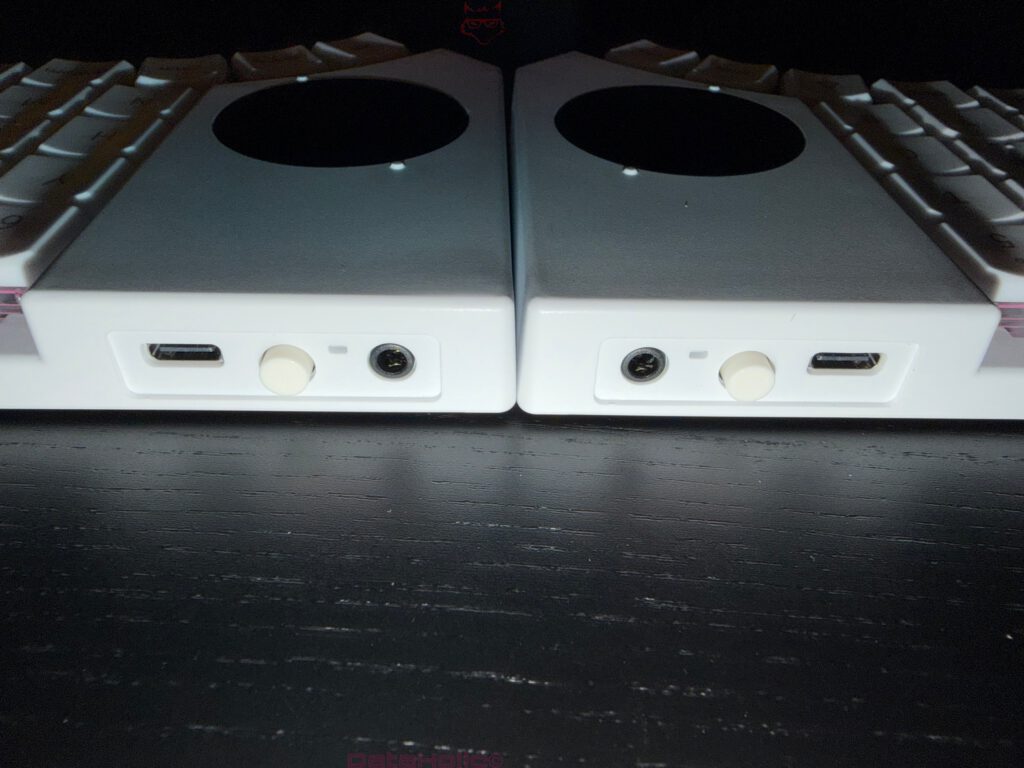
There are products that fail because of big things. There are products that get scratched by small things. The Go60 belongs to the second category. The missing opening in the case for the charging port is no drama, but it is a noticeable blemish in the system concept.
Precisely because the overall product feels so well thought out, every small inconsistency stands out more strongly. That is especially true with mobile devices. On the road, seemingly minor details suddenly gain weight. Where is the cable, how quickly can charging happen, how closed does the setup remain, how elegant is the transition between transport and use? A closable rubber or sliding cover would have given this point visibly more maturity. Not because of the effect, but because of the feeling that everything really had been thought through down to the last action.
This aspect rightly remains in the neutral camp. It does not ruin anything. It merely serves as a reminder that even strong hardware is not free of small architectural gaps. Mies van der Rohe’s sentence “God is in the details” hovers quietly over the desk here, even if “less is more” would already suffice. Good products often reveal themselves in the little things, not only in the main functions. Overall, the Go60 reveals a great deal of good there, though not absolute perfection in every case.
The security criticism: small in everyday use, big in principle
Now to a point that deserves a more nuanced assessment: Bluetooth security. According to the official documentation, pairing is performed by selecting an available Bluetooth profile and connecting to the device “Go60” within the respective operating system. A passkey prompt is not part of this standard process.
However, the technical foundation is important here. The Go60 is based on ZMK, and BLE connections are encrypted by default. In addition, the system supports a passkey requirement for pairing, which can be enabled through the advanced settings. The security feature is therefore present, but not activated by default.
This significantly shifts the evaluation. What initially appears to be a missing security feature turns out, on closer inspection, to be a deliberate decision in favor of a lower entry barrier. Out of the box, the Go60 prioritizes a frictionless pairing experience while still offering the option to secure the connection when needed.
In everyday use, this distinction may carry little weight for many users. In private environments or during a one-time setup, the risk remains manageable. In professional contexts, however, the situation becomes more nuanced. Those who regularly work with multiple devices, operate in shared environments, or maintain higher standards for connection discipline will expect a clearer security posture by default in a premium product.
This raises a valid question: would enabling passkey pairing by default—with the option to disable it—have been the more consistent approach? In its current implementation, the decision is left to the user. This provides flexibility, but also assumes awareness of the option and a deliberate choice to use it.
In the end, this is no longer a clear-cut weakness, but rather a matter of prioritization. The Go60 provides the technical means for a secure connection—it simply requires the user to actively enable it.
For whom the Go60 is an excellent idea and for whom it is not
The Go60 is particularly strong for people who type a great deal every day and move between places, devices, or forms of work. In other words, exactly for the group that is regularly let down by normal hardware. Stationary comfort keyboards are often too large for travel. Mobile keyboards are often too small for serious work. The Go60 fills this gap so convincingly that it quickly becomes very attractive to heavy typists, developers, editors, authors, analysts, and other keyboard-based professions.
It is also well suited to users who have already understood that ergonomics do not end with a wrist rest from an electronics store. Split layout, tenting, optional palm rests, magnetic attachment solutions, and hot-swap are not gimmicks. They are aimed at people who want to actively adapt work tools to their own daily life. In this context, the Go60 plays out its strengths especially clearly. It is not a rigid device, but a platform with a clear stance.
It will probably be less suitable for anyone simply looking for an ordinary keyboard with a bit of modern flair. Anyone seeking classic full-size logic, immediate familiarity, or the smallest possible adaptation effort will likely find cheaper and more uncomplicated answers elsewhere. Price sensitivity and security requirements regarding Bluetooth can also be clear counterarguments. The Go60 rewards serious interest. For casual curiosity, it is too specialized and too expensive.
That in itself contains a sympathetic consistency. This product does not try to please everyone. It tries to offer a great deal to the right target group. In times of maximum broad appeal, that is almost refreshingly old-fashioned.
Conclusion: Coherent, well thought out – and stronger than the price might initially suggest
The MoErgo Go60 is, in the end, above all one thing: remarkably coherent. Not spectacular in the sense of flashy superlatives, but convincing in depth. The product demonstrates a surprisingly clear understanding of what mobile ergonomic work actually requires. A quiet, controlled typing experience, a high-quality case, easy key and switch replacement, convincing POM keycaps, accessible customization, Bluetooth, strong magnetic solutions, excellent optional palm rests with tenting kit, and the clever concept of magnetic pucks for desk or chair mounting all come together to form a system that is clearly greater than the sum of its parts. Add to that the option to run the entire setup fully wired. This list does not just read well—it translates directly into everyday usability.
The weight also deserves proper context. The Go60 is not an ultralight device, but a deliberately balanced compromise between stability and mobility. That balance is exactly what makes it practical on the go without feeling cheap or fragile.
One aspect that shifts significantly upon closer inspection is the price. The Go60 starts at €266.95 for the keyboard itself, while optional accessories such as palm rests and mounting pucks expand the setup if desired. A fully equipped system can reach around €465.80, but this is not mandatory—it is the result of a deliberate, modular expansion.
In direct comparison with the competition, the Go60 does not appear overpriced. On the contrary, it feels surprisingly well-positioned. Especially when compared to alternatives like the ZSA Voyager, it becomes clear that many features which cost extra elsewhere—or are not available at all—are already part of the core package here. That noticeably reframes the pricing.
Neutral remains the fact that the manufacturer is based in New Zealand, which introduces additional considerations for European buyers such as import VAT, customs handling, and shipping times. This is not a drawback of the product itself, but it is something that should be realistically considered before purchasing.
The Bluetooth aspect also benefits from a more nuanced view. The connection itself is encrypted, and passkey pairing is supported, but not enabled by default. It can be activated through the advanced settings. This means it is not a missing security feature, but rather a deliberate decision in favor of a smoother out-of-the-box experience.
Still, for a premium product, the question remains whether enabling this security feature by default—while allowing users to disable it if desired—would have been the more consistent approach. In its current form, the responsibility lies with the user. This provides flexibility, but also assumes awareness and active use of the option.
In the end, this is not a clear weakness, but a matter of prioritization.
And that same impression carries throughout the entire product. The Go60 does not feel like a collection of individual features, but like a carefully designed system. Mobility without awkward compromises. Ergonomics without preaching. Quiet typing without soft trade-offs. Modular accessories without clutter. High-quality materials without unnecessary theatrics.
Perhaps that is its greatest strength. The Go60 does not aim to be a desk centerpiece. Not a design gimmick. Not a prestige object defined by weight and marketing. It is built to work. And it does exactly that—quietly, precisely, and with a level of consistency that is still surprisingly rare.
Anyone looking for a truly well-thought-out mobile split ergonomic keyboard will find one of the most compelling options currently available here. Not perfect. Not cheap. But unusually clear in its design and highly convincing overall.
Or, put a little more directly: while other keyboards start to feel like a wardrobe on wheels the moment they leave the desk, the Go60 remains controlled, quiet, and ready to perform. And in the end, that is its real achievement.
Update: Performance from a Gaming Perspective
From a gaming perspective, the Go60 also presents itself on a technically solid level. The USB report rate is set to 1 kHz by default, ensuring fast and consistent signal transmission. This is complemented by an interrupt-driven key matrix scanning system, which temporarily operates at 1 kHz during activity.
In practice, this means inputs are registered reliably and without noticeable delay. While the Go60 is not primarily designed as a competitive gaming keyboard, its technical foundation is more than sufficient to handle fast-paced scenarios with precision.
At the same time, the overall focus remains clear: maximum performance is not pushed at any cost, but rather balanced with efficiency and everyday usability. Those looking for a pure gaming keyboard with extreme polling rates will find alternatives elsewhere. However, anyone expecting an ergonomic system with solid gaming capability will find a surprisingly stable and capable foundation here.
Notice pursuant to EU transparency requirements:
The MoErgo Go60 presented in this review was provided to us by MoErgo as a non-binding loan for testing purposes. This is not paid advertising.
MoErgo had no influence whatsoever on the content, evaluation, or editorial independence of this article. All opinions expressed are based exclusively on our own hands-on experience.
We would like to sincerely thank MoErgo for providing the review sample and for the trust placed in dataholic.de.