
Basics 1: Dygma Bazecore on Windows, macOS, and Linux – Getting Started for Rise, Raise 2, and Defy
- What is Bazecore, anyway?
- Supported systems: Windows, macOS, and Linux natively
- First start: connect the keyboard and have it recognized
- The interface: clearly structured instead of colorfully overloaded
- Actively maintained instead of left behind
- Feedback is taken seriously
- Support: fast, competent, and pleasantly uncomplicated
- Changing keycaps: surprisingly easy
- Changing switches: also uncomplicated
- Everyday use with Rise, Raise 2, and Defy: the same foundation, familiar logic
- Firmware and maintenance: do not ignore it, plan for it
- Why Bazecore as a foundation is so important
- Preparation for Part 2: changing key mappings
- Closing section of the guide without closing-word romance
- Note in accordance with EU transparency requirements:
Anyone using Dygma keyboards such as the Rise, Raise 2, and Defy will sooner or later end up with a piece of software that is far more important in day-to-day use than any RGB gimmick: Bazecore. Without this control center, no keyboard suddenly falls silent, but a large part of the actual Dygma idea would remain somewhere between standard layout and half-finished setup. Bazecore is the interface through which the hardware is set up, adjusted, and maintained properly. That is exactly where the practical part of the Dygma ecosystem begins.
This guide focuses on the basics of Dygma Bazecore. So this is not a test and not a review, but a clean introduction: installation, first connection, navigating the interface, firmware, everyday usability, and handling the most important basic functions. The second part will then deal in detail with changing the key mapping. Today, the focus intentionally stays on the foundation so that nothing later gets lost in cable chaos or cryptic menus.
What is Bazecore, anyway?
Bazecore is the configuration software for Dygma keyboards. It runs on Windows, macOS, and Linux natively, so without adventurous tinkering, without awkward detours through Wine, and without the typical charm of an application that only seems friendly under Linux when the moon is in the right position. That is precisely one of its strengths, and it quickly matters in everyday use. After all, a good keyboard does not live on switches, keycaps, and pretty shop pictures alone, but on the software that works together with the hardware.
The interface is simple and intuitive in design. That does not mean it only offers two buttons labeled “Yes” and “Even More Yes.” What it means is that the structure remains understandable. Areas such as keyboard management, layout, macros, superkeys, and firmware are clearly separated. Anyone launching it for the first time or connecting the keyboard does not need to begin a degree program in cryptic menu archaeology.
That is important, especially with keyboards like the Rise, Raise 2, and Defy. These models are aimed at users who do not just want to hammer letters into a line of text, but actually treat their input hardware as a tool. A tool like that may be powerful, but it should not feel like a spaceship cockpit right before the alarm goes off.
Supported systems: Windows, macOS, and Linux natively
A particularly pleasant point in everyday use is the broad platform support. Bazecore runs natively on Windows, macOS, and Linux. At first glance, that may sound unspectacular, but in the keyboard world it absolutely is not. Especially in the Linux environment, the journey with many manufacturers often ends earlier than planned. Then the message is usually something along the lines of: “The keyboard technically works, the software more in a philosophical sense.”
Dygma takes a refreshingly direct approach here. Anyone switching between multiple systems or using different platforms privately and professionally gets one consistent foundation. The software does not feel like a hastily assembled obligation for a fringe platform. That exact point saves time, nerves, and unnecessary swearing at room volume.
On Windows, setup is usually uncomplicated. Download, installation, launch, connect the keyboard, and get started.
On macOS, the process remains similarly straightforward. Depending on the version, permissions for access to input devices may play a role, as usual. That is not a Dygma-specific issue, but rather classic everyday life in Apple’s closed garden enclosure.
On Linux, Bazecore scores points with native operation, which for many enthusiasts is more than just a footnote. That is where it quickly becomes clear whether a manufacturer takes the community seriously or is merely ticking a checkbox.
First start: connect the keyboard and have it recognized
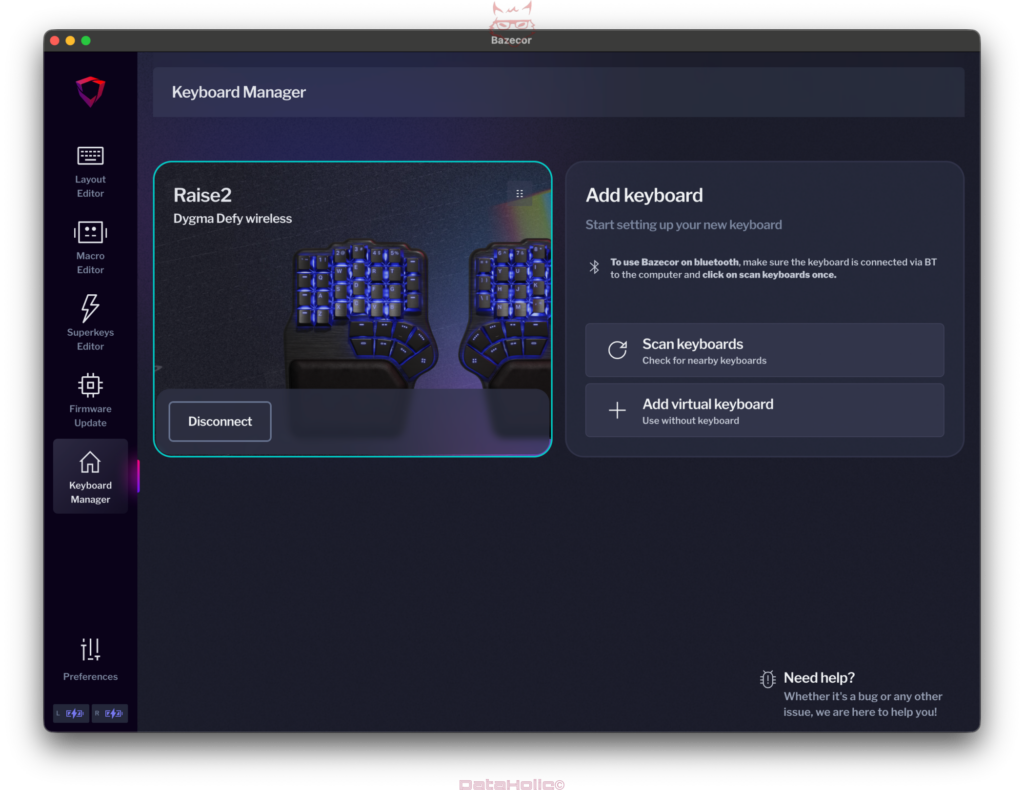
After installation, Bazecore does not greet users with unnecessary theatrics, but with clear device management. The screenshots already show the basic principle: connected keyboards are recognized cleanly, a virtual keyboard can be created, and the interface guides the user into the right section without major detours.
Anyone connecting a Rise, Raise 2, or Defy will first land in the Keyboard Manager. There, Bazecore recognizes the connected model and shows the connection status. That may seem inconspicuous, but it is practical. Instead of playing guessing games such as “Is the cable loose, the port offended, or is the software currently searching for meaning?” there is immediate and clear feedback.
It is particularly useful that Bazecore does not try to be unnecessarily complicated. The most important actions are directly accessible. New devices can be added, existing connections are displayed, and navigation is logically structured. That calmness in the interface is exactly what makes getting started easy.
The interface: clearly structured instead of colorfully overloaded
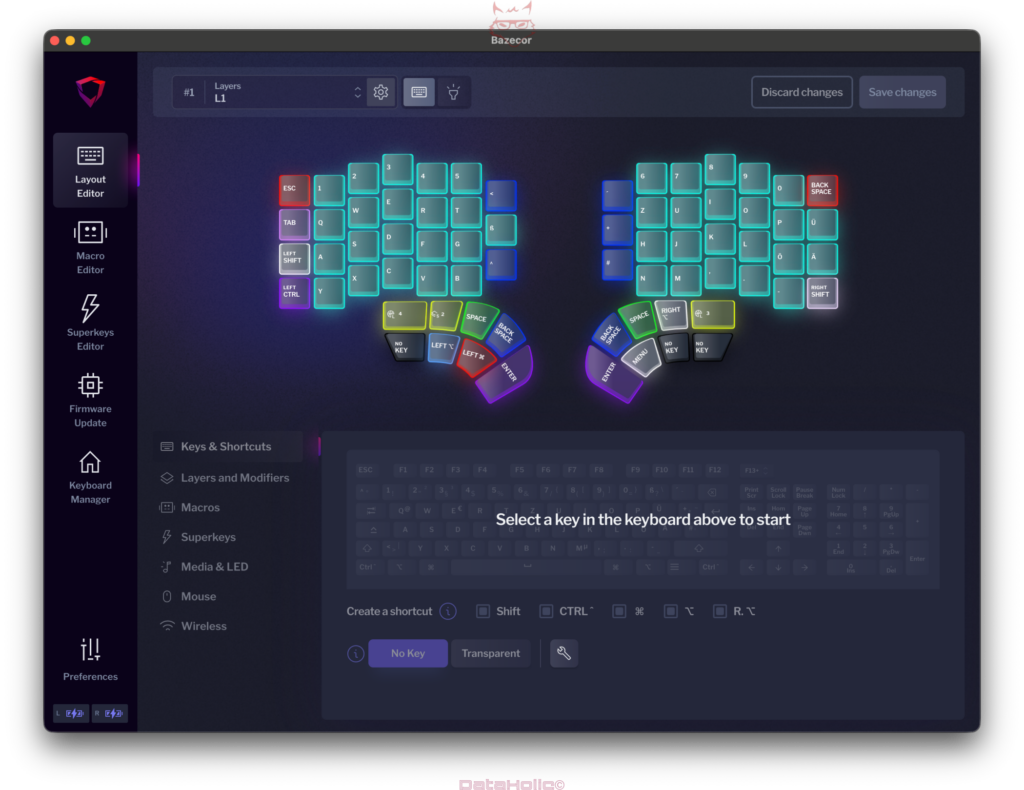
The central Bazecore sections sit on the left-hand side. These include, among others:
- Layout Editor
- Macro Editor
- Superkeys Editor
- Firmware Update
- Keyboard Manager
- Preferences
At first glance, it is already clear that Dygma is not going for effect at any price. The interface looks modern without losing sight of its actual purpose. Colors, contrasts, and icons help with orientation instead of merely serving as decorative neon feed for RGB fans.
The Layout Editor is where the actual magic will happen later. That is where keys, layers, functions, and special assignments can be configured. This section deserves its own guide, because that is where the heart of individual customization lies. For the introduction, it is enough to know that Bazecore presents this structure very clearly. The keyboard is shown graphically, individual keys can be selected directly, and the options displayed below are organized sensibly into categories.
That is not only clear, it also lowers the barrier for users coming from standard keyboards. Nobody has to fight through abstract tables or cryptic codes just to assign a different function to a key later on.
Actively maintained instead of left behind
A frequently underestimated point with keyboard software: it is not the first version that determines long-term usefulness, but the maintenance afterward. This is exactly where it stands out positively that Bazecore is actively maintained. In practice, that makes a major difference.
Active maintenance does not merely mean that somewhere, sometime, a version number changes. What matters is that the software continues to be developed, bugs are fixed, and new hardware or functions remain properly integrated. Keyboards in this class are not disposable products for a single season. Accordingly, a software foundation that does not fall into digital Sleeping Beauty slumber after a few months is very important.
Especially with specialized input devices, ongoing development is worth its weight in gold. Operating systems change, driver environments shift, user wishes evolve further. An actively maintained piece of software therefore remains not only functional, but also relevant. That creates trust in the overall system.
Feedback is taken seriously
Even more pleasant is the fact that feedback is responded to. That is a sentence almost every manufacturer likes to put on a website. In everyday life, however, the picture often looks different: contact forms send messages politely into nowhere, bug reports evaporate somewhere between the backlog and the office coffee corner, and suggestions for improvement seem to disappear directly into a black folder labeled “later maybe never.”
With Dygma, it stands out positively that feedback is taken seriously. This is especially important for keyboards like the Rise, Raise 2, and Defy, because these models deliberately address a target group that engages intensively with ergonomics, productivity, and custom key mapping. Naturally, that produces more concrete wishes than a standard office keyboard that, after unboxing, basically knows one task: typing approximately.
When a manufacturer responds to feedback, the entire platform benefits in the end. Functions become more useful, stumbling blocks disappear faster, and even small comfort improvements add up. For daily use, that is worth far more than any marketing phrase.
Support: fast, competent, and pleasantly uncomplicated
Another point that carries more weight in everyday use than any packaging poetry: very fast and competent support. Especially in the area of mechanical and ergonomic keyboards, support is not just an emergency solution for rare problem cases. It often involves questions about firmware, connection, configuration, layers, modifiers, or hardware changes.
Fast support does not just save time. It also prevents a small uncertainty from turning into half an evening of frustration. Competence is the decisive added value here. A reply within ten minutes is of little use if the actual content is about as helpful as “Please restart everything and believe in yourself.”
With Dygma, the combination of speed and expertise is especially valuable because the products go beyond classic standard keyboards. Anyone working with split housings, multiple layers, individual switches, and customizable functions needs contacts who really understand the product. That is exactly what increases the everyday usability of the entire platform.
Changing keycaps: surprisingly easy
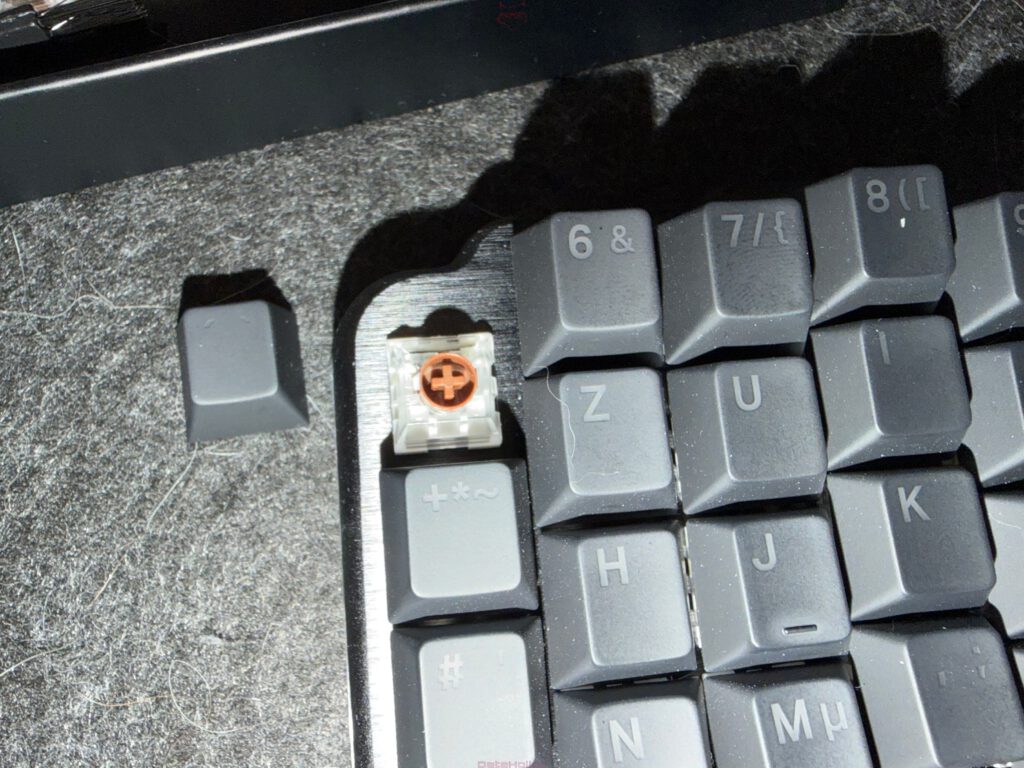
A major plus point in everyday handling of Dygma hardware is the easy keycap replacement. The images clearly show that a keycap puller is included and that the caps can be removed without any problem. That is exactly how it should be: not fiddly, not nerve-racking, and not accompanied by the feeling of accidentally pulling half the planet out of orbit.
In practice, the process is simple:
First, the relevant keycap is carefully gripped with the keycap puller. Then a straight pull upward is enough. Twisting sideways is unnecessary and rather not a clever idea. The cap then comes off the switch cleanly. After that, another keycap can be mounted by pressing it straight onto the stem.
The advantage is obvious. Cleaning, replacing damaged caps, or making visual adjustments can all be done without major drama. Especially with keyboards like the Rise, Raise 2, and Defy, which are often deliberately personalized, that is a real comfort feature. Nobody wants to bring a mixture of delicacy, courage, and three spare nerve strands just to swap a simple keycap.
Another practical aspect: anyone later working with alternative layouts or newly assigned keys can more easily adapt the visible legends. That will play an even bigger role in the upcoming part about key mapping.
Changing switches: also uncomplicated
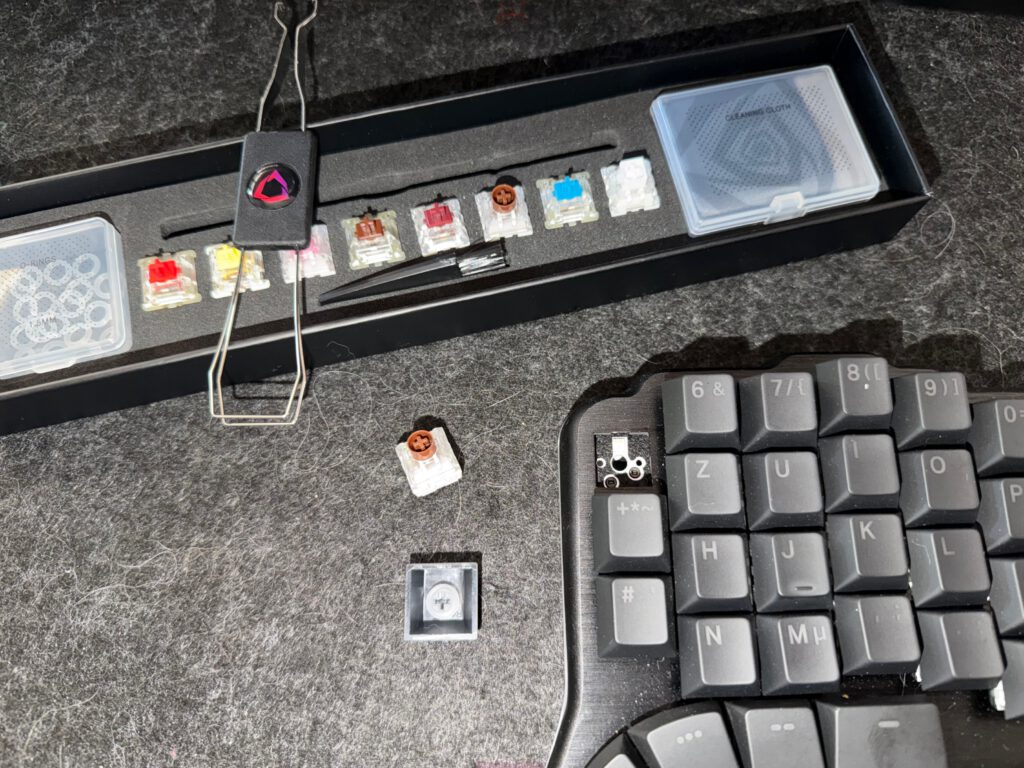
Not only the keycaps, but also the switches can be changed easily. The photos clearly show that appropriate tools and individual switches are included. That makes getting started pleasant, especially for users working with hot-swap keyboards for the first time.
The process is basically just as straightforward as replacing a keycap, only with a little more attention:
- Remove the keycap
First, the keycap is pulled off. - Grip the switch with the switch puller
The retaining clips of the switch are pressed together at the appropriate points. - Pull the switch straight out
The movement should be as vertical as possible so that the contacts are not subjected to unnecessary strain. - Insert the new switch
Before inserting it, it is worth taking a quick look at the pins. They should be straight. The switch is then aligned correctly and pressed in carefully.
That sounds simple, and that is exactly how it should be. No soldering iron, no special laboratory, no sacrifice to the gods of electronics. A quick switch replacement makes it possible to try out different typing feels directly in everyday use. Linear, tactile, lighter, heavier, quieter, or more clicky, the keyboard can be adapted cleanly to personal needs.
That is especially important in the ergonomics environment. Not every hand likes the same resistance, not every workplace tolerates the same noise level. Hot-swap makes experimentation easier without turning the keyboard into a workshop project every time.
Everyday use with Rise, Raise 2, and Defy: the same foundation, familiar logic
Even though the Rise, Raise 2, and Defy differ in form factor and orientation, working with Bazecore remains familiar in its basic logic. That is a major advantage within the Dygma portfolio. Anyone who already knows one model or changes later does not need to learn everything again from scratch.
This continuity is worth more than it may seem on paper at first. Especially with specialized keyboards, a setup often grows over a longer period of time. Habits, layer structures, functions, and ergonomic preferences develop step by step. A shared software foundation ensures that this knowledge is preserved.
In plain language: the brain is free to focus on productivity instead of having to decipher a different interface all over again every single time. And in everyday life, that is about as pleasant as a key combination working on the very first attempt.
Firmware and maintenance: do not ignore it, plan for it
A central section in Bazecore is Firmware Update. This area should not be viewed as an annoying obligation. Firmware forms the foundation for how the keyboard works internally. Improvements, bug fixes, and optimizations quite often end up exactly there.
Bazecore presents this section pleasingly clearly. Anyone wanting to perform an update will find the right entry point quickly. Especially with high-quality hardware, it is worth taking an occasional look at this section. Up-to-date firmware can improve stability, compatibility, and feature range.
One thing remains important: ideally, updates should be carried out in a calm environment, with a stable connection, and without juggling five other tasks at the same time. That is not a Dygma-specific peculiarity, but simply sensible practice. Flashing keyboard firmware half asleep between coffee and a video call rarely counts among the truly great ideas of the week.
Why Bazecore as a foundation is so important
With Dygma keyboards, this software does not merely take on the role of an accessory program. Bazecore is the actual bridge between hardware and individual working style. That is exactly why it is worth understanding the basics properly first.
Anyone who knows the menu, handles device management confidently, can classify firmware options, and knows how to change keycaps and switches creates a stable basis for everything that follows. After that, key mappings, layers, and special functions can be approached far more calmly.
That is crucial especially with products like the Rise, Raise 2, and Defy. These keyboards are not built simply to look pretty on the desk and pretend that this alone already achieves everything. Their real value comes from adaptability. Bazecore is the place where that adaptability becomes tangible.
Preparation for Part 2: changing key mappings
The next guide builds directly on these fundamentals. It will then deal specifically with changing key mappings. In other words, the question of how individual keys are reassigned, how layers are used sensibly, and how a good keyboard becomes a truly personal tool.
Until then, a short test run through the current interface is worthwhile. A look at the Keyboard Manager, a quick tour through the Layout Editor, perhaps a first careful keycap or switch swap, and the foundation is in place. After that, entering actual layout customization feels far less like jumping into cold water and much more like opening a well-organized toolbox.
Closing section of the guide without closing-word romance
Bazecore already shows in the basics why Dygma hardware does not only work through materials and form, but also through a well-thought-out software foundation. The native support for Windows, macOS, and Linux, the intuitive design, the active maintenance, the visible response to feedback, and the fast, competent support together form exactly the foundation that high-quality input devices need in everyday use.
Added to that are the easy keycap replacement and the equally uncomplicated switch replacement. Neither belongs merely in the category of “nice to have”; both make everyday customization significantly more accessible. Anyone working with the Rise, Raise 2, or Defy gets a platform that does not slow things down unnecessarily, but instead creates room for customization.
Or to put it differently: the keyboard is allowed to be demanding. Its operation does not have to be.
Note in accordance with EU transparency requirements:
The Dygma Rise, Dygma Raise 2, and Dygma Defy presented in this test report were provided to us by Dygma as a non-binding loan for testing purposes. This is not paid advertising.
Dygma had no influence whatsoever on the content, evaluation, or editorial independence of this article. All opinions expressed are based exclusively on our own hands-on experience.
We would like to sincerely thank Dygma for providing the keyboards and for the trust placed in dataholic.de.